
How to Scale a Winning Facebook Ad (2026)
How to scale a winning Facebook ad without resetting the learning phase: vertical vs horizontal scaling, the 20% rule examined, and why fresh creative beats bigger bids.
Updated December 2026 · Likit Sae Lee, CTO

Scale a winner two ways. Vertical scaling raises budget on the ad set that works, in measured steps so you stay under Meta's significant-edit threshold and avoid resetting the learning phase. Horizontal scaling duplicates the proven creative into new audiences or feeds a fresh variation alongside it. The community 20% budget step is a rule of thumb, not an official Meta number; Meta only says significant edits reset learning. The real engine is the next creative, not a bigger budget: Meta's own data shows conversion likelihood drops about 45% by the fourth repeat exposure, so the winner fades and the fresh variation is what keeps the account growing.
You found one. The cost per result settled, the ROAS held for a week, and now the obvious move is to pour money into it. So you triple the budget overnight, and the next morning the same ad is delivering worse than it did at a tenth of the spend. That is not bad luck. It is the predictable result of treating a budget dial like a volume knob, when scaling on Meta is really a question of feeding the algorithm enough stable signal and enough fresh creative to keep finding buyers. The winner you have will fade. The next variation is what actually scales.
What scaling a Facebook ad actually means
Scaling is not the act of spending more. It is the act of spending more without the cost per result falling apart. Those are different problems, and the second is the hard one. Anyone can drag a budget slider. The skill is keeping the math intact while you do it, because Meta's delivery system reacts to budget the way a stove reacts to a sudden turn of the dial: change it too fast and you reset everything that was working.
Underneath the dashboard, two forces fight you. The first is the learning phase, where Meta is still figuring out who responds to your ad and delivery is deliberately less efficient. The second is creative fatigue, where the same people keep seeing the same ad and respond less each time. Scale wrong and you trigger both at once: a big budget jump throws the ad set back into learning while the wider reach burns through your audience faster. Scale right and you sidestep both, feeding the system steady budget steps and steady fresh creative.
So the real definition is narrow. Scaling is moving budget up in increments that keep delivery stable, while keeping a pipeline of new variations so the winning angle never has to carry the account alone. Everything below is a version of those two moves.
Two ways to scale: vertical and horizontal
Before the tactics, fix the vocabulary, because the two scaling moves solve different problems and fail in different ways. Vertical scaling means putting more money behind the exact ad set that already works: same audience, same creative, a bigger budget. Horizontal scaling means taking the proven creative wider, into a new audience, a new placement, or a fresh variation running alongside the original. Vertical grows depth; horizontal grows breadth. Most accounts need both, in that order: push the proven set until the next budget step stops paying, then open a new front.
The reason the distinction matters is risk. Vertical scaling risks delivery: move the budget too fast and you knock the ad set back into the learning phase. Horizontal scaling risks fragmentation and overlap: open too many ad sets and each one starves, or worse, they collide in the same auction. Knowing which lever you are pulling tells you which failure to watch for.
| Approach | What you change | What stays intact | Main risk |
|---|---|---|---|
| Vertical scaling | Budget on the proven ad set | Audience, creative, accumulated learning | A fast budget jump resets the learning phase |
| Horizontal scaling | New audiences, placements, or fresh variations | The proven creative or offer | Fragmentation and overlap starve or cannibalise ad sets |
Protect the learning phase before you touch the budget
An ad set is in the learning phase until it gathers roughly 50 optimization events in a 7-day window, the threshold Meta uses for delivery to stabilise. Below that, Meta is guessing, and the cost per result is noisy. The failure state is Learning Limited: Meta predicts the ad set will never hit 50 events, usually because the budget is too thin, the audience too narrow, or the settings keep changing.
The prize for getting out is real. Citing Meta Marketing Science, agency analyses report that ad sets which successfully exit learning run about 19% cheaper per result than those stuck in Learning Limited. That figure is Meta's own data, so read it as directional, but the direction is not in doubt: stable delivery is cheaper delivery. Protecting that exit is the first rule of scaling, because every clumsy edit that resets learning hands back the efficiency you earned.
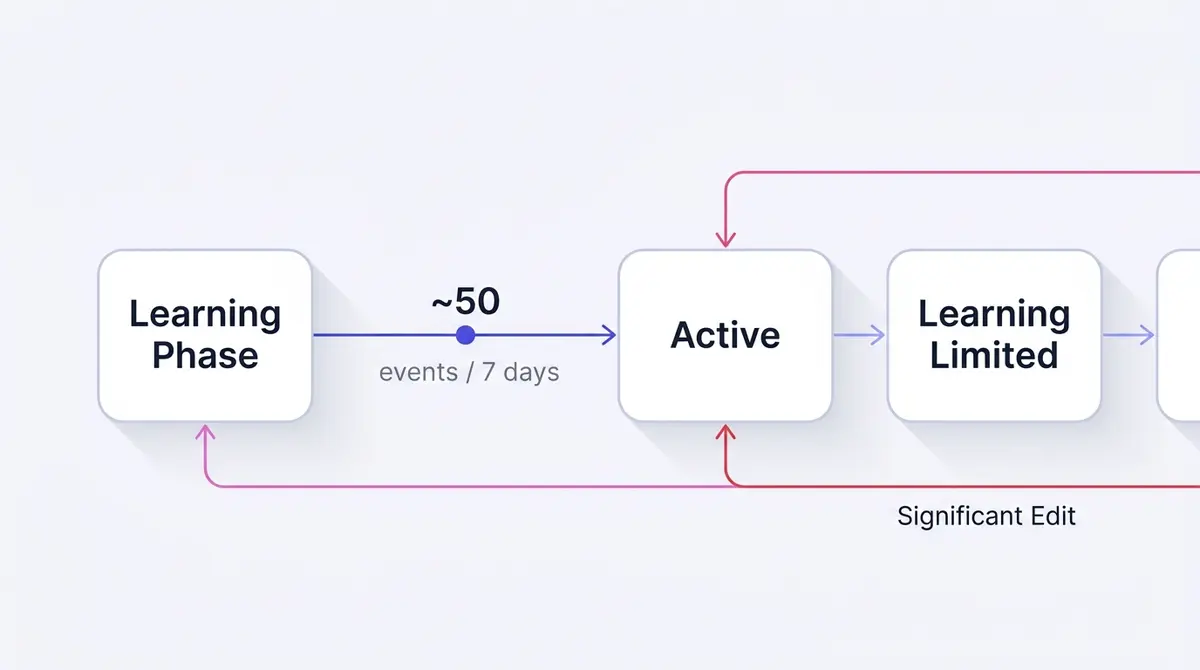
This is also why fragmenting your budget is a trap. Meta's data suggests accounts that keep under 20% of their spend in the learning phase run about 68% lower CPA than accounts with more than half their spend stuck in learning. Spread one budget thinly across eight near-identical ad sets and each one starves for the 50 events it needs; consolidate that spend into fewer, well-fed ad sets and they exit learning fast and stay efficient. When you scale, the instinct to spin up more ad sets is usually wrong. Feeding fewer is the math.
When an ad set is ready to scale
Scaling a set that is not ready just multiplies a result you cannot trust yet. Before you raise a cent, run the ad set through a short go or no-go check. Every item asks the same question in a different way: do you have a stable, real read, or are you about to pour budget on noise?
- It has exited the learning phase. The ad set has gathered roughly 50 optimization events in a 7-day window and is no longer marked Learning or Learning Limited, so delivery has settled and the cost per result you see is a real number, not an early guess.
- The cost per result has held at or below target for several days. One good day is variance. A flat, on-target cost per result across most of a week is a signal. If you steer by ROAS instead, confirm it is sitting at or above the floor your margins need before you add spend. The good ROAS guide covers how to set that floor honestly.
- Results are steady, not still climbing or already sliding. A set whose ROAS has plateaued at a healthy level is near the top of what its current audience and creative can give, which is exactly the moment vertical scaling pays. A set still improving day on day is usually worth leaving alone a little longer.
- The audience is large enough to grow into. A budget that doubles needs more people to spend on. A narrow audience caps how far vertical scaling can run before frequency climbs and cost follows.
Miss these and you are not scaling a winner, you are amplifying a maybe.
Vertical scaling: raising budget without breaking delivery
Vertical scaling puts more money into the ad set that already works, keeping the audience, creative, and accumulated learning intact. That is why it is the first move on a stable winner. The danger is the size of the step.
Meta resets the learning phase on a significant edit, and a steep budget change counts. The community answer is the 20% rule: raise the budget by roughly a fifth every few days so each change stays small enough to slip under the reset threshold. Be honest about what that number is. It is a rule of thumb, not an official Meta figure. Meta never published a percentage; it only says significant edits reset learning. Twenty percent is a sensible default the community settled on because it is conservative, not because Meta blessed it. If your delivery is rock stable you can sometimes step wider; if it is shaky, step smaller.
One setting decides whether that routine works cleanly: the budget type. Use a daily budget while you scale vertically. It spends a steady average each day, so a 20% step is a single clean edit you can read against the old level. A lifetime budget, a fixed total paced across a date range, fights the routine, because editing it mid-flight forces Meta to re-pace the remaining spend across the remaining days and can lurch delivery. Save it for fixed-window promotions, and give any edit a few days to settle before you judge it, since a budget change does not take full effect the instant you save it.
| Scaling move | What it does | Learning-phase risk |
|---|---|---|
| Raise budget ~20% every few days | Grows spend on the proven ad set | Low, stays under the reset threshold |
| Double or triple budget overnight | Forces spend up fast | High, usually resets learning |
| Raise the bid or change bid strategy | Buys more contested impressions | High, the change is itself a significant edit |
| Hand budget to Advantage+ campaign budget | Lets Meta distribute spend in real time | Low, consolidates signal |
The cleanest path through this is often to stop pushing individual ad sets by hand. Advantage+ campaign budget (formerly campaign budget optimization, or CBO) sets one budget at the campaign level and lets Meta's system move it toward whatever performs, ad set by ad set, hour by hour. Meta reports it lowers cost per action by about 4.6% on average. That is Meta's own number and should be read as directional, but the mechanism is sound: one consolidated budget gathers signal faster than several fragments, which is the same lesson the learning-phase data teaches. For a deeper walk through the mechanics, the learning phase guide covers what does and does not reset it.
Campaign-level budget is not always the right scaling tool, though. Built to chase performance across ad sets, it can quietly pull spend off a set you want to grow and feed another one Meta prefers that hour. When you have a single proven winner you want to guarantee budget to, a manual ad-set budget (ABO) is the more direct lever: you set the number on that set and Meta cannot starve it. The CBO vs ABO guide walks the trade-off in full. A common pattern is ABO to prove and protect a set, then consolidate the survivors under campaign-level budget once you trust them to compete.
Automate the step: native rules for hands-off scaling
The 20% routine has one flaw: it depends on you remembering to do it, on the right day, without emotion. That is the kind of repetitive judgement a machine does better. Meta Ads Manager has a built-in automated rules feature that adjusts budgets and bids when conditions you set are met, so the routine runs whether or not you log in.
The pattern is straightforward. You create a rule that watches a metric like cost per result and acts when it crosses a line you draw: raise a budget by a small step, say 20%, when cost per result stays below target over a recent window, paired with a rule that pauses or trims spend when it climbs above a ceiling you can stomach. That is the same disciplined step you would make by hand, applied the moment the data justifies it and never in a bad day's panic.
Two cautions. Keep the step small, for the reason you would by hand: a rule that doubles a budget overnight resets the learning phase just as a manual jump does. And give each rule a lookback window long enough to react to a trend, not a single noisy day, or it will yo-yo your budget on normal variance. Set carefully, rules turn scaling from a daily chore into a guardrail that runs itself.
Horizontal scaling: new audiences, not just a bigger budget
When vertical scaling hits diminishing returns, the next lever is horizontal: take the proven creative into new audiences. The old-school version, duplicating an ad set and pointing the copy at a fresh lookalike or interest stack, still works, but it carries the fragmentation risk from the section above, so duplicate deliberately, not reflexively.
The most concrete horizontal lever is the lookalike audience: new people who resemble a source you own, sized from 1% to 10% of a country's population, where 1% is the closest match to your seed. The standard scaling move is to start narrow and widen. Prove the creative against a 1% lookalike of your best customers, then expand toward a 3% or 5% lookalike that trades similarity for reach as the narrow one tires. Seed it off your highest-value buyers, not all buyers, so the match points at quality. The honest caveat for 2026: Meta increasingly steers you toward letting its system find the audience rather than hand-building lookalikes, so treat manual lookalikes as one reliable tool among several. The lookalike audiences guide covers sizing and seeding in depth.
The modern alternative is Advantage+ Audience, where instead of hand-building a new lookalike you give Meta the proven creative and broad targeting and let it explore. It treats your audience inputs as suggestions rather than hard walls, which means it can find pockets of buyers a manual lookalike would have fenced out. As of the early-2026 Ads Manager overhaul, the separate manual and Advantage+ creation paths merged into one flow with these AI optimizations on by default and individually toggleable, so horizontal exploration is now the path of least resistance rather than a separate campaign type.
A real example makes the duplicating decision concrete. A smart-home brand like Dasher Smart Home runs a problem-and-solution demo, one tap locking the whole house, and once it proves out in a core audience, the horizontal move is to duplicate that exact creative into a new lookalike rather than simply raising the budget on the original. The creative is proven; what is unproven is the new audience, so duplication tests the audience while the budget on the original keeps compounding. The mistake would be to assume a bigger number on one ad set is the only road forward when a fresh audience is sitting untapped.
One detail makes duplication pay better. When you duplicate a winner into a new audience, build the new ad with the same post rather than a fresh upload: in Ads Manager, choose Use Existing Post and point it at the original ad's post. Every ad referencing the same post carries the same accumulated reactions, comments, and shares, so the duplicate launches with the social proof the original earned instead of resetting to zero. A fresh upload starts cold; the same post ID arrives warm. For why that visible engagement sways a first-time viewer, see social proof ads.
Whichever route you take, the constraint never changes: each new ad set still has to clear roughly 50 events in 7 days, so do not open more fronts than your budget can feed. Two well-funded new audiences beat eight starving ones.
There is also a quieter lever that touches neither budget cadence nor audiences: placements. Leaving them on Advantage+ (automatic placements) runs the ad across Facebook, Instagram, Messenger, and the Audience Network, with Meta pushing each impression toward wherever it performs cheapest. Widening inventory adds reach without a budget step or a new audience, one of the lowest-risk ways to give a scaling campaign more room. If you have been hand-picking placements, opening them up is often free reach left on the table. The placements guide covers when manual placements still earn their keep.
There is also a signal layer beneath all of this that quietly decides how fast any of it works. Meta now calls the old Pixel a dataset, and server-side events sent through the Conversions API count toward the same 50 optimization events an ad set needs to exit learning. Cleaner, more complete conversion signal means Meta reaches that threshold faster and predicts buyers more accurately, which is the prerequisite to scaling anything at all. Before you blame a stalled scale on the budget or the audience, check that your events are firing reliably, because a starved signal looks exactly like a creative or budget problem from the dashboard.
Audience overlap: when your own ad sets compete
Fragmentation, splitting one budget across too many ad sets, is the obvious duplication trap. Overlap is the subtler one, and it is a separate problem. When two of your ad sets target audiences that share many of the same people, those sets can end up in the same auction, bidding for the same person. They do not just split your reach; they can quietly inflate your own costs.
Meta blunts the worst of this with an auction overlap filter: when two of your ad sets compete for the same impression, it generally lets only the best-performing one through. Helpful, but the side effect is that the suppressed sets under-deliver for reasons the dashboard never spells out. You see a set spending poorly and blame the creative, when the real cause is a sibling set winning the auctions it needed.
The tool for diagnosing this lives in Audiences: select up to five, choose Show Audience Overlap, and Meta reports how many people sit in two of them and what share that represents. Heavy overlap is the signal to consolidate the duplicates, tighten targeting so they address genuinely different people, or use exclusions to keep them apart. The audience overlap guide and the exclusions guide cover both fixes. The rule when scaling horizontally: every new audience should be meaningfully different from the ones already running, not a near-copy that competes with them.
Scale the funnel, not only the budget
There is a third axis most scaling advice ignores, and it is structural. Budget and creative both work on a single layer of the funnel, usually cold prospecting. But the more you spend reaching new, cold audiences at the top, the more interested-but-not-yet-convinced people you create who never buy on the first touch. Without a layer to catch them, that extra spend leaks, and efficiency collapses exactly when you are pushing hardest.
Scaling the structure means building the layers under the cold spend. Top-of-funnel prospecting reaches people who have never heard of you. A middle layer retargets those who engaged, watched the video, or visited the site but did not buy. A bottom layer chases the warmest signals, like an abandoned cart. As prospecting scales, the retargeting layers have to grow with it, because they convert the demand the cold spend generates at a far lower cost per result than cold traffic ever will. A winning cold ad set is the engine; the retargeting layer stops the fuel spilling on the floor.
The funnel guide breaks the three stages down, and the retargeting guide covers the warm layer. The takeaway: when you raise top-of-funnel spend, confirm the layers below can absorb the demand, or you will pay to create interest you never collect.
Why the winner fades, and the next variation is the engine
Here is the part most scaling advice skips. The winning ad is a depreciating asset. The moment you scale it, you push it in front of more people more often, and Meta's own research is blunt about what that does. Analytics at Meta found conversion likelihood drops about 45% by the fourth repeated exposure to the same creative. The mean creative is seen about 4.2 times over a 30-day window, so the average ad is already past its sharpest decline before most advertisers notice. Fatigue is not the exception you guard against; it is the default state of any ad you scale.
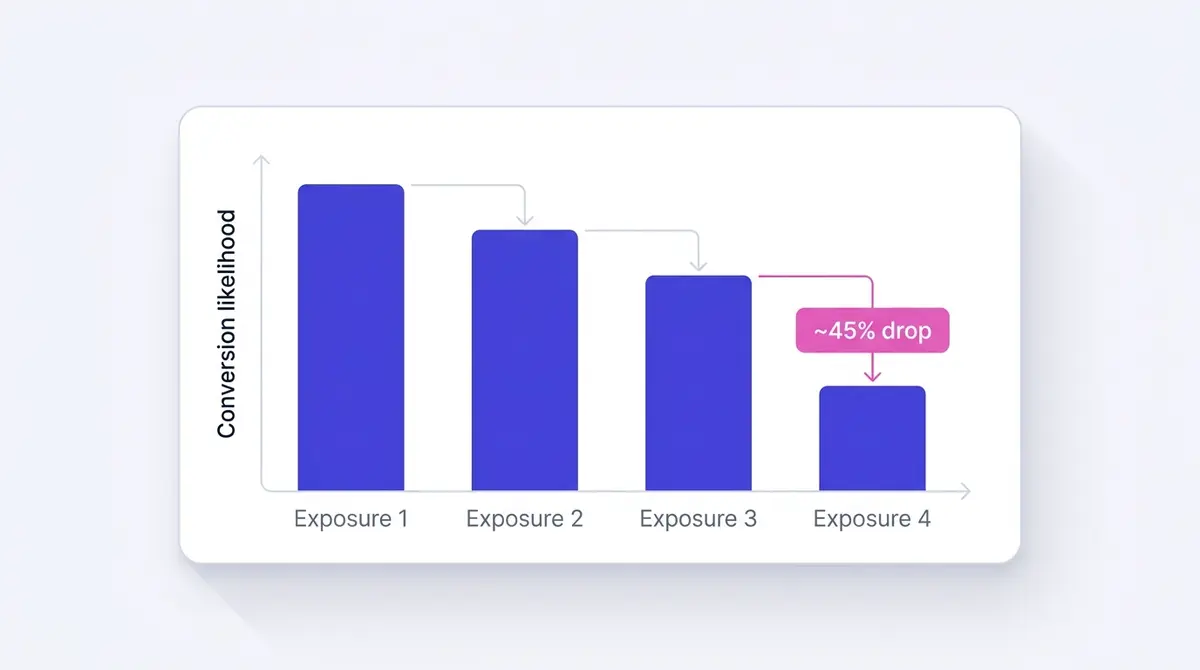
This is why raising the budget alone cannot scale you indefinitely. More budget on a fatiguing creative just buys more impressions on an audience that is responding less to each one. The lever that actually moves the account is fresh creative. In the same body of Meta testing, injecting new creative into high-fatigue ad sets lifted conversion rates about 8% on average. Those are Meta-own figures, so treat the exact percentages as directional, but the shape is unambiguous: the next variation outperforms paying more for the old one.
Neutral research from outside Meta points the same way. Across roughly 450 sales-effect studies, NCSolutions and Nielsen attributed about 49% of incremental sales to creative, more than media weight and targeting. Roughly half of what drives the sale is the ad itself, not how much you spent putting it in front of people. So when you plan a scale, plan the creative pipeline first and the budget steps second.
The variation does not have to be a new product or a new offer. It can be a new angle on the same proven thing: a different hook, a fresh testimonial, a founder explaining the why instead of a customer describing the result. A brand like Fitness Achievers does exactly this: when the hero transformation reel starts to tire, the member who dropped two dress sizes becomes the fresh variation that resets fatigue while the proven format carries on. A supplement brand like Beyond Collagen+ rotates from customer testimonials to a founder talking-head explaining why she reformulated the collagen, a different reason to stop scrolling aimed at the same buyer, which is what keeps cost per result flat while spend climbs. The structure stays stable; only the surface that meets the audience changes. Building that habit is what the creative testing guide is built around.
Bids, cost caps, and bid caps: scaling under a guardrail
It is tempting to read a stalling winner as a bidding problem and to yank the bid up to win more auctions. As a reflex, resist it. Two things go wrong at once. Changing your bid strategy mid-flight is itself a significant edit, so it can reset the learning phase you worked to exit, costing you the roughly 19% efficiency a stable ad set holds. You pay twice: once for the higher bid, and again for the relearning. And a higher bid just buys more of the same impressions an audience is already tiring of, so you pay a premium to accelerate fatigue. The auction will happily take your money to show a stale ad to people who have seen it four times; it will not make them convert.
That is the case against grabbing the bid lever in a panic, not against bid strategy itself, and conflating the two is a common mistake. Meta offers cost and bid controls built for scaling when you set them deliberately. A cost cap, which Meta calls the cost per result goal, tells the system the average cost per result you will pay and spends up to that target, paying more for one conversion and less for the next so the average holds near your number while you push the budget up. That is how you scale volume without watching profit quietly erode. A bid cap goes further, a hard ceiling on what Meta bids in any single auction: stricter control, and the disciplined way to use it is to scale through fresh creative under a fixed cap rather than by lifting the cap. Both throttle delivery if set too tight, so they reward an account that already knows its real cost per result. The bid strategy guide covers when each one fits.
Costs drift upward as you scale regardless of what you do with bids. WordStream's 2024 benchmarks pegged the all-industry Facebook cost per lead at $21.98. LocaliQ's 2025 report put it at $27.66, up from the $22.87 that same report logged a year earlier, even as the average CPC for traffic campaigns actually fell to $0.70 from $0.77. Read those figures together and the lesson holds: the gains came from placement and creative efficiency, not from advertisers bidding harder. Efficiency, not aggression, is what compounds.
When to stop, and how to step back
Scaling is not a one-way ratchet. Every audience has a ceiling, and every vertical climb eventually reaches the point where the next budget step costs more than it returns. Knowing how to retreat is as much a part of scaling as knowing how to push.
The signal to pull back is diminishing returns: cost per result creeping up step after step while frequency climbs, which together mean you are paying more to show the same ad to a saturating audience. You have hit the audience-size ceiling, and forcing more budget through only buys more expensive, more fatigued impressions. The ad fatigue guide covers the early-warning signs, and the frequency guide covers how high is too high.
The retreat should be measured, not panicked. Step the budget down by one increment, the same roughly 20% in reverse, rather than slashing it in half, because a sharp cut is another significant edit that can reset learning and overcorrect a set only slightly overextended. Then do what the rest of this guide points to: go horizontal into a fresh audience, or, more often, ship the next creative variation. The down-step is not a failure. It is how you hold efficiency while you set up the next move.
A practical scaling routine
Pull it together into a loop you can run weekly without thinking. The point is to make the safe moves automatic so the budget climbs while the math holds.
| Step | Move | Guardrail |
|---|---|---|
| 1 | Confirm the ad set is ready: exited learning, cost per result held for several days | Wait for ~50 events and a stable read, not one good day |
| 2 | Raise budget ~20% per step, every few days, on a daily budget | Stop and hold if cost per result rises |
| 3 | Automate the step with a rule tied to cost per result | Keep the step small and the lookback window wide |
| 4 | Duplicate the winner into one new, non-overlapping audience at a time | Fund each new set to reach 50 events; check the Audience Overlap tool |
| 5 | Queue the next creative variation before the winner fatigues | Have two or three ready, not one |
| 6 | Let Advantage+ campaign budget consolidate spend across the survivors | Avoid fragmenting into starving ad sets |
| 7 | Step the budget back when returns diminish | Down ~20%, do not slash; go horizontal or refresh creative |
Run that loop and scaling stops being a gamble. You raise budget in steps small enough to protect delivery, you open new audiences without starving them, and you keep a creative pipeline flowing so no single ad has to outrun its own fatigue. When fatigue does show up, and the data says it will by the fourth exposure, the replacement is already built and waiting.
The operational bottleneck in all of this is creative supply. The faster you can research what is working, generate the next on-brand variation, edit it, and push it live to Meta, the shorter the gap between spotting fatigue and shipping the fix, which is exactly where scaled budgets quietly leak money. A platform like AdPlay.ai keeps research, generation, editing, and Meta launch in one place, which compresses that gap. But the principle stands on its own: a winning ad is a starting point, not a finish line. Scale the structure carefully, and let the next variation do the real work. For the upstream half of this, spotting decay before it bites, the ad fatigue guide covers the signals to watch.
Example ad angles
Representative hooks and formats from the category.
“Testimonial ad for skin that cleared after eight weeks, scaled with Advantage+ campaign budget”
“Transformation ad for the member who dropped two dress sizes, fed in when the hero ad fatigued”
“Founder ad for why she reformulated the collagen, the next angle that held CPA flat while spend climbed”
By the numbers
Frequently asked questions
What is the difference between vertical and horizontal scaling on Facebook ads?
Vertical scaling puts more budget behind the exact ad set that already works: same audience, same creative, bigger number. Horizontal scaling takes the proven creative wider, into a new audience, a new placement, or a fresh variation running alongside the original. Vertical grows depth and risks delivery, since a fast budget jump can reset the learning phase. Horizontal grows breadth and risks fragmentation and audience overlap. Most accounts use both, pushing the proven set vertically until returns flatten, then opening a new front horizontally.
How do I know when a Facebook ad is ready to scale?
Scale only on a stable, trustworthy read. The ad set should have exited the learning phase (roughly 50 optimization events in 7 days, no longer marked Learning Limited), held its cost per result at or below target for several days rather than one good day, and reached a healthy plateau rather than still climbing or already sliding. The audience also needs to be large enough to grow into, because a narrow one caps vertical scaling fast. Miss these and you are amplifying noise, not scaling a winner.
What is the 20% rule for scaling Facebook ads?
It is a community heuristic, not an official Meta number. The idea is to raise an ad set's budget by roughly 20% every few days so the change stays small enough that Meta does not treat it as a significant edit and reset the learning phase. Meta itself only says that significant edits reset learning, without publishing a percentage. Treat 20% as a safe default step you can widen or narrow based on how stable your delivery looks, not as a law.
Why does my winning ad stop working after I scale it?
Two things happen at once. You push the same creative in front of more people, more often, and Meta's own data shows conversion likelihood falls about 45% by the fourth exposure. At the same time, a big budget jump can knock the ad set back into learning, where it delivers less efficiently. The fix is rarely more budget. It is a fresh variation that resets fatigue while the proven angle keeps the structure stable.
Can I use automated rules to scale my Facebook ad budget automatically?
Yes. Meta Ads Manager has a built-in automated rules feature that adjusts budgets and bids when conditions you set are met. A common scaling setup raises a budget by a small step, such as 20%, when cost per result stays below your target over a recent window, paired with a rule that pauses or cuts spend when cost per result climbs above a ceiling. Keep the step small so it does not reset the learning phase, and use a wide enough lookback window that the rule reacts to a trend, not a single noisy day.
What is a cost cap, and can it help me scale without losing profitability?
A cost cap (Meta's cost per result goal) is a bid strategy: you tell the system the average cost per result you are willing to pay, and it spends up to that target, paying more for some conversions and less for others to hold the average near your number. That lets you push the budget up while it protects your cost per result, which is exactly what scaling without eroding margin requires. A bid cap goes further, setting a hard ceiling on every auction bid. Both can throttle delivery if set too tight, so they suit an account that already knows its real cost per result.
How do I scale without my ad sets competing against each other in the auction?
Keep every new audience meaningfully different from the ones already running. When two of your ad sets share many of the same people, they can land in the same auction, and Meta's auction overlap filter then lets only the best-performing one through while the others under-deliver for reasons the dashboard never explains. Check the Audience Overlap tool under Audiences (select up to five audiences and choose Show Audience Overlap), then consolidate near-duplicate sets, tighten targeting, or use exclusions so each set addresses different people.
Should I use a daily or lifetime budget when scaling a winning ad?
Use a daily budget while you scale. It spends a steady average each day, so a 20% step is a single clean edit and the new spend level is easy to read against the old one. A lifetime budget is a fixed total paced across a date range, and editing it mid-flight forces Meta to re-pace the remaining spend across the remaining days, which muddies the comparison and can lurch delivery. Save lifetime budgets for fixed-window promotions, and give any budget edit a few days to settle before judging it.
Sources
- 1.Meta for Business, About Advantage+ campaign budget (2026)
- 2.Meta Business Help Center, About the learning phase (2026)
- 3.Analytics at Meta, Creative Fatigue: Managing Repeated Exposures (2023)
- 4.360 Marketing, Mastering Meta Ads: Your Guide to the Learning Phase (2024)
- 5.Hightouch, The Learning Phase: What Advertisers Need to Know (2023)
- 6.LocaliQ, Facebook Advertising Benchmarks 2025 (2025)
- 7.WordStream, Facebook Advertising Benchmarks 2024 (2024)
- 8.Westwood One, Marketers Vastly Understate the Sales Effect of Creative (2023)
- 9.Meta Business Help Center, Create an Automated Rule for Budgets and Bids (2026)
- 10.Meta Business Help Center, About Meta Bid Strategies (2026)
- 11.Meta Business Help Center, About Overlapping Audiences (2026)
- 12.Meta Business Help Center, About Lookalike Audiences (2026)
- 13.Meta Business Help Center, About Advantage+ Placements (2026)
- 14.Meta Business Help Center, Create Ads From Existing Posts in Meta Ads Manager (2026)
Keep exploring
Turn ad research into winning ads
Research the ads that work, generate the creative on-brand, and launch to Meta, all in one tool.
7-day free trial · No credit card required