
Facebook Audience Overlap: Fix It (2026)
How to check Facebook audience overlap in Meta Ads Manager, read the Venn percentage, and consolidate or exclude ad sets so they stop bidding against each other.
Updated September 2026 · Likit Sae Lee, CTO

Facebook audience overlap is when two or more of your ad sets can reach the same people, so they compete in the same auction. Check it in Meta Ads Manager: open the Audiences dashboard, tick up to five saved audiences, click the three dot menu, and choose Show Audience Overlap to read the Venn percentage. Meta confirms that when two of your ads enter one auction it keeps only the highest total value ad, so heavy overlap quietly wastes budget. Fix it by consolidating the sets or adding exclusions until each reaches fresh people.
You split your prospecting into three neat ad sets, and one races through its budget while the other two barely spend. Often the cause is not bad creative: your own audiences are colliding in the auction. Reading the overlap percentage tells you whether to merge those sets or carve them apart so each one reaches people the others cannot.
What audience overlap actually is
Audience overlap is the share of real people that two or more of your saved audiences have in common. If your interest audience for skincare and your lookalike of recent buyers both contain the same 40,000 accounts, those two ad sets are partly aimed at the identical crowd. On its own that sounds harmless. The problem starts one layer down, in the auction.
Meta runs a separate auction for almost every ad impression. When two of your ads are both eligible to show to the same person at the same moment, Meta does not let you bid against yourself. According to Meta's own guidance on auction overlap, it keeps only the ad with the highest total value and sets the others aside, so just one of your ads competes against other advertisers for that slot. That is sensible behaviour, but it has a side effect you feel in the reports: delivery concentrates on whichever ad set Meta judges most efficient, and the rest are quietly starved.
So overlap is really two ideas stacked together. There is audience overlap, the measurable percentage of shared people, and there is auction overlap, the downstream collision where Meta has to choose. High audience overlap makes auction overlap more likely, but they are not the same thing. Two audiences can look heavily shared on paper yet rarely collide if their budgets, schedules, or placements pull them apart. The overlap percentage is your early warning, not the verdict.
Why overlap happens
Overlap is rarely a freak event. It is the predictable result of how most accounts get built, and once you can name the cause you can usually fix it in one move. A handful of patterns produce nearly all of it.
- Near-identical interest sets. You build one ad set around "skincare" and another around "beauty" and "cosmetics." Those interests describe the same shoppers, so two sets quietly aim at one crowd wearing different labels.
- Several lookalike tiers from one seed. A 1% lookalike, a 2%, and a 3% built from the same customer list are not three separate audiences. Each larger tier contains the smaller one, so stacking them without exclusions is close to running the same audience three times. This is the single most common self-overlap trap, and it gets its own section below.
- Custom audiences from sources that share people. Your site visitors, your email list, and your past purchasers are not tidy, separate groups. A loyal customer often sits on all three, so three custom audiences built from those sources collide heavily.
- Broad and Advantage+ pools. Automated and broad audiences widen the net on purpose. Run two broad sets in one account and both reach into the same enormous pool, so they touch the same people far more than two tightly defined interest sets would.
- One saved audience reused across campaigns. Drop a saved audience into a prospecting campaign and again into a seasonal push, and the two campaigns now compete over identical people while every individual setting looks correct.
Most of these share a root: you sliced one audience into pieces that were never truly distinct. The fix is almost always to merge the pieces back together or draw a clean line between them with exclusions, which are the two moves the rest of this guide walks through.
How to check overlap in Meta Ads Manager
The tool sits in the Audiences area, not inside any single campaign. The steps are short.
- Open Meta Ads Manager and go to the Audiences dashboard.
- Tick the checkbox beside two or more saved audiences. You can compare up to five at once.
- Click the three dot menu at the top (it sometimes appears under Actions).
- Choose Show Audience Overlap.
A pop up appears with a Venn diagram. The first audience you selected is the baseline, and the figure shown is the percentage of that baseline audience also found in each comparison audience. As WordStream notes in its December 2025 walkthrough, the tool only compares audiences that hold at least 10,000 Accounts Center accounts each, so 10,000 is the hard floor for using it at all. Even then, a pairing stays hidden when the shared overlap between the two audiences falls below 1,000 accounts. Very small custom lists simply will not produce a reading.
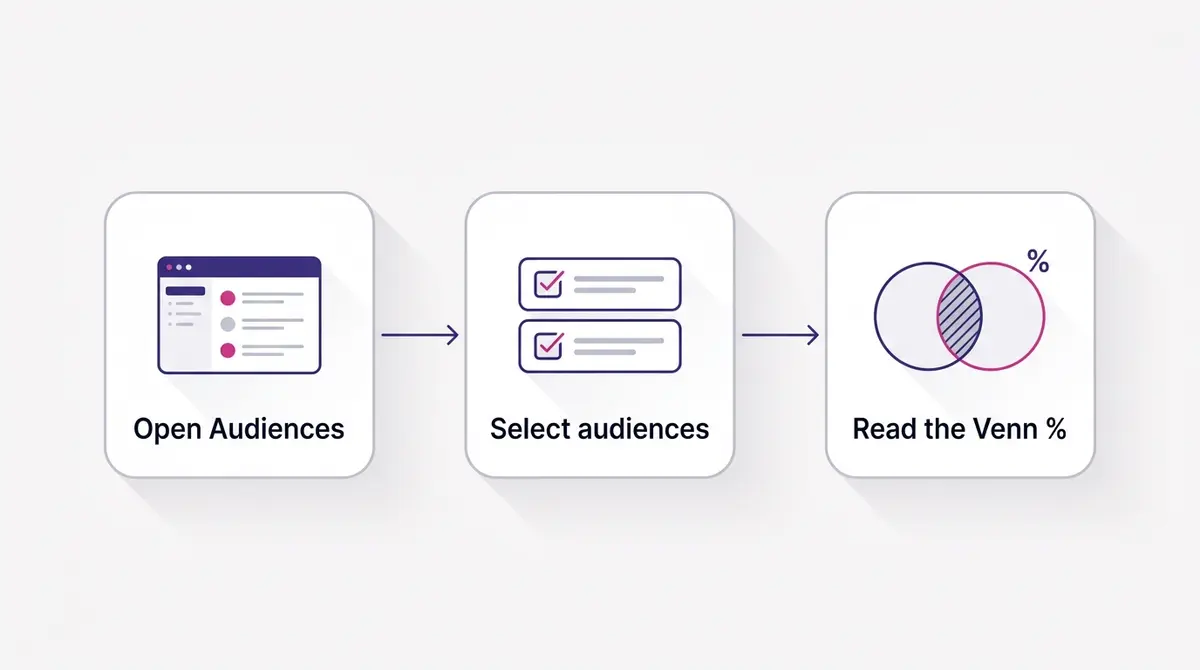
A word on what the percentage means. If the baseline is your lookalike and it shows 35% overlap with an interest audience, then about a third of your lookalike also lives inside that interest set. Flip the baseline and the percentage changes, because the two audiences are usually different sizes. Always read the number in the direction you actually care about, which is normally the smaller, more valuable audience.
The overlap tool only covers saved and custom audiences you have defined. Fully automated and broad setups give you fewer named audiences to compare, which is one reason the structural fixes later in this guide matter more as you lean on automation. If you are still mapping which audience types exist, the custom audiences walkthrough covers how each list is built before you start comparing them, including the lookalikes you derive from those seed lists.
It also helps to know what the percentage cannot tell you. The tool reports membership overlap, the raw count of shared accounts, not how much those shared people actually drive your delivery. Two audiences can share 25% of members yet behave very differently if one of those audiences is far more active or far more valuable per person. So treat the number as a map of where collisions are possible, then use your delivery and spend reports to judge where they are actually happening. The reading is a starting hypothesis, and your campaign data confirms or kills it.
Overlap that hides across separate campaigns
The overlap tool compares audiences, not campaigns, and that gap catches accounts running several campaigns at once. You can read a clean Venn diagram for two audiences and still have a collision, because the same saved audience is sitting inside two different campaigns at the same time.
Picture a permanent prospecting campaign and a separate launch campaign for a new product, both pointed at the same broad saved audience. The overlap view shows nothing wrong, since there is only one audience involved and it cannot overlap itself. The auction still sees two of your ad sets eligible for the same person, picks one, and benches the other, exactly as it would inside a single campaign. The damage is real, but the tool meant to surface it stays quiet.
To catch this, stop auditing one campaign in isolation. List every audience each active campaign uses, side by side. Wherever the same saved audience, custom audience, or lookalike appears in two places, you have a collision the Venn view will never flag. The fix is the usual pair: fold the duplicate effort into one campaign, or split the shared audience so each campaign owns a distinct slice.
How to read the percentage
There is no official threshold from Meta, which frustrates people who want a single number. The honest answer is that the percentage only means something once you know the intent behind the two audiences. The table below is a working rule of thumb drawn from common practitioner guidance, not a Meta rule.
| Overlap reading | Two cold prospecting sets | A retargeting set vs a cold set |
|---|---|---|
| Under 10% | Healthy, leave as is | Healthy, exclusions optional |
| 10% to 20% | Watch it, fine for now | Expected, add exclusions if scaling |
| 20% to 30% | Consolidate or exclude soon | Normal, exclusions recommended |
| Above 30% | Strong merge candidate | Add a hard exclusion |
The reason intent matters is that overlap between a warm retargeting audience and a broad prospecting audience is completely expected. People who visited your site last week are, almost by definition, also inside your wider interest pool. You do not panic at that figure; you simply exclude the warm audience from the cold set so each does its job. Overlap between two audiences that are both meant to find brand new people is the opposite story. There the shared percentage is pure waste, because you are paying twice to chase the same accounts.
As a working rule of thumb, many practitioners start paying attention once a pairing sits around 20% to 30% or higher, with bigger figures pushing toward a merge. That band is a prompt to investigate, not a Meta rule or an automatic action. Semrush's 2025 explainer is blunt on the point that overlap numbers are not meaningful by themselves, and that you should treat overlap as a problem only when something actually goes wrong, like an ad set struggling to leave the learning phase. So read the percentage as one input: a 25% overlap on a tiny slice of two huge audiences may move almost nothing, while a 25% overlap that sits right on your best buyers can distort an entire test.
Where overlap actually costs you
The damage rarely shows up as a single obvious line. Instead you see symptoms. One ad set spends its full budget by noon while two near identical siblings limp along at a fraction of theirs. The starved sets never gather enough events to leave the learning phase, which Meta says needs roughly 50 optimization events a week per ad set, so their numbers stay noisy and you cannot tell whether the creative or the audience is at fault.
This is the auction choosing for you. When your sets are eligible for the same people, Meta concentrates delivery on the one it reads as most efficient and effectively benches the rest. You are not getting three independent reads on three audiences. You are getting one read, plus two underfed sets producing data you should not trust. That is why overlap is as much a measurement problem as a cost problem: it corrupts the very experiment you set up.
There is a frequency angle too. When delivery piles onto one winning set, the same people see your ad more often. Databox's 2025 benchmarks place median Meta frequency at about 3.0, with the bottom quartile near 2.1 and the top quartile around 4.4. Push well past that range and you pay rising costs to reach a shrinking pool of fresh faces, which is the early texture of creative fatigue even when the creative itself is fine.
| Symptom you see | Likely overlap cause | First fix |
|---|---|---|
| One set spends fast, others stall | Auction concentration | Merge the similar sets |
| Sets stuck in learning | Too few events each, signal split | Consolidate budget into one set |
| Rising frequency on a winner | Delivery piling on shared people | Exclude warm users, widen the cold pool |
| Noisy, contradictory test reads | Same people across test cells | Exclude across cells or merge |
If your spend is also lopsided for reasons unrelated to overlap, separate an auction collision from a plain budgeting or bid issue before you start merging things, because the fixes are different.
Does overlap inflate your CPM?
The common worry is that overlapping audiences make you bid against yourself and push your own CPM up. That part is mostly a myth, and the reason is the auction rule from the top of this guide. When two of your ads are eligible for the same person, Meta does not run both and let them drive each other's price higher. It keeps the one with the highest total value and sets the other aside, so you are not literally outbidding yourself for a single impression.
So the cost of overlap is not a direct auction penalty on your CPM. The cost is everything around it. Delivery concentrates on one set while the others starve, so several ad sets never gather the events they need and stall in the learning phase. The winning set carries more of the spend, shows to the same people more often, and frequency climbs. Rising frequency is where a higher CPM can eventually creep in, as a downstream effect of fatigue, not because two of your ad sets fought over one slot. Getting this right matters: if you believe the problem is auction price, you reach for bid caps, when the real fix is structural. Merge or exclude so each set reaches fresh people.
Fix one: consolidate
When two ad sets are chasing the same kind of person and the split serves no testing purpose, merge them. One larger audience gives Meta more signal in a single place, which helps the set clear the roughly fifty weekly events it needs and exit learning faster instead of three half starved sets that never do.
Consolidation also fits where Meta's delivery has been heading for a while. Fewer, broader audiences with strong creative tend to outperform many hand sliced narrow ones, partly because narrow sets are the ones most likely to overlap and collide. If you have been running five interest sets that the overlap tool shows sharing 30% or more with each other, collapsing them into one or two broader sets often steadies spend within days. The thinking behind that consolidation, and when to keep budgets at the campaign level instead, is laid out in the CBO versus ABO comparison.
The trade off is that you lose the ability to read each old segment separately. That is usually a fair price, because you were not getting clean reads on overlapping sets anyway. If a specific segment genuinely needs its own measurement, keep it separate but make it not overlap, which is where exclusions come in.
There is a sequencing point worth stressing. Consolidate before you scale, not after. If you pour budget into a campaign whose ad sets are colliding, you simply spend faster on the same shrinking pool, and the uneven delivery gets louder. Tidy the structure first so spend distributes cleanly, let the merged set settle through its learning phase, and only then raise budgets. Scaling a clean structure compounds; scaling a messy one just amplifies the waste you already had.
Fix two: exclude
Exclusions keep your structure intact while stopping the collision. Inside an ad set you can add audiences to exclude, so the system removes those people from who the set can reach. The everyday pattern looks like this.
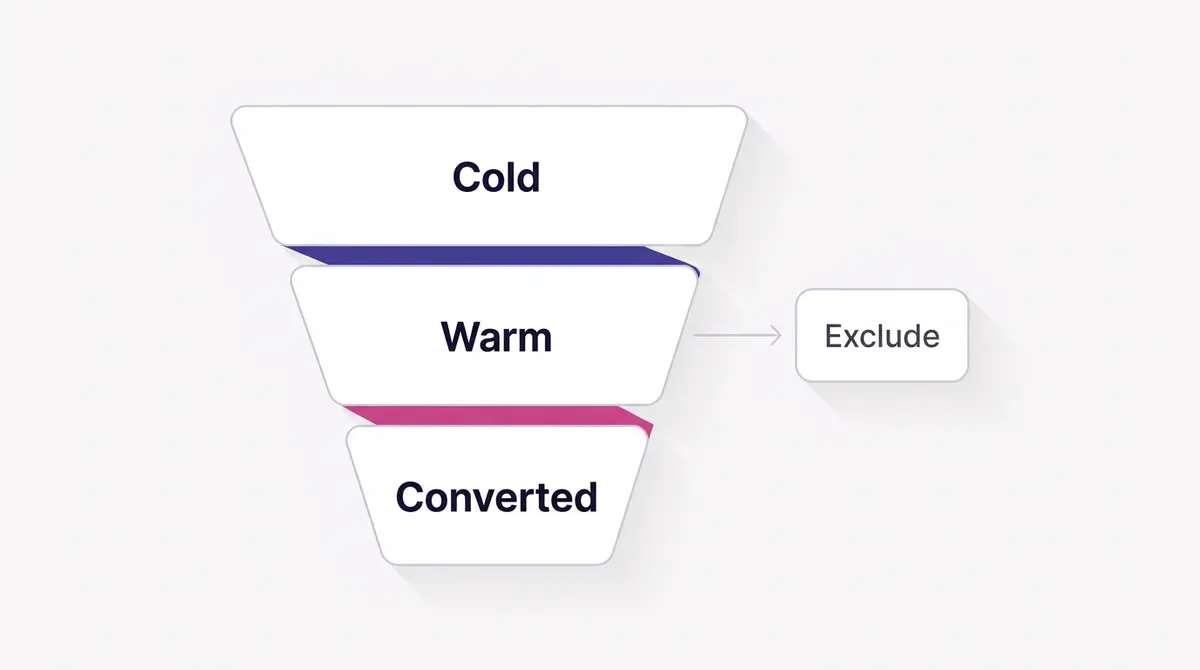
- Cold prospecting set: exclude recent site visitors, add to cart users, and past purchasers, so it only spends on genuinely new people.
- Mid funnel retargeting set: exclude past purchasers, so you stop paying to re-sell people who already bought.
- Bottom funnel set: target only the warmest segment, with the colder stages excluded from it.
Done well, exclusions turn a messy pile of overlapping audiences into a clean funnel where each stage owns its slice. The overlap tool is how you confirm it worked: after adding exclusions, recheck the pairings and the shared percentages should drop toward the healthy band. Building these tiers deliberately is the core of a staged prospecting and retargeting funnel, and the exclusions guide covers the exact fields to use when you set them.
One caution: exclusions shrink each set, so if you exclude aggressively across many tiny audiences you can starve them of size and reach. Watch the audience size estimate as you add exclusions. If a set drops below the volume it needs to gather events, that is a sign you should have merged rather than carved.
It is also worth keeping exclusions current. Custom audiences refresh on their own schedules, lookalikes rebuild as their seed lists change, and an exclusion you set in January can quietly stop covering the right people by March. When you add a new audience to a campaign, ask whether every existing set should now exclude it, and whether any old exclusion has gone stale. A short standing note of which audiences exclude which keeps the funnel honest as it grows, and saves you from re-diagnosing the same uneven spend a quarter later.
Merge or exclude: a quick decision
You now have two tools and one question: which one fits the pair in front of you. It comes down to whether the two audiences are doing the same job or different jobs.
| Question | Lean toward merging | Lean toward excluding |
|---|---|---|
| Are both sets after the same kind of person? | Yes, both chasing new buyers | No, one warm and one cold |
| Does the split serve a real test? | No, you just sliced one audience | Yes, each stage needs its own read |
| What are you protecting? | Signal, so one set gathers events faster | Structure, a clean funnel by stage |
| Risk if you choose wrong | Losing a segment read you did not need | Shrinking sets until they cannot deliver |
When in doubt, merge two cold sets that were never a deliberate test, and exclude when the sets sit at different funnel stages you want to measure apart.
One move that does not belong on this list is swapping the creative. Running a different image or video per overlapping audience is good practice, because fresh, relevant creative lifts results and slows fatigue. It does nothing for the collision itself. The same people still meet one auction, and Meta still keeps a single ad, so distinct creative solves relevance, not overlap. Treat them as two separate jobs: merge or exclude to stop the collision, then write the best creative for the structure you land on.
The most common trap: stacked lookalike tiers
If one setup produces near total overlap, it is layering lookalike tiers from the same seed without exclusions. A lookalike percentage describes how closely the audience matches your source: the 1% is the slice most like your seed, and the figure climbs toward 10% as the match loosens and the audience grows, as Meta's lookalike documentation describes it. Each larger tier is built from the top down, so a 2% lookalike already contains the whole 1%, and a 3% contains the 2% and the 1% inside it.
That means running a 1%, a 2%, and a 3% lookalike of one customer list as three separate ad sets is close to running a single audience three times. The overlap is not 20% or 40%, it is most of each smaller audience sitting wholly inside the larger ones. Three sets then split the budget and the events while chasing an almost identical crowd.
The fix is to nest the exclusions so each tier owns only its own band:
- 1% tier: leave it as the closest match, exclude nothing.
- 2% tier: exclude the 1%, so it serves only the people in the 2% who are not already in the 1%.
- 3% tier: exclude the 2%, so it reaches only the outer band.
Now the three sets reach three genuinely different groups, and you can read each tier on its own. If you would rather not manage the exclusions by hand, the simpler route is to skip the tiers and run one broader lookalike, which avoids the collision by never creating it. The lookalike audiences guide covers how to seed and build the tiers in the first place.
A worked example
Picture a skincare advertiser running three ad sets. Set A targets a skincare interest audience, Set B targets a 1% lookalike of buyers, and Set C retargets website visitors. They check overlap and find Set A and Set B share 38% of people, while Set C overlaps both heavily because visitors are also in the interest and lookalike pools.
The fix is two moves. First, because A and B are both cold prospecting trying to reach new people, and 38% is well into merge territory, they consolidate A and B into one broader prospecting set. That gives the combined set enough volume to exit learning instead of two sets splitting the events. Second, they leave C as a separate retargeting set but exclude recent visitors and past purchasers from the new merged cold set, so the cold set stops paying to reach warm people C already owns. After the change, spend evens out and the cold set finally produces a stable read.
This is also the moment to rebuild creative for the new structure. Once two audiences become one, the old ads were written for narrower segments and may not speak to the merged crowd. A brand like Skinlycious tends to win cold prospecting with a before and after video that shows clearer skin after a few weeks, Fitness Achievers leans on a member testimonial about finally sticking to training, and a jewellery label like Celovis runs a showcase carousel of everyday pieces styled for work and weekends. Each of those is a representative angle, and each maps to a different funnel stage. After a consolidation, regenerating fresh variants for the merged set, then launching them straight to Facebook and Instagram, keeps the new structure fed (AdPlay.ai handles this loop).
When to leave overlap alone
Not every overlap is a problem to chase, and over-excluding is its own failure mode. The right move is sometimes to read the number, shrug, and move on. Three cases call for that.
Leave it when the overlap is a funnel doing its job. A warm retargeting audience will always sit inside your broader cold pool, so a high reading there is expected. One exclusion on the cold set settles it, and the warm set keeps the people it should.
Leave it when the shared slice is small and low value, the kind that barely shifts delivery. Read the overlap with your spend reports open and act where money is actually moving, not wherever a percentage looks alarming.
Leave it, finally, when the overlap is deliberate. If you are sequencing messages, say a broad awareness set and a retargeting set that intentionally shows the next message to people who saw the first, some shared membership is the point, not a leak. The aim is a structure where each set has room to work, not a spreadsheet with every percentage forced to zero.
A short checklist
Run this pass whenever you launch audiences, duplicate ad sets, or notice uneven spend.
- Open the Audiences dashboard and select the pairs you want to compare, up to five at a time.
- Read each Venn percentage in the direction of your smaller, more valuable audience.
- Sort each pair by intent: are both cold, or is one warm and one cold?
- For two cold sets above roughly 20% to 30%, plan to consolidate.
- For warm versus cold pairs, add exclusions rather than merging.
- After changes, recheck overlap and confirm the shared percentages fell.
- Watch audience size as you exclude, so you do not starve a set below the volume it needs to exit learning.
- Rebuild creative for any merged set so the ads speak to the combined audience.
Overlap is one of the few problems in Meta advertising with a clean, measurable signal and a direct fix. You can see the percentage, you can read the intent behind it, and you can either merge or exclude until each set reaches people the others cannot. Do that, and your tests start telling you the truth again, which is the whole point of running them.
Example ad angles
Representative hooks and formats from the category.
“Before and After ad for skin that looks clearer after a few weeks of the routine”
“Testimonial ad for a member who finally stuck to training and saw results”
“Showcase ad for everyday jewellery styled for work and weekends”
By the numbers
Frequently asked questions
Where is the Facebook audience overlap tool in 2026?
It lives in the Audiences section of Meta Ads Manager, not inside a campaign. Open the Audiences dashboard, tick the checkbox next to two or more saved audiences, then click the three dot menu (sometimes shown as Actions) and choose Show Audience Overlap. A pop up shows a Venn diagram with the count and percentage of people shared. The first audience you select acts as the baseline that the others are compared against.
How much audience overlap is too much?
There is no official cutoff, but many practitioners start paying attention once two audiences share roughly 20% to 30% or more, and treat very high figures like 50% and above as a clear merge candidate. The right answer depends on intent. Two prospecting sets meant to reach different people should overlap little, so a high number there is wasteful. A retargeting set that overlaps a broad prospecting set is expected, and you fix it with exclusions rather than alarm.
Does audience overlap actually hurt performance?
It can, through the auction rather than through targeting itself. Meta says that when two of your ads are eligible for the same auction it keeps only the one with the highest total value, so the other is set aside. The practical result is uneven spending: one ad set sprints through budget while siblings stall, gather too few events to exit the learning phase, and never get a clean read. Overlap is not always harmful, but unmanaged overlap muddies your test results.
What is the difference between audience overlap and auction overlap?
Audience overlap is the share of people two of your saved audiences have in common, which you measure with the overlap tool. Auction overlap is what happens downstream: two of your ad sets are both eligible to show to the same person in the same auction, so Meta has to pick one. High audience overlap raises the odds of auction overlap, but they are not identical. You can have audiences that overlap on paper yet rarely collide if budgets, schedules, or placements differ.
Should I exclude audiences or just merge them?
Merge when two sets are trying to reach the same kind of person and the split has no testing purpose, because one larger set gives Meta more signal and exits the learning phase faster. Exclude when the sets serve different funnel stages and you want them kept apart, for example excluding past purchasers and recent site visitors from a cold prospecting set. Exclusions preserve your structure while stopping the collision. Use the simplest option that reaches fresh people.
Why does one ad set spend everything while the others stall?
Uneven delivery across similar ad sets is a classic symptom of overlap. When several sets are eligible for the same people, Meta concentrates delivery on the one it judges most efficient and starves the rest. The starved sets accumulate too few optimization events, sit in a limited learning state, and produce noisy numbers you cannot trust. Checking overlap, then consolidating or excluding, usually restores more even spending.
Does Advantage+ or broad targeting make overlap worse?
Broad and automated audiences widen the pool each set can reach, which raises the chance that two broad sets touch the same people. The overlap tool is most useful for the saved and custom audiences you define by hand, since fully automated audiences give you fewer levers. With broad setups the better defense is structural: fewer, larger ad sets and clear exclusions for warm and converted users, rather than many narrow sets fighting over the same crowd.
How often should I recheck overlap?
Recheck whenever you launch new audiences, duplicate ad sets, or notice uneven spend, and as a routine pass every few weeks for active accounts. Audiences drift as custom lists update and lookalikes refresh, so a pairing that was clean last month can creep upward. A quick read of the Venn percentages before scaling a campaign is cheaper than discovering after the fact that two sets were quietly cannibalizing each other.
Sources
- 1.Meta Business Help Center, Understand Auction Overlap (2026)
- 2.Meta Business Help Center, About Overlapping Audiences (2026)
- 3.Meta Business Help Center, About Lookalike Audiences (2026)
- 4.WordStream, How to Use the Facebook Ads Audience Overlap Tool (2025)
- 5.Semrush, Facebook Audience Overlap Explained + Ways to Avoid It (2025)
- 6.Code3, Understanding the Meta Learning Phase (2025)
- 7.Social Media Examiner, How to Use Facebook Audience Overlap to Improve Your Facebook Marketing (2025)
- 8.Databox, Facebook Ads Benchmarks (2025)
Keep exploring
Turn ad research into winning ads
Research the ads that work, generate the creative on-brand, and launch to Meta, all in one tool.
7-day free trial · No credit card required