
Facebook Custom Audiences: How to Build (2026)
How to build Facebook custom audiences from customer lists, site traffic, and engagement, and when to feed them into lookalikes.
Updated August 2026 · Likit Sae Lee, CTO

A Facebook custom audience is a segment of people who already know you, built from first-party sources you own (customer list, website or app traffic) or from engagement on Meta. They power retargeting and retention. A lookalike is the cold expansion Meta builds from a custom audience seed (1% to 10% of a country's population). With warm Facebook lead costs at $27.66 in 2025, up roughly 21% year over year per WordStream's LocaliQ benchmarks, custom audiences are the cheapest lever you control.
Your cheapest conversions hide in data you already have: the email list, the people who visited a product page last week, the viewers who watched half your reel. Cold prospecting gets pricier every year, so the advertisers who win in 2026 are the ones who mine first-party signal first and only then expand. Custom audiences are how you turn that signal into targeting. This piece walks the source types, the line between custom and lookalike, and how to decide which to reach for.
What a Facebook custom audience actually is
A custom audience is a saved list of people who already have some relationship with your business. You do not describe them by interest or demographic the way you would with cold targeting. Instead, you point Meta at a source of real signal: a file of customers, the visitors your dataset recorded last month, the people who watched your reel. Meta matches that signal to its users and hands you back an audience you can target or exclude.
That distinction matters because it changes what the audience is good for. Cold interest targeting guesses who might care. A custom audience starts from people who have already raised their hand, which is why it carries the lowest cost and the highest intent in most accounts. As lead prices climb, that warm pool becomes the cheapest lever you control.
The numbers make the case. WordStream's LocaliQ Facebook Ads Benchmarks for 2025, drawn from a data window spanning April 2024 to June 2025, put the average Facebook cost per lead at $27.66, up roughly 21% year over year from $22.87. Search Engine Land, citing the same dataset in September 2025, framed it as costs jumping 21% while still beating Google, where the equivalent lead ran $70.11. At the same time the average conversion rate on Leads campaigns softened to 7.72%, down from 8.67% the year before. Cold acquisition is getting more expensive and slightly less efficient. Mining people who already know you is how you fight back.
The source types, grouped the way Ads Manager groups them
When you open the Audiences section of Ads Manager and choose Create Custom Audience, the sources split into two families. Get these names right, because Meta renames them often and the wrong term sends you down the wrong build.
Your sources are first-party data you own and bring to Meta: Website, App activity, Customer list, Catalog, and Offline activity. These are the highest-intent sources because they represent real commercial behaviour, not platform engagement.
Meta sources are interactions that happened on Meta's own surfaces: Video, Lead form (instant forms), Instant Experience, Shopping, Instagram account, Facebook Page, on-Facebook listings, and Events. You did not have to instrument anything for these; Meta already recorded the engagement.
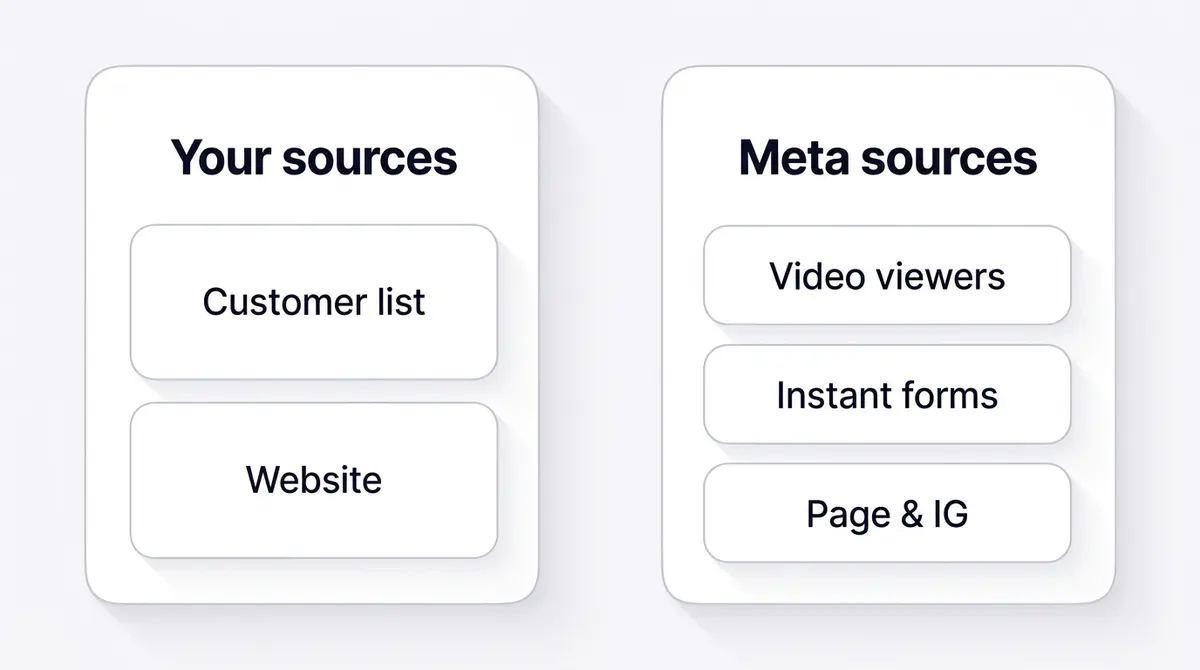
In practice, four source types do most of the work for ecommerce and lead-gen brands:
| Source type | What it captures | Best used for |
|---|---|---|
| Customer list | Emails or phone numbers you upload (hashed) | Retention, repurchase, win-back, lookalike seed |
| Website | Visitors tracked by your dataset (Pixel plus CAPI) | Cart abandoners, page viewers, recent visitors |
| Engagement (video, instant form, IG, Page) | People who interacted on Meta | Warming cold viewers, mid-funnel nudges |
| App activity | In-app events from your SDK | App installs, in-app purchasers, re-engagement |
The customer list deserves its own note because it is the most powerful and the most misunderstood. You upload a file of identifiers (email, phone, and so on), and those identifiers are hashed in your browser before they ever reach Meta. You must accept Meta's Customer List Custom Audiences Terms first. The upload, the hashing, and the matching all happen inside Ads Manager: it is a Meta-native workflow you run yourself, on data you have consent to use. Engagement audiences such as video viewers and Page interactions follow their own playbook, covered in the facebook engagement custom audience guide.
How long people stay in a custom audience
Every custom audience has a retention window: the number of days a person stays in the audience after they trigger the source event. Set it too short and the pool starves before you can spend against it. Set it too long and you keep paying to reach people who have long since forgotten you. Each source has its own maximum, and Meta enforces the ceiling.
| Source type | Maximum retention window |
|---|---|
| Website or app, standard events | 180 days |
| Website or app, purchase events | 730 days (since 18 May 2026) |
| Facebook Page or Instagram engagement | 365 days |
| Video views | 365 days |
| Lead form (instant form) | 90 days |
| Customer list | No expiry (you manage the list) |
The 730-day line is the freshest change, so a 2026 setup should account for it. Until May 2026, every website and app audience topped out at 180 days. On 18 May 2026, Meta raised the ceiling to 730 days for purchase events specifically and automatically migrated existing 180-day purchase audiences up to the new maximum, leaving advertisers an opt-out window if they wanted to keep the shorter setting. Two full years of buyers in one pool helps most for slow-cycle, high-ticket categories: a furniture or appliance buyer is not back in market for a year, so a longer window keeps you present until the timing comes back around. The catch is that a "purchasers, last 180 days" pool now reaches back two years if you let it, which means colder people and rising frequency. Set the window to match the real buying cycle rather than maxing it out of habit.
Two limits are worth knowing before you build. An audience needs at least 20 matched people before Meta will serve a single impression to it, and delivery stays unreliable until the matched pool reaches the low thousands, so treat 20 as a floor, never a target. A single ad account also holds a ceiling of 500 custom audiences, so prune dead segments instead of letting old tests pile up. Both limits are documented in Meta's Business Help Center.
Building a website custom audience from your dataset
Website audiences are the workhorse for most accounts because they capture intent in the moment. They depend on an active dataset, which is Meta's current name for the Pixel plus the Conversions API working together in Events Manager. If events are not flowing, there is nothing to build from, so the prerequisite is a healthy dataset.
Once events arrive, you can slice visitors by behaviour and recency. Common, high-value website audiences include:
- All visitors in the last 30 days (broad warm pool)
- People who viewed a specific product or treatment URL
- People who triggered AddToCart or InitiateCheckout but not Purchase
- People who spent the most time on site (the top 25% by dwell)
Recency is the lever most people underuse. A 7-day cart-abandoner audience behaves very differently from a 180-day one: the first is hot and small, the second is cool and large. The standard recency ladder makes this concrete. Build the same behaviour at several windows and treat each as a different temperature:
- 7 days: the hottest pool. Cart abandoners and recent product viewers still actively deciding.
- 14 days: warm. The deliberators on a longer consideration cycle who need a second nudge.
- 30 days: the broad warm pool. All recent visitors, the backbone of steady retargeting.
- 90 days: cooling. Worth a fresh offer or a new-product announcement rather than the same ad.
- 180 days: the coldest warm window. Often more useful as a lookalike seed than as a retargeting target.
Build several of these and let performance tell you where intent decays for your category. If your dataset is not yet capturing these events server-side, the facebook conversions api setup guide covers why server events keep your website audiences accurate as browser tracking erodes.
The build path is the same for every source type. In Ads Manager, open the Audiences section, click Create audience and choose Custom audience, then pick the source (Website, Customer list, Video, Lead form, and so on). Set the rule (for a website audience, the event and the URL or parameter), choose the retention window, name the audience, and create it. Website and engagement audiences backfill from data Meta already holds, so they populate immediately; a customer list populates as soon as the match finishes.
Dynamic retargeting: show the exact product they viewed
For ecommerce, the highest-return use of a website audience is not a generic "come back" ad. It is a catalog (dynamic) ad that shows each person the specific product they viewed or added to cart, assembled automatically from your product catalog. You connect a catalog in Commerce Manager, match its items to your dataset events (ViewContent, AddToCart, Purchase), and Meta builds a personalised set per viewer. The website audience supplies the intent; the catalog supplies the exact product and price. That pairing is usually the most efficient line in an ecommerce account, because the ad answers the one question the shopper already had.
A brand like UR Klinik, an aesthetic clinic, illustrates the simpler pattern for a service business: someone views a treatment page or opens the consultation instant form but never submits. That hesitation is a website-and-engagement custom audience worth retargeting with a single clear nudge to finish booking. The intent is already there; the ad just removes the friction.
Why first-party data is the cheapest lever now
Custom audiences keep getting more valuable because the alternative keeps getting weaker. Since Apple's App Tracking Transparency prompt arrived, only about 35% of users opt in to tracking worldwide as of 2025, per Adjust, so a large slice of mobile behaviour never reaches Meta through the old third-party path. Browser cookies are eroding on the same curve. The signal Meta loses from strangers it can still recover from the data you own and send it directly, which is exactly what a customer list and a server-fed website audience are.
That is what the Conversions API restores on the website side. A server-side feed of your events, sent from your backend and matched to the browser Pixel by a shared event ID, keeps your website audiences populating and your match quality high when the browser drops the signal. First-party data did not get more valuable by accident. It got more valuable because everything around it got noisier, and the audiences you build from data you own are the part of targeting that privacy changes cannot quietly take away.
Customer list audiences: retention's cheapest lever
The customer list is where first-party data pays off hardest, because these are people who have already paid you. You are not buying their attention from scratch; you are reminding people who chose you once. That is the cheapest conversion in the funnel.
The strongest plays are time-bound. A supplements brand like Beyond Collagen+ knows roughly when a customer's sachets run low, so a customer-list audience of buyers approaching their 90-day mark, paired with a simple restock reminder, catches them at the exact moment of need. The list is uploaded and hashed inside Meta; the timing logic lives in the brand's own CRM.
Three discipline points keep customer-list audiences clean:
- Only upload contacts you have permission to market to. Consent is yours to own; Meta will not police your CRM. The list you bring is your legal responsibility, not the platform's.
- Segment before you upload. A list of high-value repeat buyers is a far better audience (and a far better lookalike seed) than your entire database. Splitting buyers from one-time discount hunters, or VIPs from dormant accounts, lets you write to each segment in its own voice and timing.
- Refresh the list. Static lists decay as emails churn and match rates drop. Re-upload your best segments on a cadence so the audience reflects who is actually engaged this quarter, not who bought two years ago.
Lift your match rate
Match rate is the quiet metric that decides how much of your list survives the upload. Meta only matches the people whose hashed identifiers map to an active account, so a file of 10,000 emails can resolve to a much smaller usable audience. Three habits lift the rate, and none of them are exotic:
- Send more identifiers per record. Email alone matches a fraction of a list. Adding phone number, first and last name, city, state, country, and date of birth gives Meta several ways to find the same person, so the match rate climbs as you add columns.
- Normalise the formatting. Lowercase the emails, strip trailing spaces, and write phone numbers in full international format with the country code. A phone number missing its country code or an email with a stray space simply will not match.
- Upload recent data. Consumer lists decay every month as people change addresses and accounts, so a file pulled last week matches better than one exported a year ago. Re-upload your best segments on a cadence.
Meta documents the accepted identifiers and formatting rules in its Customer List Custom Audiences help. A clean, recent, multi-identifier list is the difference between a seed Meta can actually model and a thin pool that never delivers.
Value-based audiences: weight the seed toward your best buyers
There is a sharper way to upload a customer list than a flat file of emails. A value-based custom audience attaches a monetary value to each record, a lifetime value or a total purchase amount, in a column beside the identifiers. Meta reads that column and weights the audience toward your highest-value customers instead of treating a one-time discount hunter the same as a repeat VIP.
The payoff shows up when you seed a lookalike from it. A standard lookalike models people who resemble your customers. A value-based lookalike models people who resemble your most valuable customers, because the value column tells Meta whose pattern to chase. For any brand where a small share of buyers drives most of the revenue, that is the single biggest lever on seed quality you have.
The build is a variant of the customer-list flow. When you create the audience, choose the customer-file option that includes value, then map your value column to the customer-value field so Meta knows which number to optimise toward. Use lifetime value if you have it, or total purchase amount if you do not, and do not feed it order count, which says nothing about worth. Everything else, the in-browser hashing, the terms, and the matching inside Ads Manager, works exactly as a normal customer list. Meta's Business Help Center documents the value-based audience workflow step by step.
That makes your best repeat buyers, valued and segmented, the highest-quality seed you can hand Meta for a lookalike, which is the next section.
Custom versus lookalike: how the two relate
This is the distinction that trips up most advertisers, so be precise. A custom audience is people who already know you. A lookalike audience is a brand-new, cold audience Meta builds by studying a custom audience as a seed and finding strangers who statistically resemble it.
In other words, the custom audience is the input and the lookalike is the output. You cannot build a lookalike without a custom audience to seed it. Per WordStream's 2026 targeting guide, Meta requires at least 100 matched people from a single country in that seed; 1,000 to 5,000 is the practical range for the algorithm to find meaningful patterns. Lookalikes are country-specific (one per country) and you choose a breadth from 1% to 10% of that country's population. A 1% lookalike is the tightest match to your seed; a 10% lookalike is the broadest reach with the loosest resemblance.
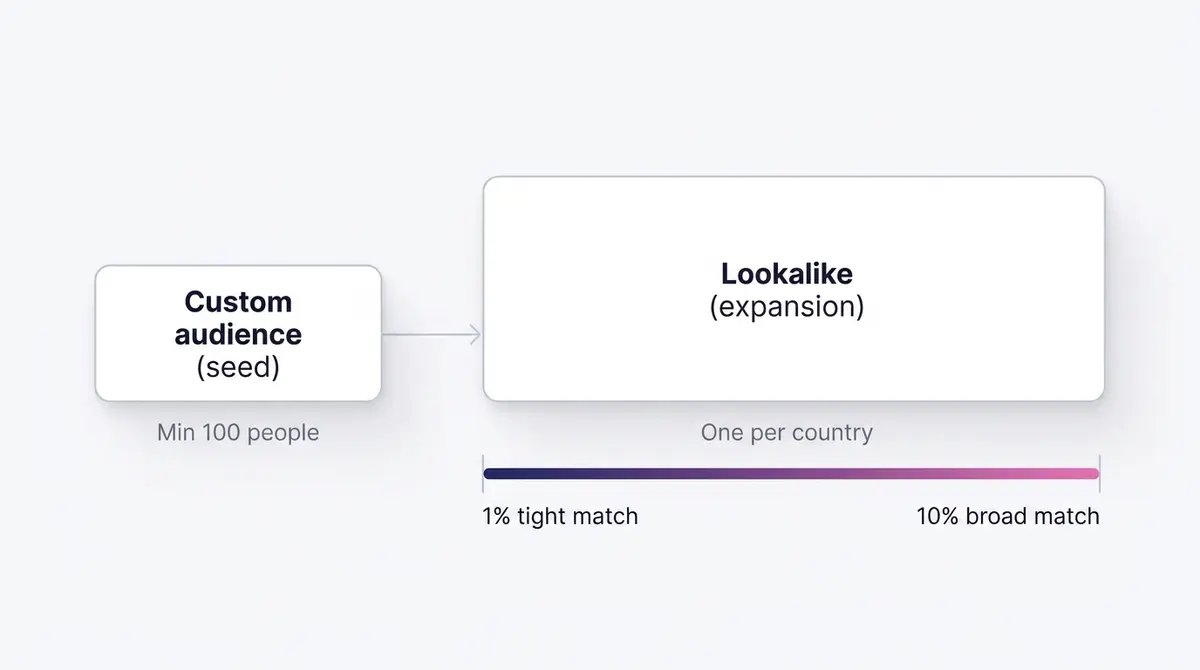
The single sentence to remember: a lookalike is only as good as the custom audience you seed it with. Seed it with everyone who ever visited your site and you get a vague lookalike. Seed it with your top 5% of repeat purchasers and you get an audience that resembles your best customers, not your idlest browsers. A brand like Dasher Smart Home, selling considered, higher-ticket home tech, gets far more from a lookalike seeded on verified purchasers than from one seeded on browsers, because the model then chases households that resemble buyers.
There is a 2026 wrinkle worth flagging. In Advantage+ campaigns, custom and lookalike audiences increasingly behave as audience suggestions rather than hard fences. Meta's AI uses them as a strong starting point and can expand beyond them, while hard guardrails (location, minimum age, exclusions, Special Ad Category) still hold firmly. So your audiences now steer the system more than they strictly cage it. The facebook advantage plus audience guide covers how those suggestions and guardrails interact.
For the full build mechanics on the expansion side, the facebook lookalike audiences guide covers seed selection and breadth in depth.
A decision framework: which audience for which job
The choice between custom and lookalike is really a question of where the person sits relative to you.
| Question | Reach for a custom audience | Reach for a lookalike |
|---|---|---|
| Do they already know you? | Yes | No |
| Funnel job | Retargeting, retention | Prospecting, scale |
| Data origin | First-party or Meta engagement | Modelled from a seed |
| Typical cost and intent | Lowest cost, highest intent | Higher cost, cold |
| Audience size | Bounded by your real data | Scales to 1% to 10% of a country |
The sequencing is what most accounts get wrong. Retarget your warm custom audiences first, because people who already know you convert at the lowest cost in the funnel. Anchor the comparison to the verified benchmark rather than a folk multiplier: WordStream's LocaliQ data put the average Leads conversion rate at 7.72% in 2025, and that figure blends cold and warm traffic together. A pool of cart abandoners or recent purchasers should beat that blended average comfortably, while a cold lookalike will sit under it until the creative and the offer do the lifting. Use 7.72% as the line your warm pools must clear, then once those audiences are too small to spend against efficiently, expand with lookalikes to find new people who resemble your best customers.
That order also protects budget. Facebook traffic-campaign CPC actually fell 6.7% to $0.70 in 2025 even as lead costs rose, a divergence WordStream attributes to competition, privacy restrictions, and inflation hitting conversion-objective campaigns hardest. Warming people cheaply with engagement, then converting them through custom-audience retargeting, sidesteps the most expensive part of the auction. The facebook retargeting guide goes deeper on structuring those warm flows, and facebook ad targeting covers how custom audiences sit alongside interest and broad targeting.
Use a custom audience as an exclusion
Half of what custom audiences are for is keeping the wrong people out. Any custom audience you can target you can also exclude, and the exclusion lives in the Audience section of the ad set: open the ad set, find the Custom audiences field, and click Exclude rather than include. Meta then removes that group from delivery. A few exclusions earn their place in almost every account:
- Exclude recent purchasers from prospecting. There is no reason to pay cold prospecting prices to reach people who just bought. Exclude a customer-list or purchase audience from your acquisition ad sets so the budget chases new demand.
- Exclude converters from cart-abandon retargeting. Someone who abandoned a cart and then bought should not keep seeing "you left something behind." Exclude the purchase audience from the abandon flow so the message stays true.
- Exclude your warm pool from prospecting. When a retargeting campaign and a prospecting campaign chase the same people, you bid against yourself and inflate your own costs. Excluding the warm audience from prospecting separates the two cleanly.
One change makes this non-negotiable in 2026. Meta removed interest-based detailed targeting exclusions for new campaigns in 2024 and stopped delivery on existing campaigns that still used them from January 31, 2025, as Social Media Today reported, so a custom audience is now the only way to suppress a group at all. That makes the audiences you build the backbone of both your targeting and your suppression. For the overlap problem specifically, the facebook audience overlap guide shows how to measure it, and the facebook ad audience exclusions guide goes deeper on structuring suppression.
Research the angle before you spend on the audience
A perfectly built audience still fails with the wrong creative. Once you know who you are reaching, the next question is what to say, and the answer changes by segment. A cart abandoner needs friction removed; a 90-day repurchase audience needs a timely reminder; a cold lookalike needs the strongest proof you have.
This is where competitor and category research earns its keep. Before writing the ad, study what is already working for the segment you are targeting. The free Meta Ad Library lets you see live ads by Page, so you can read the angles a category is leaning on right now. A brand like Fitness Achievers, building a warm engagement audience of people who watched half a workout reel, would research which proof angles (transformation, community, results) those half-watchers respond to before committing budget. The meta ad library guide walks through that research workflow.
Map the angle to the audience temperature:
- Warm custom audiences (cart, repurchase): lead with the specific objection or the timely reminder. They know the product; remove the last barrier with a clear offer or a single reason to act now.
- Engagement audiences (video, IG, Page): deepen the story. They are curious, not convinced. Give them proof, a demonstration, or the answer to the question that made them stop scrolling in the first place.
- Cold lookalikes: open with your strongest hook and clearest social proof. You have one scroll to earn attention, so lead with the result, not the brand.
The mistake to avoid is reusing one creative across all three temperatures. The same proof point lands differently to a stranger than to a cart abandoner, and a reminder that works on a repeat buyer feels presumptuous to someone meeting you for the first time. Researching the live angle for each segment, then writing to the temperature, is what separates a custom audience that prints results from one that just delivers impressions.
Build the audience in Meta, then make the ads
Here is the clean division of labour. Building and managing the audience is a Meta-native job. You upload the customer list, accept the terms, and let the hashing and matching happen inside Ads Manager. You instrument the dataset in Events Manager. You set the lookalike breadth and country. None of that touches a third-party tool, and it should not: the list, the consent, and the match all stay inside Meta.
What happens downstream of the audience is where the creative work lives. Once the segment exists in Meta, you still have to research the winning angle for it, generate on-brand creative, and launch. That is the part a platform like AdPlay.ai speeds up: research live angles across a library of running ad creative, generate variations matched to the segment's temperature, and launch straight to Facebook and Instagram. The audience stays in Meta; the ad-making accelerates around it, and the principle holds regardless of the tools you use.
The workflow, end to end, looks like this. Build the custom audience from your strongest first-party source in Ads Manager. Seed a 1% lookalike off your best buyers for cold reach. Research the angle each segment responds to. Then produce and ship the creative, measure which warm and cold combinations beat the 7.72% benchmark, and feed the winners back into the next round. The facebook ad creative testing guide covers how to run that test loop so your warmest audiences are never carrying tired creative.
Custom audiences are not a clever hack. They are the discipline of spending on people who already know you before you spend on strangers, in a year when strangers cost 21% more to convert than they did the year before. Build the audience in Meta, seed the lookalike from your best customers, match the angle to the temperature, and let the warm pool do the heavy lifting.
Example ad angles
Representative hooks and formats from the category.
“Discount or Offer ad for time-to-restock reminder to lapsing collagen buyers”
“Problem and Solution ad for booking the consultation you started but didn't finish”
“How-to or Demo ad for the workout reel half-watchers came back to finish”
By the numbers
Frequently asked questions
What is a Facebook custom audience?
It is a saved segment of people who already have a relationship with your business. You build it from sources you own (a customer list, website visitors tracked by your dataset, app activity) or from engagement on Meta (video viewers, instant-form openers, Page or Instagram interactions). Because these people already know you, custom audiences are used mainly for retargeting and retention rather than cold prospecting.
What is the difference between a custom audience and a lookalike audience?
A custom audience is people who already know you. A lookalike is a new, cold audience Meta finds by analysing a custom audience as a seed and matching strangers who resemble it. Custom audiences give you precision and warm intent; lookalikes give you scale and reach. The lookalike is only ever as good as the custom audience you seed it with.
How many people do I need to build a lookalike audience?
Meta requires at least 100 matched people from a single country in your source custom audience, per WordStream's 2026 targeting guide. That is the floor, not the target. Aim for 1,000 to 5,000 of your best customers so the algorithm has enough pattern to model. Lookalikes are country-specific, so you build one per country you want to reach.
Does uploading a customer list to Facebook expose my data?
Identifiers like email and phone are hashed in your browser before they reach Meta, and you must accept Meta's Customer List Custom Audiences Terms first. The upload, hashing, and matching all happen inside Ads Manager. You own the consent and the list. Only upload contacts you have permission to market to.
What sources can I use to build a website custom audience?
Website custom audiences rely on an active dataset, which is the Meta Pixel plus the Conversions API in Events Manager. Once events are flowing, you can build audiences like all visitors in the last 30 days, people who viewed a specific URL, or people who triggered an add-to-cart but not a purchase. See our Meta Pixel setup guide for getting the dataset live.
Should I retarget with a custom audience or prospect with a lookalike?
Do both, but in order. Retarget warm custom audiences first because they convert at the lowest cost. Use lookalikes to find new people once your warm pool is too small to spend against. As a rough split, many advertisers run the majority of budget to prospecting lookalikes and a smaller, efficient slice to custom-audience retargeting.
How long do people stay in a custom audience?
Each source has a maximum retention window, the number of days a person stays in the audience after they trigger the source event. Website and app standard events top out at 180 days, Facebook Page and Instagram engagement at 365 days, and lead forms at 90 days. Since 18 May 2026, website and app purchase events can run up to 730 days. Customer lists do not expire, because you control the list. Set the window deliberately: shorter for hot retargeting, longer for slow-cycle, high-ticket purchases.
Can I exclude a custom audience to avoid wasted spend?
Yes, and you should. Any custom audience you can target you can also exclude at the ad set level, in the same Audience section where you add one. The common moves are excluding recent purchasers from cold prospecting, excluding buyers from cart-abandon retargeting, and excluding your warm pool from prospecting so the two campaigns do not bid against each other. Since Meta removed interest-based detailed targeting exclusions (for new campaigns in 2024, with delivery on the last existing campaigns stopping January 31, 2025), a custom audience is the only way to suppress a group.
Sources
- 1.WordStream (LocaliQ), Facebook Ads Benchmarks 2025 (2025)
- 2.LocaliQ, Facebook Advertising Benchmarks for 2025 (2025)
- 3.Search Engine Land, Facebook ad costs jump 21% in 2025, but still beat Google (2025)
- 4.WordStream, Facebook Ad Targeting in 2026 (2026)
- 5.Meta Business Help Center, About custom audiences (2026)
- 6.Meta Business Help Center, How long do people stay in a custom audience (2026)
- 7.Meta Business Help Center, About Customer List Custom Audiences (2026)
- 8.Meta Business Help Center, Create a value-based Custom Audience (2026)
- 9.Adjust, ATT opt-in rates 2025 data and benchmarks (2025)
- 10.Social Media Today, Meta Removes Detailed Targeting Exclusions From Ad Campaigns (2024)
Keep exploring
Turn ad research into winning ads
Research the ads that work, generate the creative on-brand, and launch to Meta, all in one tool.
7-day free trial · No credit card required