
Meta Ad Library: Find Winning Ads (2026)
A full walkthrough of the free Meta Ad Library: search any advertiser, filter by country and platform, read the low-impression flags, and spot the long-running ads that convert.
Updated August 2026 · Xanny Lee, CEO
The Meta Ad Library is a free public archive of every ad currently running across Facebook, Instagram, Messenger, the Meta Audience Network, and (since December 2025) WhatsApp and Threads. Search any advertiser or keyword, filter by country and platform, and study each ad's creative, start date, total active time, and how many versions are running. A December 2025 update added a 'Low Impression Count' badge to ads that have reached fewer than 100 impressions since launch, plus a total-active-time figure, so it is now easier to spot a fresh test; there is still no spend, no clicks, no conversions, and ads vanish once they stop running. Run time and repetition are the signals that matter: an ad still spending weeks or months after launch, reshot across many versions, is probably converting. Set the country filter to a market like Malaysia, where Facebook's ad audience was 23.0 million in late 2025, and you are reading what brands actually pay to show.
Every ad your competitors are paying to run right now is public. The Meta Ad Library lists them all, free, searchable by brand or keyword, and most marketers still use it like a mood board: open, scroll, close. The sharper habit is to read it, because the library quietly answers the questions that matter before you spend a dollar: which angles have survived months of someone else's budget, what offer a category leader takes into a mega-sale, and how the hooks that actually convert in a feed sound. A December 2025 update flags ads with fewer than 100 impressions and adds a total-active-time figure, so a fresh test is easier to tell apart from a proven one. It still hides spend, clicks, and conversions on ordinary commercial ads, so the skill is the same: reading winners out of a tool that shows you what is running, never how well it paid back.
Why reading ads beats guessing now
Targeting used to be the lever. Then in April 2021 Apple shipped App Tracking Transparency with iOS 14.5, which forces apps to ask permission before tracking you across other apps and sites, and most people said no: only about 12% of users worldwide chose to allow tracking (MacRumors, 2021). With less individual signal flowing back, the algorithm leans harder on the creative itself to find buyers, and the advertiser's main controllable lever shifted from who you target to what you show. That is exactly what the Ad Library lets you study for free: not the audiences, which are mostly hidden, but the creative every brand in your category is paying to put in front of a feed right now.
What the Ad Library shows (and what it hides)
The Meta Ad Library is a free public archive of every ad currently running across Meta's surfaces. Find it by searching 'Meta Ad Library'; you do not need an ad account or a login to search it. Meta built it for transparency; marketers use it for research, and both uses are legitimate. The surface count grew at the end of 2025: the library now spans six places an ad can run, Facebook, Instagram, Messenger, the Meta Audience Network, and, added as filterable platforms in a December 2025 update, WhatsApp and Threads (PPC Land, 2025). If your category advertises in chat or on Threads, those are now in scope where they were invisible before.
For each ad you can see the full creative (image, video, or carousel), the primary text, headline, and call to action, the date it started running, which platforms it appears on, and a flag when the advertiser is running multiple versions. Two categories carry extra detail. Ads about social issues, elections, or politics show spend, reach, and who paid for them, and they stay archived for 7 years whether active or not (Meta, 2023). Ads delivered in the EU carry more: under the Digital Services Act, those listings disclose the parameters the advertiser used for targeting (age, gender, location) and who the ad was served to (Meta, 2023), and they stay in the library only while active plus one year after their last impression. It is the one place the library leaks real targeting and delivery data, so it is worth a look for any brand that also advertises in Europe, even though it tells you nothing about their campaigns elsewhere.
What every ad card now shows, field by field
A prose tour is easy to skim past, so here is the per-ad card as a reference. Read it once and you will know exactly what each line on an ad is telling you, and what it is not.
| Field on the ad card | What it tells you |
|---|---|
| Library ID | The stable identifier for that ad (or version group); the one durable handle when you log it |
| Active status | Whether the ad is live right now or has stopped (only active commercial ads appear at all) |
| Started running / active since | The launch date, the basis of every run-time read below |
| Total active time | Cumulative hours the ad has been live, added in December 2025 (PPC Land, 2025) |
| Platforms | Which of the six surfaces it delivers on |
| Multiple versions | A flag that variants are grouped under one Library ID (see below on what that really means) |
| Low Impression Count | A badge on ads with fewer than 100 impressions since launch, added December 2025 (PPC Land, 2025) |
| CTA and destination | The button and the link it points to, which you can click through to grade |
The December 2025 update is a useful sharpening at the margins. Ordinary commercial ads still carry no reach or spend data, but two new fields help you read run time better: a 'Low Impression Count' badge on any ad under 100 impressions since launch, and a 'Total active time' figure measured in hours (PPC Land, 2025). The badge flags the freshest, least-proven ads so you do not mistake a day-old test for a winner, and the active-time figure puts a precise number on how long an ad has actually been live. Neither tells you how an ad performed, but together they make run time and repetition, the library's only real proxies, a little sharper, which the next section puts to work.
There is also a second, separate tool worth naming so you do not go hunting for the wrong thing. The Ad Library Report is a downloadable aggregate of ads about social issues, elections, or politics in a chosen country and date range, including total spend (Meta, 2023). It is a different, civic slice of advertising; the searchable library described here is what you use to study commercial competitors. There is a third tool too, the Ad Library API, covered further down, with limits that decide whether it is any use to you.
Search by advertiser, keyword, then problem
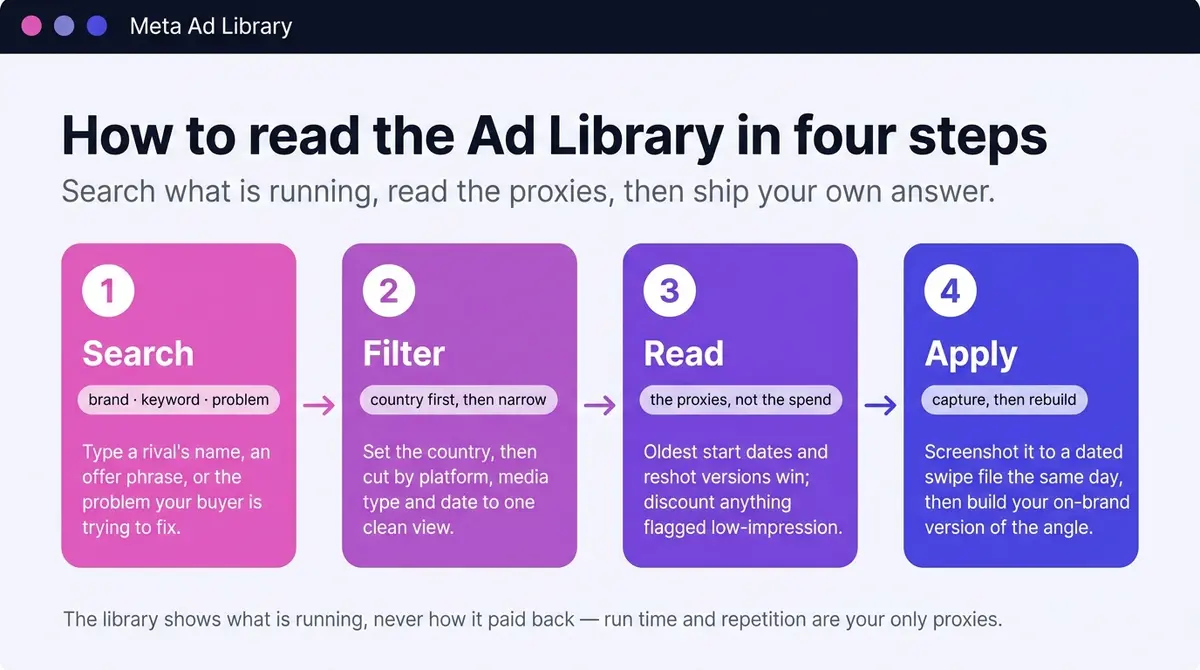
There are three doors into a brand's ads. The fast one is the Ad Library search box: type the brand name and select its Page. The second runs through the brand's own Facebook Page: open Page Transparency and choose to go to the Ad Library. The third starts on Instagram, handy because plenty of brands are easier to find there than on Facebook. Marketers often hunt for an Instagram ads library as if it were a separate tool; it is not, because Instagram ads live in this same archive. Open the brand's Instagram profile, tap the three-dot menu, choose About This Account, and the active ads listed there are the same Ad Library records. The Page route is the fallback when name-matching in the search box misfires (common with brands that share a name or trade under a slightly different Page name), and the Page Transparency panel adds context the search box does not, like when the Page was created and whether it has changed names. A young Page suddenly spending heavily is a different story from an established brand, and that is the kind of tell you want before you trust an account.
Once you are in, advertiser search is the audit. Type a brand name, select its Page from the suggestions, and you are looking at everything that brand is paying to run right now: every format, every variation, every start date. Ten minutes across your three closest competitors tells you who is testing hard, who relaunched January's creative untouched, and who has gone quiet.
Keyword search is the map. Search a phrase buyers actually see, like 'ready stock' or 'cash on delivery', and the library returns every active ad using that language in your chosen market. Quotation marks force an exact phrase match. This is how you read a category rather than a company: every brand making the same promise you make, side by side, with their framing on display.
Problem search is the discovery tool, and it is the one most marketers skip. Instead of a brand name or an offer phrase, search the thing your buyer is trying to fix in their own words, including the language they actually use: 'hair fall' or 'gugur rambut', 'acne' or 'jerawat', 'knee pain' or 'sakit lutut'. The results surface every advertiser fighting for that problem in your chosen country, including the rivals you had never heard of, the new entrants, and the cross-border sellers shipping in. Known competitors tell you the game you are already in; problem search shows you the whole field.
Then cut the results down. The country filter comes first (more on that below). Platform narrows results to one of the six surfaces, Facebook, Instagram, Messenger, Audience Network, and, since December 2025, WhatsApp and Threads, which matters when your budget lives mostly on one. Media type separates image, video, and carousel, and the date and language filters trim the rest. A practical recipe for a weekly check: country set to your market, media type video, one advertiser at a time, scanning start dates and skipping anything flagged 'Low Impression Count' as you scroll.
Reading the library: time, repetition, and velocity
Steps are abstract until you run them on a real account, so here is the shape of a single pass. Set the country to your market, type a skincare brand into the search box, and select its Page. The results load every ad it is paying to run: say eighteen of them, a mix of static testimonials and short before-and-after videos. Sort your eye by start date and one jumps out, live since March while the rest started in May. None of the eighteen carries a 'Low Impression Count' flag, so the March ad has not just been left switched on, it has earned months of renewed budget. That oldest ad is the one earning its keep, so read it closely: a customer-voice testimonial about a stubborn skin problem, reshot as four near-identical versions with different opening lines. Click through. The ad routes not to the homepage but to a dedicated landing page whose headline repeats its exact promise, with a priced bundle and a cash-on-delivery offer near the button. In one pass you have learned the angle that survived their budget, the format they trust it in, the price they sell at, and the page they send traffic to.
That single pass works because you are reading proxies, since the library still hides true performance. Five signals are worth tracking, and the table below is how to weigh each one.
| Signal | What you look at | What it usually means |
|---|---|---|
| Run time | Oldest start dates in a brand's list | A long-running ad is paying rent: it survived someone's budget |
| Repetition | One angle reshot as many near-identical versions | The angle converts and they are scaling it |
| Low-impression flag | The 'Low Impression Count' badge, since December 2025 | An ad wearing it has under 100 impressions: a fresh test or a dud, not yet a winner |
| Live ad count | How many ads are active right now vs last time you checked | A sharp jump signals a major push; a drop suggests pullback or fatigue |
| Format mix | Ratio of video to static to carousel | Where the brand is placing its creative bet |
Run time first. An advertiser still paying for the same ad weeks or months after launch is seeing numbers in Ads Manager that justify the renewal; nobody keeps funding a loser for long. Scan any brand's list for the oldest start dates, because those ads are paying rent. One caveat: a large brand can keep an awareness campaign alive on sheer budget, so weight run time most heavily for small and mid-size advertisers, the ones who feel every wasted dollar.
Repetition second. A brand running one angle as a dozen ads, the same testimonial reshot, recropped, and recut, is telling you the angle converts and they are scaling it. Near-duplicate creatives spread across weeks, plus the multiple-versions flag, is the loudest signal the library gives.
The low-impression flag is the newest signal, and it sharpens the two above rather than replacing them. Read it next to run time. Anything wearing the 'Low Impression Count' badge has fewer than 100 impressions since launch, so it is almost certainly a fresh test or a dud: discount it, and do not mistake a day-old ad with a clever hook for a proven winner. An old ad with no badge and a long total-active-time figure is the opposite, a creative someone has chosen to keep funding for weeks. The badge cuts the freshest noise out of your read so the long-runners stand out cleanly. The honest caveat is that it is a binary flag, not a performance number: it tells you an ad has barely been served, never how profitably anything above the line actually paid back. It makes the run-time read more confident; it does not turn the library into an analytics dashboard.
What 'this ad has multiple versions' really means
The multiple-versions flag is the strongest repetition signal the library gives, and it is also the easiest to misread. It groups creative variants under one Library ID, but it does not say who did the grouping. Sometimes it is a human deliberately scaling a proven angle: a dozen near-identical reshoots of the same testimonial, each a deliberate choice you can see and learn from. Sometimes it is Meta's Dynamic Creative doing the work, the system auto-combining a pool of images, copy lines, and placements into permutations the advertiser never hand-built. The tell is in the variants themselves. A spread of genuinely distinct reshoots, different openers, different talent, different cuts, reads as a person scaling an angle on purpose. A set of near-identical cards that differ only in a swapped headline or a reshuffled image reads more like the algorithm permuting assets. Read the variants before you read the flag, because a dozen machine permutations is a weaker signal than three deliberate reshoots a buyer chose to keep funding.
Velocity is the signal most people miss, because it only shows up when you check the same brand twice. Note the live ad count each visit. A competitor that was running a handful of ads and is now running many has just opened a push, often before a sale or a launch; the reverse, a brand that has quietly switched most of its ads off, can mean a budget pullback or creative that fatigued and got retired. Watching what just got turned off is as informative as watching what stayed on. The format mix is the quieter cousin: a swing toward video tells you where a brand is betting its production effort. Treat both as judgement calls, tells to watch rather than rules, since the library never confirms the why behind a number.
Dissecting one winning ad
Finding the winner is half the skill; the other half is reading what makes it work, because that is what you can rebuild. Once an ad has earned a close look on run time and repetition, study it in passes rather than all at once.
| Pass | What you are reading | The question to answer |
|---|---|---|
| Hook | The first frame and first few seconds | Does it stop the scroll before the sound is on? |
| Message | The core claim and the proof it offers | What promise is doing the persuading? |
| Format and pacing | Length, cuts, captions, where the product appears | How is attention being held to the end? |
| Congruency | The click through to the landing page | Does the page deliver what the ad promised? |
Watch the hook first, on mute, the way the feed plays it. Meta's own guidance is that strong creative nails the hook within the first few seconds, the moment a viewer decides whether to keep watching (Social Media Today, 2025), so judge whether motion, contrast, or an on-screen line earns that decision before any audio helps. Then read the message: the single claim the ad rests on and whatever proof it shows, a result, a testimonial, a demo, a number. Next, format and pacing, how long the video runs, how fast it cuts, whether captions carry it silent, and how late the product appears.
The last pass is congruency, and it is the one most people skip. Click through and grade the match. Does the ad route to a dedicated landing page or dump you on a generic homepage? Does the page headline echo the ad's hook, or change the subject? Is the offer the ad teased actually there, at the price implied, with a call to action that matches? An ad and its page are one argument in two halves. A winner is usually congruent end to end, and a high-spend ad pointing at a mismatched page is a gap you can beat.
Where spend and targeting do exist: political, issue, and EU ads
Everything above is the commercial read, where the library gives you run dates and creative and nothing on money. There is one slice of the library where real spend and audience data sit in the open, and it is worth seeing concretely so you know why it does not solve the commercial problem. Ads about social issues, elections, or politics carry a full transparency card, because regulators require it. Open one and the 'See ad details' panel shows spend as a bracket rather than an exact figure (a band like under $100 at the low end up to large ranges at the top), an impression or reach estimate, a demographic breakdown by age and gender, a geographic distribution, and the funding entity, the 'paid for by' disclosure naming who actually bankrolled it. A single political ad's detail card might read: spend in a $90K to $100K band, more than a million impressions, skewing to women aged 35 to 44, delivered almost entirely in one region, paid for by a named committee. That is the texture of an ad you can only see for civic advertising, and these ads stay archived for 7 years whether active or not (Meta, 2023).
EU-delivered ads are the other place real data leaks, and they earn a careful read because two facts about them are easy to blur. First, the fields: under the Digital Services Act, the 'See ad details' panel surfaces an EU transparency section listing the parameters the advertiser used for targeting (age, gender, location) and who the ad was served to (Meta, 2023). It is the one place outside civic advertising where the library shows real targeting and delivery information. Second, and the part most guides get wrong: the retention windows are not the same. Political and issue ads sit in the library for 7 years. EU-delivered ads stay only while they are active and for one year after their last impression (Meta, 2023). So a competitor's EU ad is a window that closes: catch it while it runs, because a year after it stops it is gone, where a political ad would still be there in 2032.
Three tools, not one: library, Report, and API
The searchable library is the front door, but Meta ships three transparency tools, and knowing what each one is for saves you hunting in the wrong place. The searchable Ad Library shows individual ads as they run, the workhorse for commercial research described in this guide. The Ad Library Report rolls political and issue advertising up into downloadable spend tables by country and date range, a civic aggregate, not a competitor tool. The Ad Library API is the third, and it is the one readers ask about most and benefit from least.
Here is the honest shape of the API. It is free, but it gates hard: you have to complete Meta identity and country verification before you get access, and even then it is scoped to ads about social issues, elections, or politics, plus public branded content (Meta, 2023). It does not return ordinary commercial ads. It also carries tight rate limits. The punchline matters: you cannot pull your commercial competitors' creatives programmatically from Meta's own API, because those ads are simply not in the API's scope. That single fact is why the workflow this guide teaches is manual reading plus a swipe file, not a script. If you want every active beauty ad in your market in a spreadsheet, the API will not hand it to you, and no amount of verification changes that. (There is also a separate Ad Targeting Dataset for approved academic researchers, covering targeting selections on political and issue ads since August 2020 across more than 120 countries and retained for 7 years; it is research infrastructure, not a marketer's tool.)
What the library does not show: the honest limits
It is worth gathering the limits in one place, because reading the library well starts with knowing exactly where it goes silent. After the December 2025 update the honest summary is still precise: you can see what is running and now flag the freshest tests, but performance and spend stay hidden.
- No spend, budget, or impression count on commercial ads. The December 2025 update flags ads under 100 impressions, but it never puts a reach or spend number on an ad above that line. Only political, issue, and election ads show spend, and only as a range.
- No clicks, CTR, conversions, ROAS, or cost per result on any ad. The library never confirms whether a run turned into sales.
- No exact audience or interest targeting outside EU-delivered ads. For everything else, who an ad was aimed at stays hidden.
- No creative for ended commercial ads. When a commercial ad stops running it leaves the library entirely, so there is no back catalogue of what a brand ran last quarter.
- Dead detail-page links. An ad's URL only resolves while the ad is live; pause or end it and the link rots.
- No native save, bookmark, or saved-ad feature. Nothing inside the tool keeps a record for you, which is exactly why a swipe file is the workflow.
The reframe is simple. The library tells you what is running and, now, which ads are too fresh to trust. It will never tell you how well any of them paid back, and that gap is permanent for commercial research, which is what makes the reading habit and a dated swipe file the real edge.
Read the country filter, then the calendar
Set the country filter before you read anything, because what runs in a market is what competes with you there, and the audience behind that filter is large. To make it concrete, take Malaysia: Facebook's ad tools reported an audience of 23.0 million there in late 2025, Instagram added 16.1 million, and DataReportal counted 30.7 million active social media identities in October 2025, 85% of the population (DataReportal, 2026). Every market has its own version of that number; set the filter to yours and the same reading method applies.
The calendar is the other half of the read, because the strongest ads cluster around the dates that matter in each market. Take the same example. The weeks before Raya show local advertising at full strength: sedondon family sets, kuih and hamper gifting angles, balik kampung delivery countdowns, and last-order cutoffs timed to the day. Watch how early the strong brands start, and how the message shifts from collection reveal to urgency as the date closes in. Then the 9.9 to 12.12 mega-sale stretch, where the craft is offer mechanics: voucher stacks on free-shipping minimums, bundle maths that nudges a basket over the threshold, cash-on-delivery reassurance for first-time buyers, and countdown creative refreshed for every double-date. Run the same lens against your own market's peak dates, whatever they are.
Listen to the hook language too. Ads that survive in a feed tend to code-switch the way their buyers speak, and in a market like Malaysia that often means a Malay hook over English product copy or the reverse, with prices anchored plainly in the local currency. Treat everything you see as representative of how a brand sells, not as proof that any single ad is winning; the proxies above tell you which ones probably are.
Make it a routine, then ship your answer
The library rewards a schedule, not a binge. The cleanest way to keep up is a tiered cadence: a quick weekly scan, a monthly deep read, and a quarterly look across the whole category.
| Cadence | Time | What you do |
|---|---|---|
| Weekly | 20 minutes | Scan your five closest rivals: new ads, live count, what got switched off |
| Monthly | 1 hour | Dissect the month's winners pass by pass; refresh the swipe file |
| Quarterly | Half a day | Read the whole category by problem keyword; map angle and offer shifts |
The weekly scan keeps a short list honest: your five closest competitors plus two or three category leaders you respect, watching for new ads, a jumping or shrinking live count, and what just got turned off. The monthly read is where you slow down and dissect the winners properly, then update your swipe file. The quarterly pass is the wide one, searching by problem keyword to catch the new entrants and the category-wide shifts a brand-only list never surfaces. Across all three, screenshot anything notable the day you see it, because an ended ad is gone, and log the same handful of fields every time: brand, start date, angle, offer. Within a month you will know which angles in your category have survived real budgets, and what offer maths buyers in your market are being trained to expect.
Then take the step the library cannot take for you. It shows the winning angle; it will never build your version of it. Reading that a competitor's testimonial angle has run since March only pays off when your on-brand answer is live in the same feed: your product, your proof, your hook. AdPlay.ai, which indexes millions of Malaysian ads, keeps those reference ads on hand after the originals leave the library, and from there the work is execution: make the creative, then run it properly. The marketers who profit from the Ad Library are not its best readers. They are its fastest responders.
By the numbers
Frequently asked questions
Is the Meta Ad Library free to use?
Yes. The Ad Library is a free public tool (search 'Meta Ad Library' to find it), and you do not need an ad account or a login to search commercial ads. Pick a country, then search by advertiser name or keyword, and filter results by platform, media type, date, and language. It covers active ads across Facebook, Instagram, Messenger, and the Meta Audience Network. You do not need to use incognito or turn off an ad blocker to browse it.
Can I see a competitor's spend, performance, or targeting?
Not really, even after the December 2025 update. You see the creative, the copy, the start date, total active time, the platforms, and whether multiple versions run. A December 2025 change also flags any ad with fewer than 100 impressions since launch as 'Low Impression Count', which marks a fresh test, but you still see no spend, no clicks, no click-through rate, and no sales. Only social-issue, election, and political ads show spend, and only as a bracket. Targeting is hidden too, with one exception: ads delivered in the EU disclose the targeting parameters the advertiser used (age, gender, location) and who the ad was served to, because the Digital Services Act requires it. For commercial ads, run time and repetition are your proxies for performance.
How do I open the Ad Library from a brand's Facebook Page?
Two routes reach the same place. The fast one is the Ad Library search box: type the brand and select its Page. The second route starts on the brand's Facebook Page itself: open Page Transparency, then choose to go to the Ad Library. The Page route is the fallback when search name-matching glitches, and the Page Transparency panel also shows when the Page was created and any past name changes, useful context before you trust an account.
Why do the Ad Library links I copy stop working?
An ad's detail page has its own URL, but that link only resolves while the ad is live. The moment the advertiser pauses or ends the ad, the page goes dead, and there is no native bookmark or saved-ad feature to fall back on. So a copied link is not a durable record. Screenshot the static, screen-record the video, and log the brand, start date, angle, and landing page the same day. Capture the asset, not just the link, because the link rots when the campaign does.
What is the Ad Library Report, and how is it different?
Meta ships three transparency tools, and it helps to keep them straight. The searchable Ad Library shows individual ads as they run, the workhorse for commercial research. The Ad Library Report is a separate downloadable file that aggregates ads about social issues, elections, or politics in a chosen country and date range, including total amounts spent, a civic slice, not a competitor tool. The Ad Library API is the third: free but identity and country verified, scoped to political and issue ads plus public branded content, and rate-limited, so it cannot return ordinary commercial ads. For researching commercial competitors, the searchable library is the one you want; the Report and the API both cover the civic slice.
How do I tell a real winner from an awareness ad that runs forever?
Run time is the headline signal, but read it with the advertiser's size in mind. A small or mid-size brand that keeps paying for one ad for weeks is almost certainly seeing it convert, because that budget feels every wasted dollar. A large brand can keep an awareness or branding ad alive on sheer budget regardless of direct response. So weight long run times most heavily for smaller advertisers, and cross-check with repetition: a winner usually shows up as one angle reshot across many versions, not a single evergreen post. Since December 2025 the 'Low Impression Count' badge sharpens this from the other end: an ad carrying it has fewer than 100 impressions since launch, so it is a fresh test or a dud you should not yet trust either way, no matter how clever the hook.
What is a swipe file, and how should I organise saved ads?
A swipe file is your own dated archive of ads worth learning from, captured the day you find them so an ended campaign cannot erase the evidence. Keep it simple: one row per ad with the brand, the start date you saw, the angle in a few words, the offer, the format, and the landing page. Group rows by category so you can read patterns, not one-offs. Within a month the file tells you which angles in your category have survived real budgets and what offer maths buyers now expect.
Can I filter the Ad Library to only show ads in Malaysia?
Yes. The country selector sits at the top of the search page; set it to Malaysia and results narrow to ads reaching people there. That one filter changes what you learn, since Facebook's ad audience in Malaysia was 23.0 million in late 2025 (DataReportal, 2026). Combine it with the platform filter, which since December 2025 spans six surfaces, Facebook, Instagram, Messenger, Audience Network, WhatsApp, and Threads, and the media type filter to study, say, only the video ads running on Instagram in your category, or to watch how brands time their Raya and 11.11 pushes.
Sources
- 1.Meta Transparency Center, Ad Library tools (2023)
- 2.DataReportal, Digital 2026: Malaysia (2026)
- 3.Buffer, 7 Ways to Use the Meta Ad Library to Inform Your Marketing (2024)
- 4.Meta, New Features and Additional Transparency Measures as the Digital Services Act Comes Into Effect (2023)
- 5.Social Media Today, Meta Shares Tips on Reels Hooks and Creative (2025)
- 6.MacRumors, Analytics Suggest 96% of Users Leave App Tracking Disabled in iOS 14.5 (2021)
- 7.PPC Land, Meta Ads Library adds WhatsApp filter and low impression labels (2025)
Keep exploring
Turn ad research into winning ads
Research the ads that work, generate the creative on-brand, and launch to Meta, all in one tool.
7-day free trial · No credit card required