
Facebook Lookalike Audiences Guide (2026)
How Facebook lookalike audiences work in 2026: high-intent seeds, value-based lookalikes, the 1% vs 10% size trade-off, and Advantage lookalike explained.
Updated August 2026 · Likit Sae Lee, CTO

A Facebook lookalike audience is a new audience Meta builds by finding people who resemble a source you give it, such as your recent purchasers. You build it in Meta Ads Manager under Audiences, and the source needs at least 100 people from a single country, though Meta recommends 1,000 to 5,000 and seed quality beats raw size (Meta Business Help Center, 2026). The size slider runs from 1% (the closest match to your source, best for performance) to 10% (the broadest, best for scale), measured as a share of the target country's population. A value-based source models your highest-revenue buyers instead of all converters, and in 2026 a lookalike usually feeds Advantage+ audience as a suggestion rather than a hard wall, while Advantage lookalike can expand delivery beyond the percentage you picked.
You uploaded your customer list, picked a percentage almost at random, and now you are staring at three lookalike audiences with no idea which one is doing the work. The mechanics are simple, but the choices that matter (which source you seed from and how wide you stretch the match) are where most accounts quietly leak money. Get the seed right and the percentage honest, and a lookalike becomes the most reliable cold audience you have.
What a lookalike audience actually is
A lookalike audience is a new, cold audience that Meta builds by studying a source you hand it, then finding strangers who share traits with that source. The source is a Custom Audience: a customer list, a set of website or app events, a video-engagement segment, or your instant-form leads. A Facebook or Instagram Page can also act as a source. What cannot be a source is the trip-up beginners hit: you cannot seed a lookalike from an interest, a demographic, or a saved audience. The seed has to be a real set of people you already have a relationship with, because Meta needs concrete profiles to model, not a category. Once it has them, it does not simply duplicate your source. It models the behavioral and demographic patterns inside it and then scans the locations you choose for people who fit that pattern.
That last point is the one people miss. A lookalike is only as smart as the seed it learns from. Feed it a list of people who bought from you last month, and it learns to find more people who buy. Feed it everyone who ever touched your site, and it learns to find more people who bounce. The mechanics are identical; the outcomes are not.
Sprout Social frames it cleanly in its 2025 glossary: a lookalike audience is a targeting option that reaches new people who are likely to be interested in your business because they resemble your existing customers. The phrase that matters there is existing customers, not existing traffic.
In 2026 the lookalike sits inside a larger system. Meta's Advantage+ audience uses AI to find converters, and a lookalike is now usually added as a suggestion: a soft hint that points the AI at the right kind of person rather than a hard fence it cannot cross. We will come back to that, because it changes how you should think about precision. First, the seed.
Why the seed decides everything
The single biggest lever on lookalike quality is the audience you build it from. The Meta Business Help Center puts the floor at 100 people from a single country, and recommends a source of 1,000 to 5,000 for best results. Shopify's 2024 guide and AdNabu's 2026 guide land in the same place: at least 100 individuals, with a typical strong seed of 1,000 to 5,000 of your best customers.
But the more important word in both is best. AdNabu's 2026 guide stresses that the highest-quality lookalike comes from your highest-quality customers, so a lookalike can work from as few as 100 high-quality seed users, such as recent buyers or high-value subscribers, precisely because seed quality beats volume. A small list of proven payers outperforms a huge list of cold contacts.
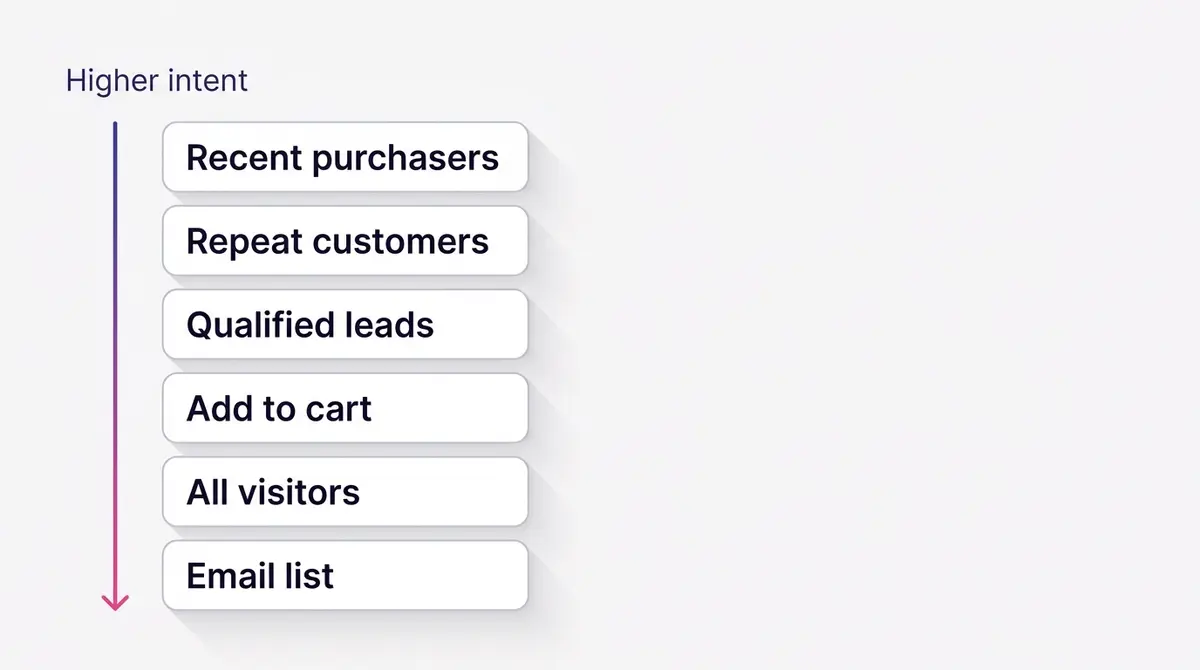
Rank your possible seeds by intent before you pick one:
| Seed source | Intent signal | Lookalike quality |
|---|---|---|
| Recent purchasers (last 30 to 90 days) | Paid money, recently | Highest |
| Repeat or high-LTV customers | Paid more than once | Highest |
| Qualified instant-form leads or bookers | Gave details, asked to be contacted | High |
| Add-to-cart or checkout-initiated | Strong intent, no purchase | Medium-high |
| All website visitors (30 days) | Showed up, mixed intent | Medium |
| Newsletter or full email list | Loosely interested, often stale | Low |
A supplement brand like Beyond Collagen+ makes the point concrete: a seed built from repeat, high-LTV collagen buyers carries real purchase intent, while a seed built from every site visitor dilutes it with browsers who never paid. The model inherits whatever you give it.
If your purchaser list is too thin to hit the floor, you have two honest options: combine your best high-intent segments into one source, or use a value-based approach where Meta weights customers by how much they spent so the model leans toward your most valuable buyers. What you should not do is pad a thin list with low-signal contacts to clear 100. That clears the number and ruins the seed.
Freshness is the other quiet variable. A purchaser list from three years ago describes a customer who may have moved, changed habits, or churned, and the lookalike built on it inherits that staleness. Tightening the window (last 30 to 90 days of buyers, rather than all-time) usually produces a sharper match because recent behavior predicts future behavior better than ancient behavior. The cost is volume: a 30-day window may not clear the recommended 1,000 to 5,000. The fix is to widen the window only as far as you must to hit a stable source size, not as far as your CRM will let you.
Timing helps you judge a new audience honestly. A lookalike can take between six and 24 hours to populate after you create it, so a freshly built audience that looks tiny in the first hour is not broken, it is still filling. Once it is live and in an active ad set, Meta re-scores it against the source roughly every 3 to 7 days (Hootsuite, 2024). That cadence matters for how you maintain it. If your source Custom Audience is a static uploaded list, it ages while the world moves, and the lookalike inherits that drift. A purchaser-event source that updates automatically (driven by your Dataset and the Conversions API) stays current on its own, which is one more reason to seed from live purchase events rather than a one-time export.
That seed quality is also why measurement plumbing matters more now than it did a few years ago. Since Apple's App Tracking Transparency prompt thinned the browser signal Meta receives, a clean server-side feed of purchase events does more of the work of telling Meta who actually bought. The lookalike is only as good as the events behind its source, so a recent-purchaser seed built on reliable server-side conversions models real payers, while one built on patchy, blocked browser pixels models a fuzzier, lossier picture of them. Get the events right and every audience downstream gets sharper. See our Conversions API setup guide for the server-side half of that.
Value-based lookalikes: model your highest-revenue buyers
A standard lookalike treats every person in the seed the same. A customer who bought once for $25 and a customer who has spent $4,000 over two years both count as one converter, so Meta learns to find more converters of either kind. A value-based lookalike changes that. It seeds from a source that carries a value per person, so Meta weights the model toward the people who resemble your most valuable customers, not just any customer who paid.
There are two ways to give Meta that value signal. The first is a customer list uploaded as a Custom Audience with a value column: alongside each email or phone number, you include a number for what that customer is worth, usually their lifetime value or recent spend. The second is a value-based conversion event from your Dataset, where each Purchase already reports a value and currency, so Meta reads the worth of each buyer straight from your store. Either way, the requirement is the same: the source has to carry value data. A plain list with no value column produces a plain lookalike, not a value-based one. You build it the same way you build a lifetime-value Custom Audience, then use that audience as the lookalike source (Meta Business Help Center, 2026).
The practical effect is a shift in what the audience optimizes toward. A standard purchaser lookalike chases more purchases. A value-based lookalike chases more revenue, because it leans toward the profile of your big spenders and repeat buyers. That distinction is worth most when your customers vary a lot in worth. A high-average-order-value store, or one with a wide spread in lifetime value (a handful of subscribers worth ten times the median), gains the most, because finding more big spenders is materially more profitable than finding more buyers of any size. If your customers are all worth roughly the same, the two approaches converge and a standard purchaser lookalike is simpler to run.
One honest caveat: a value-based lookalike is only as good as the value data behind it. If your purchase events report a flat or missing value, or your customer list guesses at lifetime value, the weighting is noise and you are better off with a clean standard lookalike off recent purchasers. Feed it real numbers or do not feed it at all.
The 1% to 10% size trade-off
Once you have a seed, the size slider is the second real decision. The percentage represents a share of the target country's population, and it runs from 1% to 10%, per Shopify. A 1% lookalike is the closest possible match to your source. A 10% lookalike is roughly ten times larger and far looser.
Shopify and AdNabu both frame the trade-off the same way: 1% is the tightest match and best for performance, while the broader end of the range (roughly 6% to 10%) prioritizes scale and suits awareness or top-of-funnel goals. The narrower you go, the more the audience behaves like your actual buyers. The wider you go, the more it behaves like the general population that vaguely resembles them.
| Lookalike size | Match to your source | Audience size | Best for |
|---|---|---|---|
| 1% | Closest | Smallest | Performance, bottom of funnel, conversions |
| 2% to 5% | Strong, broader | Medium | Balanced reach with decent precision |
| 6% to 10% | Loosest | Largest | Scale, awareness, top of funnel |
There is no universally correct percentage. A small account with a narrow niche and a tight budget usually starts at 1% to 2%, because precision matters more than reach when every impression counts. A larger account that has already saturated its 1% will widen to 5% or 10% to find fresh volume. The mistake is treating one number as a rule. The percentage is a dial you tune against your goal and your budget, not a setting you copy from a blog post.
There is a layering choice too. A common approach is to exclude your 1% from your 5% ad set, and your 5% from your 10%, so the same people are not chased across three overlapping audiences at once. That keeps your test clean and stops the percentages from cannibalizing each other in the auction. It is optional, but it makes the read between sizes more honest, because each ad set is then competing for a genuinely different slice of the population rather than re-bidding on the same overlap.
There is a faster, native way to build those clean tiers. When you create a lookalike, Meta lets you generate several audiences at different similarity ranges from the same source in one step, for example a 0-1%, a 1-2%, and a 2-3%. Those ranges are non-overlapping by design, so the 1-2% audience excludes everyone already in the 0-1%, and you skip the manual exclusion-stacking entirely. You can create up to 500 lookalike audiences from a single source (Meta Business Help Center, 2026), so the real limit is how many distinct tiers your team can actually manage and read, not the platform. For most accounts, three clean tiers is plenty. Hundreds is a way to lose track of what each ad set is testing.
One caveat for 2026: because a lookalike is now usually a suggestion inside Advantage+ audience rather than a hard limit, the practical gap between a 1% and a 5% can compress. Meta's AI may expand beyond either if it predicts better results. That is a reason to test rather than assume, which is exactly where the next section goes.
Lookalike, custom audience, or broad targeting: which to reach for
A lookalike is one of three ways to point an ad set, and choosing well starts with knowing what each one actually reaches. A Custom Audience is people who already know you: past purchasers, site visitors, your email list, video viewers. A lookalike is new people who resemble one of those sources. Advantage+ audience (broad targeting handed to Meta's AI) is everyone Meta thinks is likely to convert, with your audiences fed in only as a starting hint. They are not competitors so much as different jobs.
| Targeting type | Who it reaches | When to reach for it |
|---|---|---|
| Custom Audience | People who already engaged: buyers, visitors, your list | Retargeting and retention; warm prospects who need a nudge |
| Lookalike Audience | New strangers who resemble a source you own | Prospecting for net-new customers who behave like your best ones |
| Advantage+ / broad audience | Anyone Meta's model predicts will convert | Scale with strong creative; let the system find buyers you would not target |
The honest 2026 read is that these increasingly blend. Advantage+ audience treats a Custom Audience or a lookalike as a suggestion and looks beyond it, so the lines between warm, lookalike, and broad have softened. The decision is less "which one is right" and more "which signal do I want to give Meta to start from": your warmest people for retention, a high-intent lookalike for prospecting, or nothing but creative and conversion data for the widest net. Our Advantage+ audience guide goes deeper on the broad option, and broad vs detailed targeting covers the wider shift.
How to test percentages cleanly
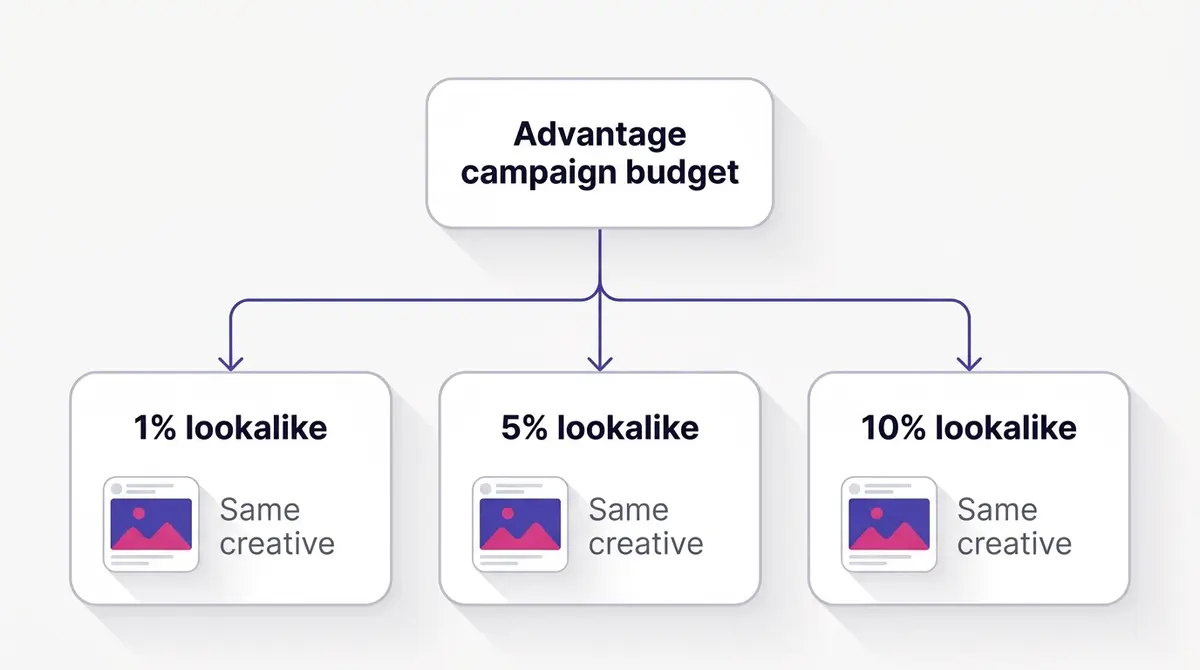
The only way to know which percentage works for your account is to test it, and the only way to test it honestly is to change one thing at a time. Build three lookalikes from the same seed: a 1%, a 5%, and a 10%. Put each in its own ad set inside a single campaign using Advantage campaign budget, the option Meta previously called CBO (campaign budget optimization).
The discipline that makes the test valid is identical creative. Run the same ad, the same copy, and the same offer across all three ad sets. If the creative differs, you cannot tell whether the 5% won because of the audience or because of the ad. Hold the creative constant and the percentage becomes the only variable, so the result you read is genuinely about audience size.
A jewellery brand like Bene Jewellery illustrates the setup: hold the hero-product showcase creative identical across a tight 1% to 2% audience and a 10% scale audience, and the difference in cost per result is the size effect, cleanly isolated. A skincare brand like Skinlycious does the same with a single testimonial video across a 1% and a 5%, reading which match width its purchaser seed prefers.
One hygiene move keeps a prospecting test honest: exclude your existing customers from the lookalike ad set. A lookalike is built to resemble your buyers, so by definition it overlaps with people who already are buyers, and without an exclusion you spend prospecting budget re-serving ads to people you already converted. Add your purchaser Custom Audience as an exclusion on each lookalike ad set, and the spend goes to net-new people instead. The arithmetic is blunt: if 15% of a 5% lookalike already bought from you, then on a $1,000 prospecting budget you are quietly burning roughly $150 reminding customers to buy what they already own, money that should be finding strangers. That same exclusion also stops your prospecting and retargeting campaigns from bidding against each other for the same people. Our audience exclusions guide shows the setup, and audience overlap covers how to check two audiences are not quietly competing.
Give the test room before you judge it. Each ad set needs enough budget and time to exit the learning phase and accumulate conversions, otherwise you are reading noise. Once the data is stable, keep the winner, pause the losers, and feed the budget into the audience that beat your historical cost per result. Then, when fatigue sets in, refresh the creative rather than the audience. Our guide on Facebook ad creative testing covers how to keep that loop running without resetting the learning phase every week.
Where you build it: Ads Manager, not an ad tool
Lookalikes live in one place. You create them in Meta Ads Manager under the Audiences dashboard: open Audiences, choose Create Audience, then Lookalike Audience, select your source, set the target location, pick the percentage, and create. Shopify and AdNabu both describe the same path, and it is the only supported one. The audience is built and managed inside Meta.
This matters because the audience layer and the creative layer are separate jobs. No third-party ad platform builds, owns, or manages your lookalike for you. Those tools sit either upstream of the audience (researching which angles and offers are working) or downstream of it (reporting on what the audience delivered). The audience itself is yours to define in Ads Manager.
The seed for that audience comes from your data. The cleanest purchaser seeds are powered by your Dataset (the signal source formerly surfaced as the Pixel) and the Conversions API, which together record the purchase events that make a high-intent source. If your purchase events are firing reliably server-side, your recent-purchaser Custom Audience is accurate, and your lookalike inherits that accuracy. If your events are patchy, every audience built on top of them is patchy too. For the plumbing, see our Facebook custom audiences walkthrough.
A useful way to hold the two layers apart: targeting decides who might see the ad, and creative decides whether they stop. As detailed targeting has softened into suggestions, the creative does more of the qualifying, which is why a strong seed and a strong ad work together rather than in competition. Our broad vs detailed targeting guide goes deeper on that shift.
Targeting more than one country with one lookalike
A common misread is that one lookalike equals one country. The single-country rule applies to the source, not the audience. Your seed has to contain at least 100 people from a single country, but the lookalike you build from it can target one country, several countries, a whole region, or worldwide (Meta Business Help Center, 2026). Meta optimizes delivery across whatever locations you select.
That makes a real difference for an advertiser selling into more than one market. You do not have to clone a separate lookalike for every country. You can build one lookalike off your strongest single-country purchaser seed and point it at the full set of markets you want to reach. The quality caveat is worth knowing: a lookalike matches best when the countries you target are represented in the source, so a seed that is 100% United States buyers will model a sharper audience for the United States than for a market with very different buying behavior. When two markets behave alike, one multi-country lookalike is efficient. When they behave very differently, a per-market seed (where you have the data) tends to match more cleanly. Start with one and split only when the data tells you the markets are not the same.
Advantage lookalike: the automatic version, and how it differs from a suggestion
Two things in 2026 share the word lookalike and get conflated, so it is worth pulling them apart. The first is Advantage lookalike, a specific automatic behavior. When you use a conversion, value, or app-promotion optimization, Meta turns it on by default: it uses the lookalike you built as a guide, then expands delivery beyond the percentage you selected whenever its model predicts better results (Meta Business Help Center, 2026). Pick a 1% and Meta may serve well past it if the wider pool performs. Your location, age, and gender restrictions and your exclusions still apply during that expansion, so the boundaries you set as controls hold even as the match loosens.
The second is a lookalike used as a suggestion inside Advantage+ audience, covered in the next section. The distinction is real: Advantage lookalike expands a lookalike you explicitly built and selected, while the Advantage+ audience suggestion feeds your lookalike in as one input among several and looks broadly from there. Both loosen the old hard percentage fence, but they are different mechanisms, and knowing which one is acting on your ad set explains why a "1%" audience can deliver to far more than the closest 1%.
One compliance point matters here. Advantage lookalike is not available for Special Ad Categories: housing, employment, credit, and social, electoral, or political issues (Meta Business Help Center, 2026). Targeting in those categories is restricted by policy, so if you run housing, jobs, lending, or issue ads, do not build your prospecting plan around lookalike expansion that the system will not grant you. Confirm your ad account's category declaration before you design the audience, not after Meta disables it.
How lookalikes fit Advantage+ audience in 2026
Advantage+ audience is Meta's AI-driven targeting layer, and it is the second mechanism from the section above: here a lookalike is fed in as one suggestion among several, rather than being a lookalike you explicitly expand. Understanding how it plugs in is what keeps your strategy current rather than dated. The key distinction is between suggestions and controls. Suggestions are optional hints (Custom Audiences, lookalikes, interests) that guide Meta's AI. Controls are binding limits (locations, minimum age, exclusions, languages) that the AI cannot cross.
In 2026, a lookalike is typically a suggestion. You add it to tell the system the kind of person you want, and Meta starts there, but it can deliver beyond the lookalike if its model predicts better results elsewhere. That is a meaningful change from the old behavior, where a lookalike fenced delivery to a fixed percentage. Now it points; it does not wall.
Meta has leaned hard into this AI-driven model. The company reported that Advantage+ Shopping campaigns (now called Advantage+ Sales after Meta consolidated its campaign creation flows) reached a $20 billion-plus annual revenue run-rate and grew 70% year over year in Q4 2024, per Marketing Dive's coverage of its earnings. Those are Meta-reported figures from an earnings call, so treat them as directional rather than independently verified, but the direction is unambiguous: automated targeting is where Meta is investing, and lookalikes increasingly act as one strong input into it rather than a standalone targeting method.
Practically, that means you still build the best purchaser-seeded lookalike you can, then hand it to the system as a high-quality suggestion. You keep your binding rules (location, minimum age, customer exclusions) in the controls layer, where they hold. And you let the test data, not a fixed percentage, tell you how tightly to match.
Common lookalike mistakes to avoid
Most lookalike underperformance traces back to a handful of repeatable errors. Scan this list before you build, and again when an audience disappoints:
- Seeding from a stale source. A purchaser list from three years ago models a customer who may have churned. Tighten the window to recent buyers and let an auto-updating event keep the source current.
- Padding a thin list to clear 100. Hitting the minimum with low-signal contacts ruins the seed. Combine your highest-intent segments instead, or run a value-based source off your best customers.
- Seeding from low-intent traffic. All-site-visitors or full email lists teach Meta to find more browsers. Seed from people who actually paid.
- Going too broad too early. Opening at 5% or 10% before you have proven the offer converts spends scale budget on a loose match. Start tight, then widen once a 1% to 2% is working.
- Overlapping tiers without exclusions. Running a 1%, a 5%, and a 10% that all contain the same people makes them bid against each other and muddies the read. Use non-overlapping ranges or exclude the smaller tier from the larger.
- Forgetting to exclude existing customers. Prospecting budget should find strangers, not re-serve buyers you already converted.
- Treating it as set-and-forget. A lookalike on a static list ages. Refresh the source, and when results fade, refresh the creative before you blame the audience.
What good looks like, and the benchmarks to beat
The right success bar for a lookalike is your own account's historical cost per result, because beating your own baseline is the entire point. External benchmarks only give you a rough yardstick. WordStream's 2024 Facebook Ads benchmarks (data drawn from February 2023 to April 2024) put the all-industry medians for lead-gen at an 8.78% conversion rate, a $21.98 cost per lead, a 2.53% click-through rate, and a $1.88 cost per click.
Read those as cross-industry medians, not lookalike-specific numbers. A high-intent purchaser-seeded 1% audience in a strong niche can sit well inside those figures; a 10% awareness audience reasonably sits outside them, because it is doing a different job. The benchmark tells you whether you are roughly in the game, not whether a specific audience won.
| Metric (Facebook lead-gen, all industries) | Median | Source |
|---|---|---|
| Conversion rate | 8.78% | WordStream, 2024 |
| Cost per lead | $21.98 | WordStream, 2024 |
| Click-through rate | 2.53% | WordStream, 2024 |
| Cost per click | $1.88 | WordStream, 2024 |
An aesthetics lead-gen advertiser like UR Klinik shows how the whole loop closes: seed a lookalike from qualified instant-form bookers (people who actually asked to be contacted), test the percentage cleanly, then take the angles that won and turn them into the next round of creative.
That handoff is where research and production come in. Once you know which audience and which offer are converting, the next bottleneck is feeding it fresh angles before it fatigues. Researching what is already working in your category (the Meta Ad Library holds a searchable record of live creative across thousands of brands) tells you which hooks to try next, and tools like AdPlay.ai let you generate on-brand variants of those winning angles to keep the tested audience fed. Build and manage the lookalike in Ads Manager; let the creative pipeline keep up with it.
Example ad angles
Representative hooks and formats from the category.
“Testimonial ad for a 1% buyer-seeded lookalike tested against a 5% audience”
“Showcase ad for a tight 1% to 2% lookalike held against a 10% scale audience”
“Testimonial ad for instant-form bookers used as the lookalike seed”
By the numbers
Frequently asked questions
What is a Facebook lookalike audience?
It is a new audience Meta builds by analyzing a source you provide, then finding other people who share traits with that source. The source has to be something you own, like a Custom Audience built from your customer list, recent purchasers, or website event visitors, or your Facebook Page. You cannot seed a lookalike from an interest or a saved audience. Meta does not just clone your source: it models the patterns in it and surfaces strangers who resemble those patterns, so the quality of the match depends almost entirely on the seed you feed it.
How many people do I need to create a lookalike audience?
Your source needs at least 100 people from a single country, per the Meta Business Help Center. That is the floor, not the goal: Meta recommends a source of 1,000 to 5,000 people for best results. Intent matters more than raw volume, so a small list of proven buyers usually beats a large list of low-signal contacts. If your list is thin, combine your highest-intent segments rather than padding it to clear 100.
What is the difference between a 1% and a 10% lookalike?
The percentage is a share of the target country's population, from 1% to 10%, not a share of your customers. A 1% lookalike is the closest match to your source and is best for performance and bottom-of-funnel conversion. A 6% to 10% lookalike is far broader, trades precision for reach, and suits scale and awareness goals. Smaller behaves more like your buyers; larger behaves more like the general population that loosely resembles them.
What is a value-based lookalike audience, and when should I use one?
It seeds from a source that carries a value per customer (a customer list with a lifetime-value column, or a purchase-value conversion event) instead of treating every converter the same. Meta weights the model toward people who resemble your highest-revenue buyers, not just any buyer, so the audience leans toward more revenue rather than simply more orders. Reach for it when your customers vary a lot in worth: a high-average-order-value store or one with a wide spread in lifetime value gets the most from it, because finding more big spenders is worth more than finding more buyers of any size.
What is Advantage lookalike, and can I turn it off?
Advantage lookalike lets Meta expand delivery beyond the percentage you picked when its model predicts better results, using your lookalike as a guide rather than a hard wall. It is automatically on for conversion, value, and app-promotion optimizations, and your location, age, and gender restrictions and your exclusions still apply during the expansion. It is not available for Special Ad Categories (housing, employment, credit, and social, electoral, or political issues), where targeting is restricted by policy. Because it is built into those optimizations, treat the percentage you choose as a starting point, not a fence.
Can one lookalike audience target more than one country?
Yes. The source must contain at least 100 people from a single country, but the lookalike you build from it can target one country, several countries, a whole region, or worldwide. Meta optimizes across the locations you select. If you know which countries you want to reach, including people from those countries in the source produces a higher-quality match, so a global advertiser is not forced to build a separate lookalike per market unless the markets behave very differently.
How long does a lookalike take to be ready, and how often does Meta refresh it?
A new lookalike can take between six and 24 hours to populate after you create it, and once it is live and in an active ad set, Meta refreshes it against the source roughly every 3 to 7 days (Hootsuite, 2024). So a lookalike seeded from an auto-updating purchase event keeps pulling in fresh matches on its own. A lookalike built on a static uploaded list does not, which is one reason to seed from live events where you can.
Are lookalike audiences still relevant with Advantage+ audience in 2026?
Yes, but their role shifted. In 2026 a lookalike is typically added to Advantage+ audience as a suggestion, a soft signal that guides Meta's AI rather than a hard boundary it cannot cross. Meta can deliver beyond the lookalike if it predicts better results. So you still build a strong purchaser-seeded lookalike, but you treat it as a high-quality hint to the system, not a fence around delivery.
Sources
- 1.Meta Business Help Center, About Lookalike Audiences (2026)
- 2.Meta Business Help Center, Create a Lookalike Audience (2026)
- 3.Meta Business Help Center, About Advantage+ lookalike (2026)
- 4.Meta Business Help Center, Best Practices for Multi-country Lookalike Audiences (2026)
- 5.Meta Business Help Center, Create a Lifetime Value Custom Audience (2026)
- 6.Meta Business Help Center, About How Lookalike Audiences Work (2026)
- 7.Shopify, How To Use Lookalike Audiences To Target Your Ads (2024)
- 8.AdNabu, How To Use Facebook Lookalike Audiences: A Guide for 2026 (2026)
- 9.WordStream, Facebook Ads Benchmarks 2024 (2024)
- 10.Marketing Dive, Meta Q4 2024 earnings report (2025)
- 11.Sprout Social, What are Facebook Lookalike Audiences? (2025)
- 12.Hootsuite, How to Use Facebook Lookalike Audiences (2024)
Keep exploring
Turn ad research into winning ads
Research the ads that work, generate the creative on-brand, and launch to Meta, all in one tool.
7-day free trial · No credit card required