
Facebook Engagement Custom Audiences 2026
Build no-pixel engagement custom audiences from video viewers, Facebook Page engagers, Instagram savers, and lead form openers, then retarget your warmest fans.
Updated September 2026 · Likit Sae Lee, CTO
An engagement custom audience is a segment Meta builds from people who interacted with your content inside Facebook or Instagram, with no pixel or website required. The strongest sources are video viewers segmented by watch depth (3 seconds, ThruPlay, 25, 50, 75, 95 percent), Instagram engagers, Facebook Page engagers, and lead form openers. Per Meta Business Help, video, Instagram, and Page engagement audiences hold a window up to 365 days, while lead form audiences hold up to 90 days. Because the signal lives inside Meta, these segments are unaffected by browser privacy changes.
Most retargeting advice assumes you already have a pixel firing on a busy website. Plenty of brands do not: the traffic is thin, the consent banner blocks half the events, or the catalog lives on a marketplace you do not control. The good news is that the warmest audience you can build needs none of that. People who watched your video or tapped your Instagram profile have raised their hand inside Meta itself, and you can turn that signal into a targetable segment in a few clicks.
Why engagement audiences are the retargeting most brands skip
Retargeting is the cheapest performance you can buy, but the standard recipe assumes a website busy enough to feed a pixel. That leaves a gap. Brands selling through a marketplace, a link in bio, or WhatsApp often have rich activity on Facebook and Instagram and almost nothing on a site they control. Engagement custom audiences close that gap by treating the interaction itself as the signal.
The numbers explain why it matters. Spiralytics' retargeting roundup reports that retargeted visitors are roughly 70 percent more likely to convert than first-time prospects (a directional figure), and puts the typical retargeting click-through rate around 0.7 percent, meaningfully above standard display. You are not buying a clever trick; you are buying the difference between talking to strangers and talking to people who already paused on your brand.
There is a second reason these audiences keep climbing in importance. Because the engagement happens inside Meta, the signal never depends on a browser cookie or an app-tracking prompt. Roughly half of iOS users opt in to app tracking worldwide, about 50 percent as of early 2024 per AppsFlyer, which means a large share of mobile traffic never hands an outside tracker any data at all. A website custom audience feels that loss: consent banners block events and operating systems tighten tracking, so the pool can shrink. A video viewers audience does not, because Meta recorded the watch itself. That durability is the whole pitch for 2026: a warm pool privacy changes cannot quietly drain.
If you have never built a custom audience of any kind, the broader field guide to Facebook custom audiences covers the full taxonomy. This piece zooms into the engagement sources that need no pixel at all, from video viewers to Page engagers to lead form openers.
How to build an engagement audience in Ads Manager
The mechanics are the same for every source, so learn the path once and you can build any of them. In Meta Ads Manager, open the main menu and choose Audiences, then click Create audience and pick Custom audience. Meta splits the choices into two groups: "Your sources" (website, app activity, customer list, offline activity) and "Meta sources," which is where every no-pixel engagement option lives.
From the Meta sources column pick what you want: Video, Instagram account, Facebook Page, Lead form, Shopping, Events, or Instant Experience. The next screen changes to fit the source. For video you choose the watch threshold and which videos count; for Instagram or Page you choose the action; for a lead form you choose the form and the open-or-submit slice. Then you set the retention window in days, name the audience something you will recognise later (for example "IG savers 90d" or "75pct viewers 30d"), and click Create audience.
That is the whole flow: Audiences, Create audience, Custom audience, pick the Meta source, set the action or threshold, set the window, name it, create. Meta starts filling the audience immediately from activity it has already logged, so a source with recent engagement can be usable within minutes rather than waiting for fresh data to accumulate the way a new pixel does.
Video viewers, segmented by how much they watched
A video viewers audience is the workhorse. When you build one in Ads Manager, Meta asks how much of the video someone needs to have watched to qualify. The options are people who watched at least 3 seconds, people who completed a ThruPlay, and people who watched 25 percent, 50 percent, 75 percent, or 95 percent of the video, per Meta Business Help. You then choose which videos count and a retention window of 1 to 365 days.
Watch depth is a proxy for intent, and it is a good one. Someone who sat through 75 percent of a sixty-second product video has shown more deliberate interest than most people who clicked a link and bounced. A 3 second viewer barely registered the ad; a 95 percent viewer practically asked for the next step. The skill is matching the threshold to the job.
| Watch threshold | Audience size | Intent | Best use |
|---|---|---|---|
| 3 seconds | Largest | Low | Top-of-funnel reach, lookalike seed for scale |
| ThruPlay | Large | Low to medium | General awareness retargeting |
| 25 percent | Medium | Medium | Mid-funnel nudge with a soft offer |
| 50 percent | Smaller | Medium to high | Consideration content, social proof |
| 75 percent | Small | High | Direct offer, strong retargeting seed |
| 95 percent | Smallest | Highest | Hard CTA, lookalike seed for quality |
ThruPlay deserves a note. Meta counts a ThruPlay when someone watches your video to completion or for at least 15 seconds, whichever comes first. For a short fifteen-second reel that is effectively a full watch; for a two-minute video it is a much shallower bar than 75 percent. So read ThruPlay relative to your video length, not as a fixed level of commitment.
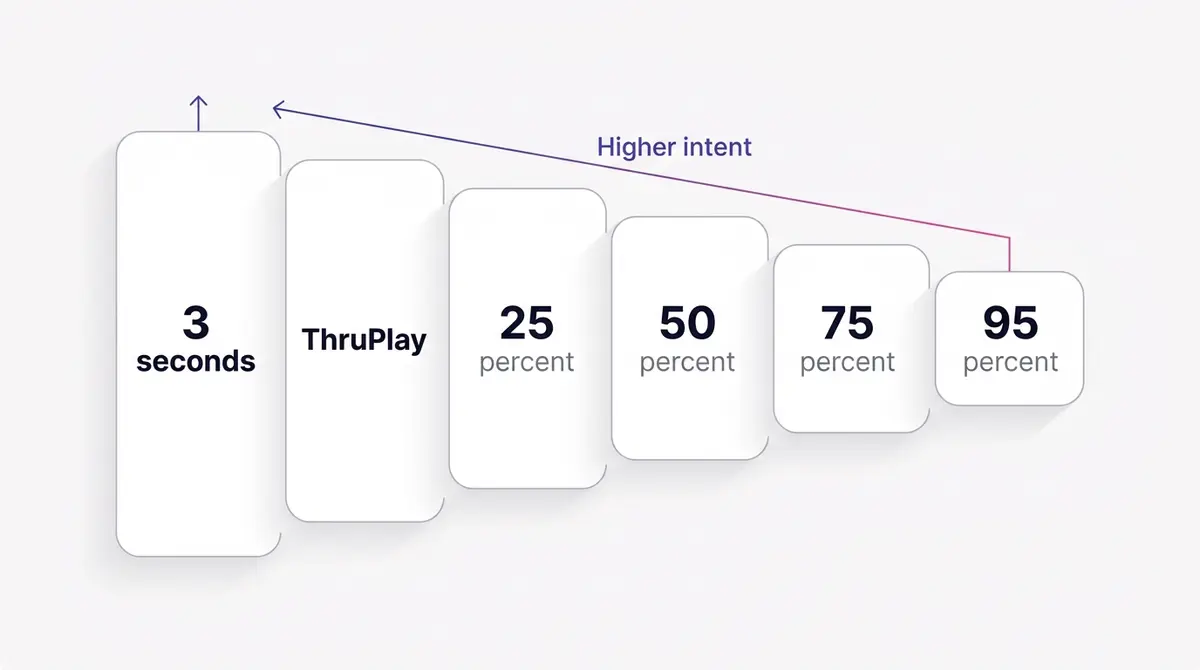
Put real numbers on it so the tiers stop being abstract. Say a reel earned 100,000 three-second views. A typical drop-off curve might leave roughly 40,000 people at the 25 percent mark, around 12,000 at 75 percent, and a few thousand at 95 percent. The 25 percent pool is big enough to prospect against and to seed a lookalike; the 75 percent pool is a tight, high-intent list you can hit with a direct offer. Same video, two completely different jobs, and you did not spend an extra cent to build either one. Your own curve depends on length and hook, so read the video's retention graph rather than assuming these exact splits.
A practical pattern: build two audiences off the same video. A wide 25 percent pool over 180 days becomes a steady retargeting and lookalike base, and a tight 75 percent pool over 30 days becomes your hot list for a direct offer. Skincare brand Skinlycious is a clean example of the kind of asset that powers this: a demo-style video walking through a three-step night routine gives viewers a reason to keep watching past the first ten seconds, which is exactly where a 50 percent or 75 percent threshold starts to separate the curious from the committed.
Instagram engagement, where deliberate actions reveal intent
The second pixel-free source is Instagram account engagement. Here the qualifying action is something a person did on your profile or your content rather than how long they watched a single video. Meta offers a menu: everyone who engaged with your professional account, anyone who visited your profile, people who interacted with any post or ad, people who saved a post or ad, and people who sent your account a message.
Two of those slices punch above their weight. A profile visit is rarely accidental; it usually follows an ad or a post that made someone want to see more. A save is an even stronger tell, because saving content is a deliberate "I want to come back to this." Both actions filter for people who leaned in, which is why they make excellent retargeting pools and excellent lookalike seeds.
Instagram engagement audiences support a retention window of up to 365 days, the same ceiling as video. A long window suits considered purchases and win-back: a jewellery shopper who saved a piece ten months ago is still a sensible person to re-approach. A short window suits momentum: people who messaged you this month are a live sales conversation, not a memory.
To use these audiences you need an Instagram professional account linked to a Facebook Page and connected to Ads Manager. A creator account cannot open every engagement type, so most advertisers switch to a business account, which is free and reversible. The switch does not change how your profile looks to followers, and it is the step most often missing when an engagement source refuses to populate.
There is a quiet compounding effect here that prospecting does not give you. Every reel, every carousel, and every post that earns a save or a profile visit feeds the same engagement pool, so your organic activity and your paid activity build the same warm asset. A brand that posts consistently for a quarter wakes up with a sizeable retargeting audience it never had to buy. Fitness Achievers shows the content side of this well: a coach talking straight to camera in a founder-style clip earns the kind of saves and profile visits that quietly fill an engagement pool, because a real face giving real advice is what makes someone tap through to see the rest. Format choice plays into it too, since some assets are simply more save-worthy than others; the comparison of static versus video creative is worth a read when you are deciding what to publish to grow these pools.
Facebook Page engagement: the no-pixel source for Page-first brands
If your brand lives more on Facebook than Instagram, the Page engagement source is your main no-pixel pool, and it is the one Instagram-heavy guides tend to skip. It works the same way: Meta builds the audience from people who interacted with your Page or its content, with a retention window of 1 to 365 days.
The action menu is wider than most people expect. You can target everyone who engaged with your Page, anyone who visited your Page, people who engaged with any post or ad (a reaction, a comment, a share, a link click, a carousel swipe), people who clicked any call-to-action button (a Shop Now or Contact Us, for example), people who sent your Page a message, and people who saved your Page or any post. Each slice is a different temperature. A message sender or a CTA clicker is close to a buyer; a general post engager is cooler and better for the top of a sequence.
Match the action to the offer. The CTA-button and message slices are small but red-hot, ideal for a direct offer or a follow-up that answers the question they were clearly about to ask. The broad "engaged with any post or ad" slice is your reach pool, big enough to seed a lookalike or to run a consideration ad to people who have seen you but never raised their hand. Because the window runs to a full year, a Page that posts and advertises steadily accumulates a sizeable warm audience without a pixel ever firing.
Lead forms: retarget the people who opened but never submitted
Instant forms, Meta's on-platform lead forms, generate their own engagement audience, and it is one of the most underused pools in Ads Manager. When you run a lead ad, some people tap the form, start reading, and leave before they submit. That hesitation is not a dead end; it is a retargeting list.
When you build a lead form engagement custom audience, Meta gives you three slices: anyone who opened the form, people who opened it but did not submit, and people who opened and submitted. The did-not-submit slice is the gold one. These are people interested enough to open the form but who stalled, exactly the audience for a reminder, a clearer offer, or a shorter ask. The submitted slice is useful too: exclude it from prospecting so you stop paying to reach people who already gave you their details, or build a lookalike from it to find more of your best leads.
One catch sets lead form audiences apart: the retention window is shorter, up to 90 days rather than the 365 the video, Instagram, and Page sources allow. Intent on an abandoned form decays fast, so that shorter horizon is a feature, not a limitation. Retarget the did-not-submit pool within a week or two while the interest is still warm, and pair it with the broader lead ads playbook to tighten the form itself so fewer people abandon in the first place.
The rest of the no-pixel menu, and how the sources compare
Video, Instagram, Page, and lead forms cover most brands, but the Meta sources list has more. If you run an Instant Experience (the full-screen mobile canvas that opens from an ad), you can build an audience of people who opened it or clicked a link inside it. If you sell through on-platform Shopping, you can retarget people who viewed or saved a product inside Facebook or Instagram. And if you host Events, you can target people who responded or took action on your event. Each one is a no-pixel pool fed by an interaction Meta already logs, so the right source is simply wherever your content actually earns attention.
The settings that differ most are the retention window and the kind of intent each source captures. This table lines them up.
| Source | Max retention window | What it captures | Best use |
|---|---|---|---|
| Video views | 365 days | Watch depth on a video | Tiered retargeting and lookalike seeds |
| Instagram account | 365 days | Profile visits, saves, post or ad actions, messages | High-intent retargeting from organic and paid |
| Facebook Page | 365 days | Page visits, post or ad actions, CTA clicks, messages, saves | Main no-pixel pool for Page-first brands |
| Lead form | 90 days | Form opens, submits, and abandons | Fast follow-up on warm leads who stalled |
| On-platform Shopping | 180 days | Product views and saves inside Facebook or Instagram | Catalog-led retargeting without a pixel |
| Events | 365 days | Event responses and actions | Re-engaging an event audience |
For contrast, a website custom audience built from your pixel caps at 180 days (and up to two years for value-based purchase events), and on-platform Shopping engagement runs to 180 days rather than the full year the video and Page sources allow. Knowing each ceiling stops you setting a window the source cannot honour.
How engagement audiences refresh and age out
An engagement audience is not a static list you build once. It is a rolling, auto-updating window. The moment someone takes the qualifying action they enter the pool, and the moment they pass the retention horizon you set they drop out, with no action from you. Set a 30-day window and the audience always holds "people who engaged in the last 30 days," a membership that turns over completely every month.
That mechanic is exactly why a pool quietly shrinks and advertisers panic. A 30-day video viewers audience built off one viral reel looks healthy on day one and thins out over the following month as those viewers age past 30 days and no new video feeds the top. The fix is not to widen the window in a panic; it is to keep publishing, because every new view, save, and profile visit refills the pool from the top. Engagement audiences reward brands that post on a schedule and starve the ones that go quiet.
Size sets the floor. A custom audience needs at least 100 people before Meta will serve ads to it, and in practice you want a larger active pool, often cited around 1,000, for delivery to stabilise and leave the learning phase cleanly. If you intend to seed a lookalike, the source needs at least 100 people from a single country, and Meta recommends roughly 1,000 to 5,000 source records for a model worth trusting. A deep threshold over a short window on a low-view video can fall below those floors, which is the most common reason an engagement audience will not spend.
Picking the right window and stacking sources
Two settings decide whether an engagement audience is useful: the retention window and how many sources you fold in. Get them wrong and the audience is either too cold to convert or too small to leave the learning phase.
Start with the window. Shorter is hotter. A 30-day window holds only recent engagers, who carry the freshest intent and usually the best conversion rate, but it can run dry on a small account. A longer window builds a bigger, cooler pool that is better for consideration sequences and lookalike seeding. A common, safe pattern is 30 days for direct-offer retargeting, 90 to 180 days for consideration, and the full window only when you specifically want reach.
Then think about stacking. You do not have to build one narrow audience and live with its size. You can combine multiple videos and multiple engagement types into a single custom audience so the pool is large enough to spend against. You can also layer audiences at the ad-set level: include 50 percent video viewers and Instagram savers, then exclude recent purchasers so you are not paying to reach people who already bought.
| Goal | Source mix | Window | Why |
|---|---|---|---|
| Hot retargeting | 75 percent video viewers plus IG savers | 30 days | Highest intent, freshest signal |
| Consideration nudge | 25 to 50 percent viewers, profile visitors | 90 to 180 days | Bigger pool, still warm |
| Win-back | All IG engagers, all video viewers | 180 to 365 days | Maximum reach for lapsed fans |
| Lookalike seed | 75 percent viewers or savers | 180 days | Quality signal, enough volume to model |
Watch for overlap when you stack. If your 50 percent video viewers audience and your Instagram savers audience contain mostly the same people, splitting them across two ad sets makes them compete in the same auction and inflates your costs. Meta's audience overlap tool (in the Audiences dashboard, select two audiences and choose Show audience overlap) tells you how much they share. When two pools overlap heavily, merge them into one audience or run a single ad set, and use exclusions to keep your funnel stages from cannibalising each other.
Exclusions matter as much as inclusions. If you are running a welcome offer, exclude existing customers; if you are nurturing, exclude people already deep in the funnel. The guide on audience exclusions goes deeper, and if you plan to seed a lookalike from any of these pools, the lookalike audiences walkthrough explains how the seed quality decides the output.
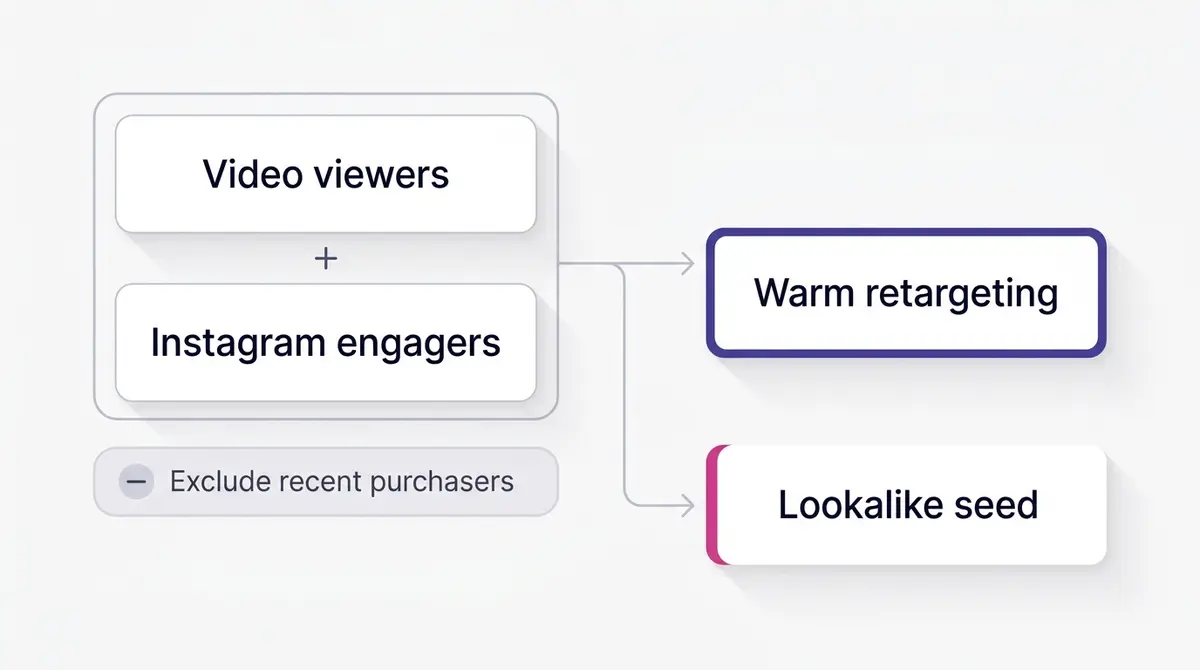
One more setting deserves attention: how engagement audiences behave inside Meta's broader campaigns. In many 2026 campaign types, your custom audiences function as a strong suggestion to the system rather than a hard fence; the algorithm treats them as a starting point and can expand beyond them while still honouring hard rules like location, age, and exclusions. That changes how you reason about size. A tightly defined engaged pool now steers delivery toward the right kind of person even when the system reaches a little wider, so you can afford to be precise on the seed without starving the campaign of volume. The practical takeaway is to define the engaged audience by genuine intent, set sensible exclusions, and let the rest of the machinery do the expansion.
Cost context makes the case for warmth concrete. Even on cool traffic campaigns, the average Facebook cost per click sat at $0.70 with a 1.71 percent click-through rate in 2025, per WordStream and LocaliQ's benchmark data, and lead campaigns across all industries averaged a 7.72 percent conversion rate in the same report. Warm engagement pools typically beat the cool-traffic figures because the person already recognises you, which means the same budget buys more qualified clicks and, downstream, cheaper conversions. That gap is the entire economic argument for mining engagement before prospecting.
What to actually serve a warm engagement audience
Building the audience is half the job. The other half is showing it the right ad. A warm engager has already met you, so repeating the introduction wastes the warmth. The creative should advance the relationship, not restart it.
Match the message to the depth of engagement. People who watched only the first few seconds of a video still need the value proposition, so a stronger hook and a clearer benefit make sense. People who watched to 75 percent already get it, so the job is to remove friction: a specific offer, a deadline, a proof point, a clear next step. People who saved an Instagram post signalled intent to return, so a reminder of the exact thing they saved often beats a generic brand ad.
Sequencing helps too. A simple two-step flow is to run a wide awareness video to cold and broad audiences, then retarget the 25 percent-plus viewers with a consideration ad, then hit the 75 percent viewers and savers with the offer. Each step talks to a warmer slice, and each slice gets a message tuned to where it is. The top, middle, and bottom of funnel framework maps cleanly onto these engagement tiers and gives you a structure for the offer you put in front of each warm slice.
Jewellery brand Celovis fits the deep-watch end of this. A slow rotating-product clip is built to be watched all the way through, which means its 75 percent and 95 percent pools are full of genuine admirers, exactly the audience for a clean showcase ad with a single strong call to action rather than another awareness piece. Smart-home brand Dasher Smart Home sits at the demo end: a one-tap automation reveal earns Instagram profile taps from people curious enough to see what else the product does, which makes profile-visitor retargeting a natural next move. Once you know which warm slice you are talking to, you can build the next-step image and copy on brand, drop it into a quick video or static edit, and launch it to Facebook and Instagram. A platform like AdPlay.ai keeps that loop in one place, though the principle holds regardless of the tools you use.
A checklist to launch your first engagement audience
Use this as a build order. It assumes you have a Facebook Page and, for the Instagram steps, a linked professional account connected to Ads Manager.
- Confirm the plumbing. Page connected, Instagram switched to a professional account and linked, both visible in Ads Manager. No pixel needed for these sources.
- Pick the source. Video viewers if your strongest assets are videos; Instagram or Page engagement if your profile and posts do the heavy lifting; lead form if you run lead ads. Most brands build several.
- Choose the threshold or action. For video, start at 25 percent for reach or 75 percent for intent. For Instagram and Page, start with profile or Page visitors, savers, and message senders for the highest-intent slices. For lead forms, start with the did-not-submit pool.
- Set the window. 30 days for hot retargeting, 90 to 180 for consideration, up to 365 for video, Instagram, and Page sources, and up to 90 for lead forms.
- Size-check. If the audience is below the roughly 100-person floor or too small to exit the learning phase, widen the window, loosen the threshold, or fold in more videos and engagement types.
- Add exclusions and check overlap. Remove recent purchasers or anyone you do not want to re-approach, and use the overlap tool so stacked pools do not bid against each other.
- Match the creative. Serve a next-step message tuned to engagement depth, not the same intro ad you used to acquire them.
- Measure and refresh. Watch conversion rate and frequency by audience, retire creative as it tires, keep publishing so the pool refills, and seed a lookalike from your best-performing engaged slice once it is large enough.
Engagement custom audiences reward brands that publish. Every video you run and every post that earns a save quietly grows a warm pool you can retarget for far less than you pay to reach strangers. Treat your organic and paid content as audience-building, keep the windows honest, and feed each warm slice the next thing it needs to hear. That is the whole loop, and none of it requires a pixel.
Example ad angles
Representative hooks and formats from the category.
“How-to or Demo ad for the three-step night routine that hooks viewers past the first ten seconds”
“Founder or UGC ad for a coach talking straight to camera so savers and profile visitors stack up”
“Showcase ad for a slow rotating-jewellery clip built to earn 75 percent completions”
“How-to or Demo ad for a one-tap automation reveal that drives profile taps on Instagram”
By the numbers
Frequently asked questions
What is a Facebook engagement custom audience?
It is a segment Meta builds automatically from people who interacted with your content on Facebook or Instagram. Sources include video viewers, Instagram profile visitors and savers, Facebook Page engagers, people who opened a lead form, and people who messaged your account. Unlike a website custom audience, it needs no pixel and no website because the interaction happened inside Meta. The audience updates on its own as new people engage and as older engagers age out of your retention window.
Do I need a pixel to build a video viewers or Instagram engagement audience?
No. Engagement audiences are populated from activity Meta already records inside Facebook and Instagram, so there is no pixel, Conversions API, or website event involved. That is what makes them durable in 2026: because the signal never crosses a browser or an app-tracking prompt, it is unaffected by cookie deprecation and opt-outs. You do need a connected Facebook Page and, for Instagram sources, a linked Instagram professional account.
What watch-depth options does Meta offer for video viewers?
When you build a video engagement custom audience, Meta lets you choose how much of the video someone watched: at least 3 seconds, ThruPlay, or those who watched 25 percent, 50 percent, 75 percent, or 95 percent of the video. Shallower thresholds like 3 seconds give you a larger, cooler pool, while 75 percent or 95 percent give a smaller, much warmer one. You then pick which videos count and a retention window of 1 to 365 days.
Can I retarget people who opened my lead form but did not submit it?
Yes, and it is one of the highest-value engagement audiences you can build. When you create a lead form engagement custom audience, Meta offers three slices: anyone who opened the form, people who opened it but did not submit, and people who opened and submitted. The did-not-submit slice is your abandoned-form pool, people interested enough to tap but who dropped off before finishing. Lead form audiences carry a shorter window than other engagement sources, up to 90 days, so retarget them quickly while the interest is fresh.
How long do engagement audiences remember someone, and why is mine shrinking?
Per Meta Business Help, video, Instagram, and Facebook Page engagement audiences support a window of up to 365 days, while lead form audiences cap at 90 days. The window is a rolling one: someone joins when they engage and drops off automatically once they pass the horizon you set. So a 30-day pool that is not fed by fresh engagement quietly shrinks day by day as older engagers age out. If yours is shrinking, either widen the window or publish more content to refill it from the top.
What is the minimum audience size before Meta will run ads to it?
A custom audience needs at least 100 people before Meta will serve ads to it, and in practice you want a larger active pool, often cited around 1,000, for delivery to stabilise and exit the learning phase. If you plan to seed a lookalike, the source needs at least 100 people from a single country, and Meta recommends roughly 1,000 to 5,000 source records for a reliable model. If a pool is too small, widen the window, loosen the threshold, or fold several sources into one audience.
What is the difference between an engagement audience and my Page followers or likes audience?
Page followers and likes are people who chose a lasting connection to your Page. An engagement custom audience is broader and action-based: it captures anyone who took a specific action (watched a video, visited your profile, saved a post, opened a lead form, sent a message) within a set window, whether or not they follow you. Most people who engage with an ad never follow the Page, so the engagement audience is usually far larger and a better retargeting pool than your follower count alone.
Should I use engagement audiences for retargeting, lookalike seeds, or both?
Both, in that order. Retarget your warmest engagers first because they convert at the lowest cost; Spiralytics reports that retargeted visitors are about 70 percent more likely to convert (a directional figure), which is why a warm pool tends to out-earn cold prospecting on the same budget. Then use a high-intent slice, such as 75 percent video viewers or profile visitors, as a lookalike seed once the pool is large enough to model. The lookalike is only ever as good as the engaged seed behind it.
Sources
- 1.Create a video engagement custom audience (Meta Business Help) (2026)
- 2.Create a Facebook Page engagement custom audience (Meta Business Help) (2026)
- 3.Create an Instagram account custom audience (Meta Business Help) (2026)
- 4.Create a lead form engagement custom audience (Meta Business Help) (2026)
- 5.Create an Instant Experience engagement custom audience (Meta Business Help) (2026)
- 6.Create an Events engagement custom audience (Meta Business Help) (2026)
- 7.About custom audiences from your sources (Meta Business Help) (2026)
- 8.About lookalike audiences (Meta Business Help) (2026)
- 9.Social Media Examiner: Facebook ThruPlay for Video Ads (2025)
- 10.AppsFlyer: App Tracking Transparency opt-in data findings (2024)
- 11.Jon Loomer Digital: Facebook Video Engagement Custom Audiences (2025)
- 12.Spiralytics: Retargeting Statistics (2026)
- 13.WordStream (LocaliQ): Facebook Ads Benchmarks 2025 (2025)
Keep exploring
Turn ad research into winning ads
Research the ads that work, generate the creative on-brand, and launch to Meta, all in one tool.
7-day free trial · No credit card required