
Instagram Reels Ads: How to Create Them (2026)
Build a Reels ad that earns the swipe: the 9:16 1440x2560 specs, Reels safe zones, sound-on hook craft, then generate, edit, and launch to Instagram.
Updated August 2026 · Likit Sae Lee, CTO

An Instagram Reels ad is a full-screen vertical video that plays inside the Reels feed, shot at 9:16 with a recommended resolution of 1440x2560 pixels, delivered as an MP4 or MOV up to 4GB. Reels now carry the bulk of Instagram's advertising: 53% of Instagram ads ran on Reels in Q4 2025, up from 35% a year earlier, per eMarketer (Sensor Tower data). Design audio-first because Reels default to sound on, caption everything for muted viewers, and keep your message and call to action out of the bottom 35% of the frame where the interface lives. Meta's own split tests found 9:16 sound-on creative with the message in the safe zone cut cost-per-result by 34.5%, a directional figure worth designing around.
The Reels ad you are about to make competes with a thumb that moves at the speed of boredom. People do not browse Reels so much as flick through them, and your spot earns one second to prove it is worth the next fourteen. That is a different craft from a feed image: vertical, full-screen, sound-on by default, with an interface that eats the edges of your frame. The mechanics are not hard once you know the spec, the safe zones, and where the hook has to land. Get those three right and the rest of the work, the script, the edit, the launch, gets faster every time you do it.
What an Instagram Reels ad actually is
A Reels ad is a full-screen vertical video that plays inside the Reels feed, between the organic clips people scroll for entertainment. It is not a feed post stretched tall and it is not a Story. It is its own placement in Ads Manager, with its own dimensions and its own interface eating the edges of the frame. The viewer expects motion, sound, and a fast payoff, because that is what the surrounding organic content trains them to expect.
A Reels ad can surface in three places, each marked Sponsored: in the dedicated Reels tab as you swipe through full-screen clips, inside Explore when Reels appear there, and as an in-feed Reels unit served between regular posts in the main feed. You do not choose the surface ad by ad. You opt into the Reels placement and Meta serves the spot wherever a Reels-style impression comes up. The craft stays the same across all three, because the unit is always the same full-screen vertical video.
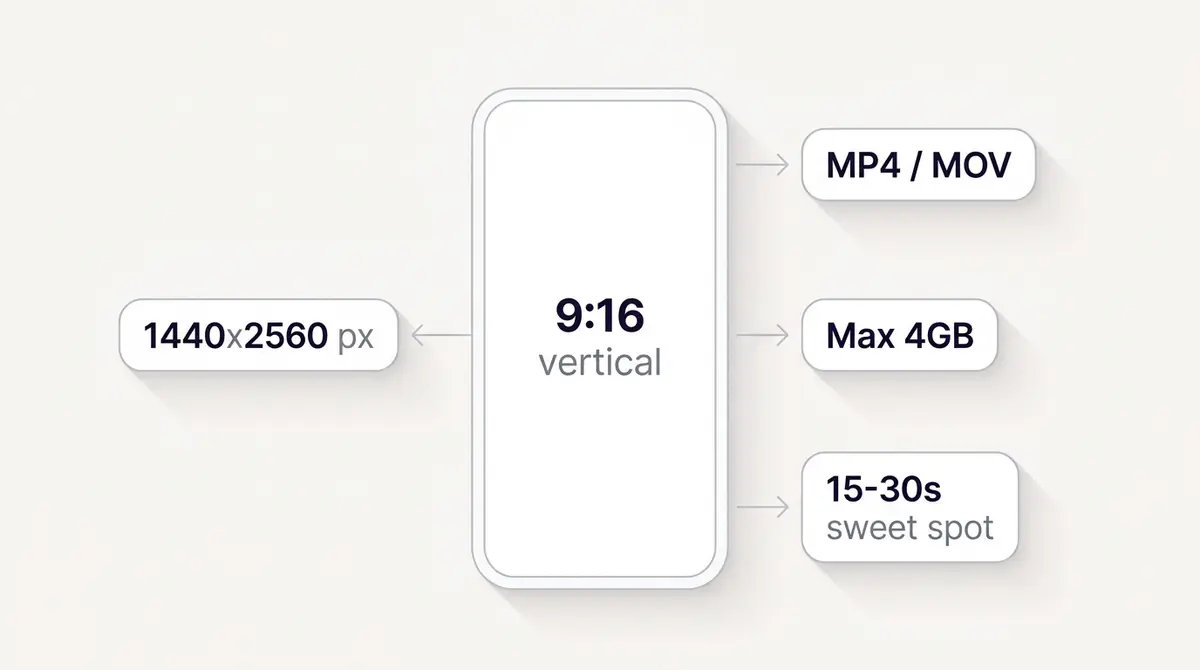
The spec is fixed and worth memorizing. Meta's Ads Guide recommends a resolution of 1440x2560 pixels at a 9:16 aspect ratio, delivered as an MP4 or MOV file up to 4GB, with durations allowed up to 15 minutes. That last number is a ceiling, not a target. The practical sweet spot for an ad is 15 to 30 seconds: long enough for a hook, a proof point, and a call to action, short enough to survive a feed-trained attention span. Use H.264 video, AAC stereo audio, and a constant frame rate, and your file will play cleanly across every device.
The reason this format matters more every quarter is distribution. eMarketer, citing Sensor Tower data, reported that 53% of Instagram ads ran on Reels in the fourth quarter of 2025, up from 35% a year earlier. The same firm found that 46% of US time on Instagram now goes to Reels, up from 37% the year before. Where people spend their attention is where the auction sends ad impressions, and both are migrating to Reels. Meta has said Reels, the short-video format that spans both Facebook and Instagram, now runs at an annual ad-revenue run rate above $50 billion (Zuckerberg, Q3 2025 earnings call), a Meta-reported figure to treat as directional but a clear signal of where the platform is investing.
The 9:16 spec and the 1440x2560 frame
Frame for vertical from the first shot. A 9:16 canvas at 1440x2560 pixels is tall and narrow, which changes how you compose: faces fill more of the frame, products sit higher, and there is no room for the wide establishing shots a landscape edit relies on. If you film horizontally and crop later, you lose resolution and usually clip the subject. Hold the phone vertically, or set your camera to a vertical preset, and shoot for the frame you will actually ship.
| Spec | Reels ad requirement |
|---|---|
| Aspect ratio | 9:16 vertical, full screen |
| Recommended resolution | 1440x2560 pixels |
| File type | MP4 or MOV |
| Maximum file size | 4GB |
| Duration ceiling | Up to 15 minutes |
| Practical sweet spot | 15 to 30 seconds |
| Minimum width | 250 px (under 30s), 500 px (30s or longer) |
| Audio and video settings | H.264, fixed frame rate, AAC stereo 128kbps+ |
Meta sets a floor as well as a recommendation. The asset has to be at least 250 pixels wide for an ad under 30 seconds, or 500 pixels wide for one 30 seconds or longer, but treat those as the bare minimum, not a target. A clip that renders soft or upscaled reads as low quality next to the crisp, native Reels around it, which is the last impression you want in a feed people scroll for entertainment.
A 1440x2560 master gives you headroom. You can export a smaller 1080x1920 version for delivery and still have sharp footage, and a high-resolution master survives re-cropping for other placements without falling apart. If you are producing one asset to run across surfaces, film the 9:16 sound-on master first, then derive the other sizes from it. For a full breakdown of every placement's dimensions, the companion guide on Facebook and Instagram ad sizes maps each one against its spec.
Reels safe zones: keep your message off the edges
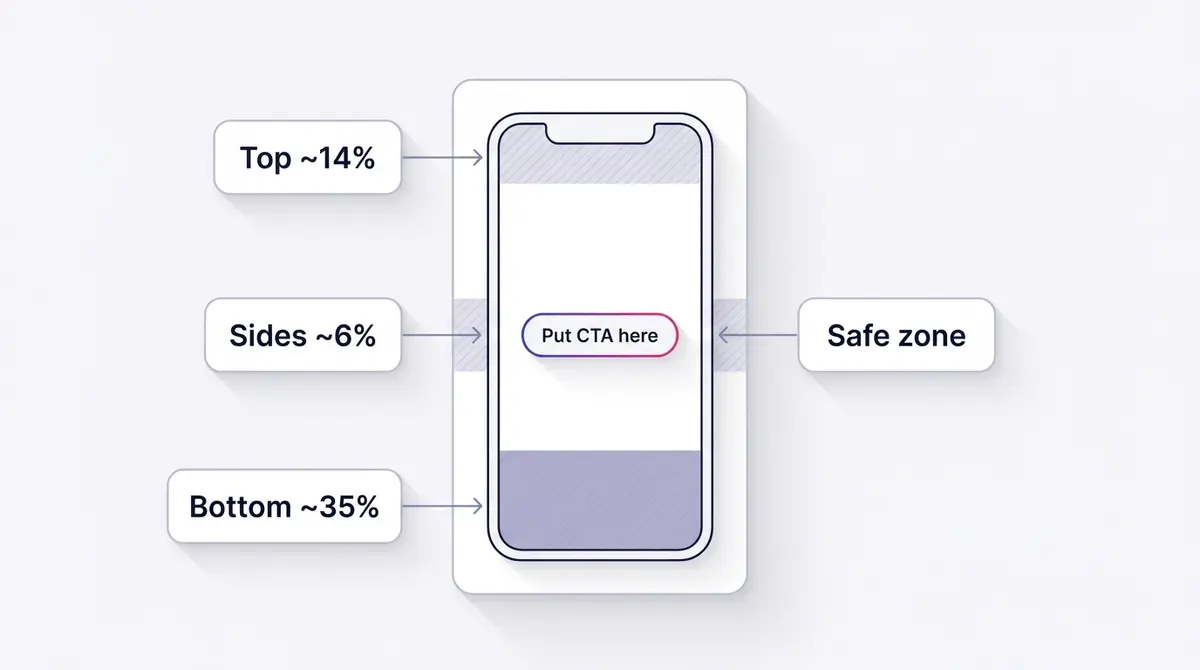
The single most common mistake in a Reels ad is putting the important thing where the interface covers it. The Reels UI overlays your video: the profile name and handle sit near the top, and the caption, likes, comments, share icon, audio attribution, and Meta's own call-to-action button stack across the bottom. Anything you place there gets buried.
Keep your key content clear of roughly the top 14% of the frame, the bottom 35%, and about 6% on each side. The bottom band is the one that catches people out, because it is larger on Reels than on Stories. That is where your call to action wants to go by instinct, and it is exactly where the interface will hide it. The fix is simple: move your message and your CTA to the center or upper-center of the frame, never the bottom.
| Edge | Approximate margin | What the interface puts there |
|---|---|---|
| Top | ~14% | Profile name, handle, sponsored label |
| Bottom | ~35% | Caption, likes, comments, audio, CTA button |
| Sides | ~6% each | Action icons, spacing |
You do not have to guess at these margins. Ads Manager includes a Safe Zone toggle in the ad preview's media editor that shades the areas the Reels interface will cover, and Meta publishes a downloadable safe-zone template you can drop into your editing timeline as a guide layer. Use both: design with the template, then confirm in the live preview before you publish. Reels and Stories have different safe zones, so a Stories asset checked against the Stories overlay can still fail on Reels. A brand like Medicube that runs a How-to or Demo ad for watching pores tighten in ten seconds keeps every caption above that bottom band so the message reads even as the interface loads.
The deeper reason the bottom margin matters is timing. The interface does not appear instantly; the caption expands, the audio attribution scrolls, and the CTA button settles into place over the first second or two of playback. If your message lives in that zone, it is legible for a beat and then swallowed, which is worse than never showing it because the viewer half-reads it and gives up. Designing for the safe zone is really designing for the moment the interface is fully drawn, which is the same moment your hook has to land. Position the headline in the upper third, the supporting line in the center, and leave the bottom third as breathing room the interface will fill. If you also run Stories ads, note that the Stories safe zone is shaped differently, so reframe rather than reuse.
Sound-on hook craft for a swipe feed
Reels default to sound on, which makes audio your first tool rather than an afterthought. A voice-over that states the value, a music bed that sets a mood, a real person talking to camera: any of these can carry the hook. But you cannot rely on sound alone, because plenty of viewers still watch muted depending on where and how they scroll. The discipline that works is to design audio-first and caption everything, so the ad plays as a silent film and rewards anyone with the sound up.
The hook is the first one to three seconds, and it decides everything downstream. Lead with a face, a result, a bold on-screen line, or fast motion that interrupts the scroll. State the payoff in plain words, both on screen and out loud, so even the viewer who keeps moving absorbs your message in passing. Because the opening frames carry so much weight, it pays to write several hooks against one identical body and test them, the same way you would for any Facebook video ad. For a deeper library of opening lines that stop the thumb, the guide on Facebook ad hooks breaks down the patterns that work.
Meta's strongest single proof point for this craft comes from its own split testing. Across 15 split tests, Meta found that 9:16 video with audio and the key message inside the safe zone cut cost-per-result by 34.5% against still images, at 99.9% confidence. That is a Meta-own figure, so treat the exact number as directional, but the direction is unambiguous: vertical, sound-on, safe-zone creative beats static images on Reels. A brand like Skinlycious running a Testimonial ad for "I stopped hiding my skin," with the before-and-after held in the safe zone and a voice-over hook in the first second, is built exactly to that pattern.
What audio you can actually use in a paid Reel
Here is the catch that trips up advertisers who repurpose an organic Reel. The trending songs in Instagram's music picker, the ones that make an organic Reel feel native, are generally not cleared for commercial or paid use, so they do not carry over to an ad. Build a Reels ad on a popular chart track and Meta will usually mute it, block it, or refuse to let you promote it. The safe source is Meta's Sound Collection, a free library of more than 14,000 royalty-free songs and sound effects that Meta has pre-cleared for commercial use in Facebook and Instagram content, ads included. You can search it by mood, genre, duration, and instrument, then pull a track straight into the ad. The other always-safe option is original audio you recorded yourself: a real voice-over, a creator talking to camera, or sound you own outright. Plan the hook around a track from the licensed pool, not the trending one, so the audio you designed for survives the build.
The text, the CTA button, and the loop
The video is only half the ad. Around it sit the fields you fill in inside Ads Manager, and they behave differently on Reels than in the Feed. Meta's Ads Guide lists a recommended primary text of about 44 characters for the Reels placement, far shorter than the room the Feed gives you, and it does not surface a separate headline the way a Feed ad does. The lesson is to stop relying on the caption to carry the message. On Reels, the words that matter are the ones burned into the video itself, in the safe zone, where the viewer actually looks. Treat the primary text as a short supporting line, not the pitch.
The conversion mechanism is the call-to-action button. Ads Manager attaches a tappable button to the ad, with a label you choose from a set such as Shop Now, Learn More, Sign Up, Download, or Book Now, and it sits in the bottom interface band with the rest of the chrome. Match the label to the objective: Shop Now for a sales campaign, Sign Up or Get Quote for leads, Learn More for traffic and awareness. The button is what makes the Reel actionable, so name it for the exact next step you want, and reinforce it with an on-screen line ("tap to shop the offer") in the safe zone, because the button itself is small and easy to miss in a fast scroll.
One lever most advertisers forget: Reels loop. On Instagram a Reel of any length replays continuously while it stays on screen, and on Facebook a short ad loops for roughly ninety seconds before it stops, which means a 15-second Reel can play five or six times to a viewer who lingers (Social Media Today, 2025). Edit so the last frame flows back into the first instead of dead-ending on a hard cut or a black frame. A clean loop buys you free repetition of the hook and the offer; a jarring one breaks the spell and invites the swipe. Design the end of the Reel as deliberately as the opening second.
Reels as a reach engine, read honestly
It is tempting to claim Reels have the highest engagement of any Instagram format, but that is not universally true and your media plan should not rest on it. Socialinsider's benchmark of 35 million Instagram posts across 2025 actually put carousels first, at a 0.55% engagement rate, with Reels just behind at 0.52% and single images last at 0.37%. Sprout Social reports the same order, carousels narrowly ahead of Reels. Engagement rate depends on what you count and whose accounts you measure, and on that scoreboard Reels rarely run away with it.
The defensible, repeatable edge for Reels is reach and discovery, not raw engagement rate. Loopex Digital puts the average Reels reach rate at 30.81% of followers, roughly double that of carousels, images, and Stories. Combine that with 53% of Q4 2025 Instagram ad load and 46% of US Instagram time, and the picture is clear: Reels is how you get in front of new people at scale. DataReportal pegs total Instagram ad reach at 1.74 billion users, which is the denominator your Reels campaign is fishing in.
| Instagram format | Engagement rate (Socialinsider 2025) | Average reach edge |
|---|---|---|
| Carousels | 0.55% | Lower reach than Reels |
| Reels | 0.52% | Highest, ~30.81% reach rate |
| Images | 0.37% | Lowest of the three |
Read that table as a reason to use Reels for discovery and top-of-funnel volume, and to keep carousels and static formats in the mix where a considered comparison or a detailed product story does the job better. The smart move is rarely to pick one format. It is to feed the surface that gives you the cheapest qualified reach, then let your other formats carry the parts of the funnel they handle best.
What a Reels ad costs
There is no fixed price for a Reels ad and no separate Reels rate card. You set a daily or lifetime budget in your account currency, the ad competes in the same auction as every other Meta placement, and you pay per result. What a result costs is driven far more by your creative and your offer than by the placement you picked, so the right way to budget is to anchor on the platform-wide benchmarks and treat them as reference points, not quotes.
As of 2025, Gupta Media's CPM tracker put the average cost to reach a thousand people across Meta (Facebook and Instagram) at about $8.19, while WordStream's 2025 benchmarks put the average cost per link click at $0.70 for a traffic campaign and $1.92 for a lead campaign. Those numbers move with your industry and the season: media gets sharply more expensive into the Q4 holiday peak, so the same Reel that earns cheap clicks in spring can cost noticeably more in November.
| Cost reference (Meta-wide, 2025) | Figure | Source |
|---|---|---|
| Cost per 1,000 impressions (CPM) | ~$8.19 | Gupta Media, 2025 |
| Cost per link click, traffic | ~$0.70 | WordStream, 2025 |
| Cost per link click, lead campaign | ~$1.92 | WordStream, 2025 |
The reason the Reels placement is worth leaning into is not a hidden discount, it is supply. With 53% of Instagram's ad load and 46% of US Instagram time now on Reels, that is where the cheap, qualified impressions are accumulating, and a placement with abundant inventory and rising attention tends to clear at efficient prices for advertisers who feed it strong creative. Do not chase a cheaper CPM by bidding harder. Chase it with a better hook, because creative quality moves cost per result the furthest. For what each cost metric means and how to read it, the guide on Facebook cost per result goes deeper.
How to set up a Reels ad in Ads Manager, step by step
There are two ways to put a Reel behind paid spend. The lightweight one is to boost an existing organic Reel from the Instagram app (the same idea as boosting a post): open a published Reel, tap Boost, and set a goal, budget, and audience. It is quick, but limited. The Reel has to be 9:16 and ninety seconds or shorter, it cannot already have run as an ad, it cannot use a trending song that is not cleared for commercial use, and a personal account cannot promote at all. The fuller path, and the one that gives you real objectives, placements, tracking, and proper testing, is to build the ad in Meta Ads Manager. Here is that flow.
- Create a new campaign and pick the objective that matches your goal. Reels delivers across Meta's objectives: Awareness, Traffic, Engagement, Leads, App promotion, and Sales. For an ecommerce store that almost always means Sales, optimized for purchases.
- Set the budget and schedule at the ad set level: a daily or lifetime amount in your account currency, and start dates that give the ad room to exit the learning phase before any deadline.
- Define the audience. A broad audience paired with strong creative now routinely beats a hand-stacked interest list, and Advantage+ audience widens from whatever seed you give it.
- Choose the placement. Leave it on Advantage+ placements to let Reels run automatically alongside Feed and Stories, or switch to Manual placements and tick Instagram Reels explicitly if the creative only works full-screen.
- Confirm the identity. Make sure the ad set uses the Instagram account you want the Reel to run from, so the handle and profile shown in the ad are correct.
- Upload the 9:16 creative. Drop in your 1440x2560 MP4, then open the media editor and toggle the Safe Zone overlay to confirm nothing important sits under the interface.
- Write the text and pick the CTA button. Keep the primary text short, choose the call-to-action label that matches the objective, and set the destination URL.
- Wire up tracking. For a conversion campaign, connect your dataset (the renamed Pixel in Events Manager) and the Conversions API; for leads, attach an instant form so people convert without leaving the app.
- Submit for review. Most ads clear within about 24 hours. If one is held longer or rejected, the notice names the policy, and the Account Quality hub in Meta Business Suite is where you check status and appeal.
What to track once your Reel is live
Building the Reel is half the loop. The other half is reading whether it worked, and a Reels ad gives you a clear signal chain. Start at the top with the hook. Hook rate, a practitioner metric, is your three-second video plays divided by impressions, and it tells you whether the opening second stopped the thumb. A low hook rate means the problem is the first frame, not the offer, so rebuild the opening before you touch anything else.
Then read how far people watch. Watch-through or hold rate shows where viewers drop off, and ThruPlay, Meta's own metric, counts a view that reached at least fifteen seconds or played to completion if the video is shorter. A strong hook rate with a weak hold rate is a precise diagnosis: the opening earned the watch, but the middle lost it, so tighten the body, not the hook. From there the business metrics decide whether the ad earns its place: CTR for how compelling the next step looked, CPM for how expensive the reach got, and cost per result for what each purchase or lead actually cost, the number that ends the argument.
| What to track | What it tells you |
|---|---|
| Hook rate (3-second plays / impressions) | Did the first second stop the scroll |
| Hold or watch-through rate | Where viewers drop off in the body |
| ThruPlay (15s or completion) | Whether the Reel held a real watch |
| CTR | How compelling the call to action looked |
| CPM | How expensive the reach is getting |
| Cost per result | What each purchase or lead costs |
Read these together, not in isolation, and let the weakest link point you at the exact part to rebuild for the next version. The guide on the Facebook ad metrics that matter breaks each one down with benchmarks.
Generate an on-brand vertical Reel with AI
Producing a fresh vertical Reel every week is where most advertisers stall. The spec and the safe zone are easy once you know them, but turning a product into a watchable 15-second story, on brand, in the right dimensions, is the work that eats time. This is the part that AI now compresses. Modern tools can take a product, a brand, and a short brief and generate an on-brand vertical draft framed for 9:16, which gives you a starting point instead of a blank timeline.
The draft is not the finished ad, and you should not ship it raw. Treat the generated Reel as a first assembly: a hook, a few shots, and a structure you can refine. The value is speed. Instead of scripting, shooting, and editing from scratch, you start from a draft that already respects the vertical frame and the safe zone, then you make it yours. A brand like Beyond Collagen+ running a Founder or UGC ad for "why I drink this every morning," creator-shot and vertical with a centered call to action, is the kind of format an AI draft can scaffold and a human can finish. If you are weighing whether to invest in motion at all, that decision deserves its own honest accounting before you commit a budget.
Where AI earns its keep is volume without sacrificing consistency. Reels reward a steady stream of fresh creative because the auction fatigues a single ad fast, and the surface itself favors advertisers who keep feeding it. Generating three or four on-brand variants from one brief lets you test hooks in parallel instead of betting everything on a single edit. Keep the brand inputs tight: your real product shots, your actual offer, your color and tone, so each draft reads as yours rather than a generic stock reel. The model handles the framing and the pacing; you supply the truth about the product and the angle that makes a stranger stop. That division of labor is what turns a weekly Reel from a project into a routine.
Polish in the video editor and ship to Reels
Once you have a draft, the editing job is assembly, not artistry. Drop your captions on, position them above the bottom 35% band, and proof them so a product name or a number is never misspelled. Move the call to action to the upper-center where the interface will not bury it. Trim ruthlessly to 15 to 30 seconds, cutting anything that does not advance the hook. Then export at 1440x2560 as an MP4 with H.264 video and AAC audio, under the 4GB ceiling.
Launching is the last step, and you have seen the flow above: confirm the placement, write the short primary text, pick the CTA button that matches the objective, wire up tracking, and submit. The one judgment call left is automatic versus manual placement. Advantage+ placements let Meta send each impression to whichever surface is cheapest, which is usually the right default. Reserve Manual placement, with Instagram Reels ticked, for a Reel that only works full-screen and you do not want cropped into Feed, because manual forfeits that cross-placement efficiency. Open the placement previews and toggle the Safe Zone overlay one last time before you publish.
The whole loop, generate a vertical draft, refine it in a video editor, and launch it straight to Instagram Reels, is the kind of repeatable production cycle that platforms like AdPlay.ai are built to shorten. Whatever tool you use, the discipline is the same: ship a 9:16 sound-on Reel with the message in the safe zone, caption it for the muted scroll, and put your strongest second first. Do that consistently and you stop dreading the weekly Reel and start treating it as a habit.
Example ad angles
Representative hooks and formats from the category.
“Testimonial ad for 'I stopped hiding my skin' with the before-and-after kept in the safe zone”
“How-to or Demo ad for watch the pores tighten in ten seconds, captioned for sound-off viewers”
“Founder or UGC ad for why I drink this every morning, creator-shot vertical with a centered CTA”
By the numbers
Frequently asked questions
What is the exact size and format for an Instagram Reels ad?
Shoot and export vertical 9:16. Meta's Ads Guide recommends a resolution of 1440x2560 pixels, accepts MP4 or MOV files up to 4GB, and allows durations up to 15 minutes. The practical sweet spot for an ad is 15 to 30 seconds. Use H.264 video and AAC stereo audio, and keep the frame rate constant. Anything wider than 9:16 gets letterboxed or cropped, so frame for vertical from the first shot rather than cropping a landscape clip later.
Where are the Reels safe zones, and why do they matter?
The Reels interface covers parts of your video with the profile name at the top, and the caption, likes, comments, audio attribution, and the call-to-action button across the bottom. Keep key content clear of roughly the top 14%, the bottom 35%, and about 6% on each side. The bottom band is larger than it is on Stories, so the single most useful rule is to move your message and your call to action to the center or upper-center, never the bottom. Ads Manager has a Safe Zone toggle in the ad preview, and Meta publishes a downloadable safe-zone template.
Do Reels ads need sound, or should I assume people watch muted?
Both. Reels default to sound on, so design the audio first: a voice-over hook, a music bed, or a real person talking carries the ad. But a large share of viewers still watch with the sound off in some contexts, so burn in captions and put the core message on screen as text. The safest creative works as a silent film and rewards anyone who has the sound up. Treat audio as an upgrade your viewer might have, not a guarantee.
How much do Instagram Reels ads cost?
There is no fixed price and no separate Reels rate card. You set a budget in your account currency and pay per result in the same auction as every Meta placement, so your creative and offer move the cost more than the placement does. As reference points, Gupta Media put the average Meta CPM at about $8.19 in 2025, and WordStream put the average cost per link click at $0.70 for a traffic campaign and $1.92 for a lead campaign. Reels often delivers efficient reach simply because that is where impressions and attention are migrating, but the lever you actually control is a stronger hook, not a harder bid.
Are Reels really the highest-engagement Instagram format?
Not universally. Socialinsider's benchmark of 35 million Instagram posts across 2025 put carousels at a 0.55% engagement rate, Reels just behind at 0.52%, and single images last at 0.37%, so carousels actually edge Reels on raw engagement. Sprout Social reports the same order. Rankings shuffle from study to study depending on what they count and whose accounts they measure. The honest framing is that Reels win on reach and discovery, not always on engagement rate: their average reach rate of 30.81% is roughly double other formats, which is why they have become the scale engine for Instagram advertising.
Can I boost an existing Reel instead of building an ad in Ads Manager?
Yes, with limits. You can boost a published Reel straight from the Instagram app: choose the Reel, tap Boost, and set a goal, budget, and audience. The Reel has to be vertical 9:16 and ninety seconds or shorter, it cannot have already run as an ad, and it cannot use a trending song that is not cleared for commercial use. Personal accounts cannot promote at all; you need a professional account. Boosting is fast but shallow. To pick a real objective, control placements, connect the Pixel, and test hooks properly, build the ad in Meta Ads Manager instead.
Can I run conversion or lead ads on Reels, not just awareness?
Yes. Reels supports the full range of objectives, including sales and leads. For conversion campaigns, connect your dataset (the renamed Pixel inside Events Manager) and the Conversions API so Meta can optimize and measure. For lead generation, Reels works with instant forms, the native form that opens inside the app so people never leave Instagram. The creative craft does not change: the vertical spec, the safe zone, and the sound-on hook still apply whatever the objective.
Can I use trending or popular songs in a Reels ad?
Usually not. The trending songs in Instagram's music picker are generally not cleared for commercial or paid use, so an ad built on a chart hit tends to get muted, blocked, or refused for promotion. Pull audio instead from Meta's Sound Collection, a free library of more than 14,000 royalty-free tracks and sound effects that Meta has pre-cleared for use in Facebook and Instagram content, ads included, or use original audio you recorded yourself, like a voice-over or a creator talking to camera. Plan the sound from the licensed pool from the start rather than swapping it in after the edit.
Sources
- 1.Meta Ads Guide, Instagram Reels Video Ad Specs (1440x2560, 9:16, 4GB) (2026)
- 2.Meta for Business, Instagram and Facebook Reels Ads (sound-on, safe zone, 34.5% split test) (2026)
- 3.eMarketer, Reels Carries Over Half of All Instagram Ad Load (53% in Q4 2025, 35% in Q4 2024, Sensor Tower data) (2026)
- 4.Tubefilter, Meta Q3 2025 Earnings: Reels Passes a $50B Run Rate (2025)
- 5.Socialinsider, Instagram Engagement Benchmarks by Format (35M posts: carousels 0.55%, Reels 0.52%, images 0.37%) (2025)
- 6.Sprout Social, Instagram Stats (carousels lead engagement at 0.55%, Reels 0.52%) (2026)
- 7.Loopex Digital, Instagram Reels Statistics (reach 30.81%) (2026)
- 8.DataReportal, Essential Instagram Stats (1.74B total ad reach) (2025)
- 9.Gupta Media, Social Media Ads Cost and CPM Tracker (Meta CPM $8.19) (2025)
- 10.WordStream, Facebook Ads Benchmarks 2025 (CPC by industry) (2025)
- 11.Meta Sound Collection, royalty-free audio cleared for Facebook and Instagram ads (2026)
- 12.Meta Business Help Center, About ThruPlay (2026)
- 13.Social Media Today, Shorter Video Ads on Facebook Get More Looping Replays (2025)
- 14.Meta Help Center, Troubleshoot Instagram Boost (Reels eligibility) (2026)
Keep exploring
Turn ad research into winning ads
Research the ads that work, generate the creative on-brand, and launch to Meta, all in one tool.
7-day free trial · No credit card required