
Facebook Ads Attribution Windows in 2026
How the 7-day click, 1-day engage-through, and 1-day view attribution windows work in 2026, what Meta removed in January, and how to pick the right window for your sales cycle.
Updated September 2026 · Likit Sae Lee, CTO

A Facebook attribution window is the time span after a click or a view in which Meta will credit your ad for a conversion. Meta removed the 7-day view and 28-day view options on January 12, 2026, then in March 2026 narrowed click-through to link clicks only and made the default a three-part setting: 7-day click, 1-day engage-through, and 1-day view. The 28-day click window stays available for longer sales cycles. Pick a shorter window for low-priced impulse buys and the full 7-day click for considered purchases, then judge every creative test on the same window so the numbers stay comparable.
You logged into Ads Manager in mid-January and your conversions looked like they fell off a cliff overnight. Spend was steady, the creative had not changed, yet reported sales dropped by a fifth. Before you pause anything, understand this: Meta changed how it counts. The attribution window is the quiet setting that decides which conversions show up next to your ad, and in 2026 the menu of choices got shorter. Knowing what each window credits, and which one fits how long your buyers actually take to decide, is the difference between trusting your dashboard and chasing a ghost.
What an attribution window actually counts
An attribution window is the clock Meta starts the moment someone interacts with your ad. If that person converts before the clock runs out, the ad gets the credit. If they convert after, the ad gets nothing, and the sale shows up as direct or organic somewhere else. That single setting quietly shapes every cost per result, every return on ad spend figure, and every creative comparison you make.
There are two kinds of interaction the clock can start on. A click is someone tapping your ad and going to your destination. A view is someone seeing your ad in the feed, scrolling past, and converting later without ever clicking. Meta credits these on separate clocks: a click window and a view window. The naming convention you will see everywhere, like "7-day click, 1-day view," is just those two clocks stated together. It reads as: credit a conversion if it happened within 7 days of a click, or within 1 day of a view.
The reason this matters is that the wider the window, the more conversions Meta can attach to the same spend. A 7-day click window catches the buyer who saw your ad on Monday, thought about it, and checked out on Saturday. A 1-day click window would have missed that sale entirely. Neither number is wrong. They are answers to different questions, and the trouble starts when you compare a result measured one way against a result measured another.
It helps to separate two ideas that often get tangled. The attribution window is how conversions are counted and reported. The optimization signal is what Meta's delivery system steers your budget toward. They use the same setting, but they are not the same job. When you widen the window, you are not just changing a number on a chart; you are also telling the algorithm to chase a broader definition of success, which can shift who it shows your ad to. That is why casually flipping the window mid-flight is risky: you are quietly handing the machine a new target while expecting the old trend line to hold.
What Meta removed in January 2026
On January 12, 2026, Meta removed the 7-day view and 28-day view attribution windows from both Ads Manager and the Ads Insights API, according to PPC Land's reporting on the API changes. The longest view-through clock you can now set is a single day. The change landed across all API versions at once, so there was no grace period and no legacy fallback for advertisers who had built reporting around the longer view windows.
The fallout was immediate and uneven. Accounts that had leaned on long view windows, common in awareness, video, and high-consideration campaigns, felt it most. As PPC Land noted, those view-through windows had been fundamental to how advertisers justified upper-funnel spending, so once they stopped returning data a steady-spend account could watch reported sales sink overnight. The sales themselves did not disappear. What disappeared was the credit for buyers who watched an ad, left, and came back days later without clicking. Industries with longer sales cycles felt it hardest, because that delayed, no-click path was exactly the behavior the 7-day and 28-day view windows had been capturing.
Meta did not stop at the window menu. The same January update tightened historical data retention in the Ads Insights API. Unique-count fields and hourly breakdowns are now retained for 13 months, frequency breakdowns for 6 months, while aggregate total metrics stay at 37 months. Meta framed the package as a way to "reduce discrepancies with Meta Ads Manager" and improve API performance. For most advertisers the practical takeaway is simpler: pull and store the granular reports you care about before they age out, because the platform will not hold them forever.
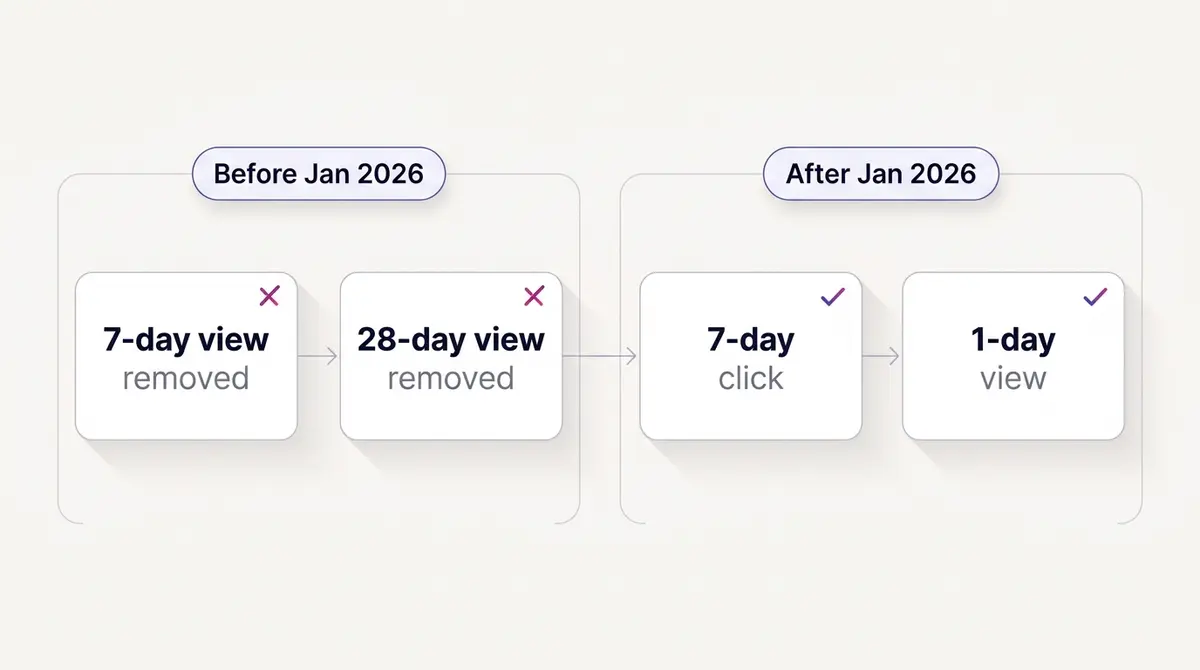
A second shift followed on March 3, 2026. Meta narrowed the definition of a click so that only an actual link click, one that sends the person to your website, app, lead form, or other destination, counts toward click-through attribution. Everything softer moved into a renamed bucket: the old engaged-view window became engage-through, and it both expanded and changed shape. Engage-through now captures the non-link social interactions that used to sit under click-through, like likes, shares, and saves, alongside qualifying video views, all on a single 1-day clock that is on by default, as Search Engine Land reported. Meta also dropped the video qualifying threshold from 10 seconds to 5, pointing to data that 46% of Reels purchase conversions happen within the first 2 seconds of attention. The redefinition does not change your spend, it changes the labels. Your click-through number became a purer, slightly smaller measure of people who genuinely tapped through to your site, matching how independent web analytics tend to count a link click, while everything else got its own one-day clock. Upper-funnel campaigns felt the reshuffle most, so it is worth reading these changes next to how you structure a full-funnel campaign.
The windows you can still choose
After the January and March changes, the menu in Ads Manager is short and easy to reason about. You set a click window, a view window, and optionally an engage-through window, then Meta reports against that combination.
| Window setting | What it credits | Best fit |
|---|---|---|
| 1-day click | Conversions within 24 hours of a link click | Impulse buys, flash sales, same-day decisions |
| 7-day click | Conversions within 7 days of a link click | Considered purchases, higher prices, longer thinking |
| 28-day click | Conversions within 28 days of a link click | Long, deliberate, high-ticket purchases |
| 1-day view | Conversions within 24 hours of seeing the ad, no click | Awareness and video where influence is real but soft |
| 1-day engage-through | Conversions within 24 hours of a non-click engagement | Social-first campaigns driving saves and shares |
The default combination is now 7-day click, 1-day engage-through, and 1-day view, per Jon Loomer's 2026 attribution breakdown. That default exists because it balances catching delayed click-driven sales against over-crediting people who merely glanced at an ad, while giving non-link engagement its own short clock. For most ecommerce advertisers it is a sensible starting point. The 7-day view and 28-day view options are gone, but the 28-day click window is not: per PPC Land, the 1-day click, 7-day click, and 28-day click windows all remain intact, so if your buyers genuinely take weeks to decide you can still reach for the longer click clock.
Choosing well comes down to one honest question: how long does a typical buyer take to decide? If your average order value is low and the purchase is impulsive, a tighter window keeps your dashboard close to real time and your daily decisions clean. If your product is expensive or needs research, the full 7-day click window stops you from under-counting the slow, deliberate sales that arrive late. The same logic that governs how you read the metrics that actually matter applies here: the setting only helps if you understand what it is and is not counting.
Where to change the attribution window
The attribution setting lives at the ad-set level, not on the campaign or the account, which trips up people who go hunting for it in account settings. Meta folded what used to be a separate account-level window and ad-set conversion window into one control on each ad set, so every ad set in a campaign can carry its own setting. That is genuinely useful: you can run 1-day click on a retargeting ad set, where buyers move fast, and 7-day click on a cold prospecting ad set, where they take longer to decide.
To find and change it:
- Open Ads Manager and click into the Ad Sets tab.
- Tick the box next to the ad set you want to change and click Edit.
- In the ad-set editor, scroll to the Cost per Result Goal area, just below the bid-strategy field.
- Click Show More Options, and the Attribution setting row appears beneath it.
- Click Edit next to Attribution setting, choose your click, view, and engage-through windows, and publish the change.
One caution before you touch it on a live ad set. The window is not only a reporting choice, it is also the optimization target Meta delivers toward. Narrowing it, say from 7-day click to 1-day click, can drop your weekly attributed conversions below the roughly 50 events an ad set needs to stay out of the learning phase, which re-enters learning and resets the delivery you already paid to stabilize. If you want to experiment, change the window when you launch a fresh campaign or a new flight, not in the middle of one that is working.
Compare windows without changing your optimization
The honest answer to which window is right is to look at how the same conversions split across all of them, and Meta gives you a way to do that without touching a single live setting. In Ads Manager, open the Columns dropdown and choose Compare Attribution Settings. You can then add side-by-side columns for 1-day, 7-day, and 28-day click, 1-day view, and 1-day engaged view, and the report shows how each window would credit the campaign you are already running. Because it only changes what you see, not what Meta optimizes toward, you can study the trade-offs risk-free before deciding whether the live setting deserves a change.
The same panel hides a second decision most advertisers never notice: Choose Conversion Count, which toggles between All Conversions and First Conversion. All Conversions, the default, counts every purchase a person makes inside the window, so a repeat buyer can register two or three. First Conversion counts only the first one per person. The difference is not cosmetic. A store with strong repeat purchasing can look dramatically more efficient on All Conversions, while First Conversion is the cleaner read on how well the ad acquires a new customer. Pick the count that matches the question you are asking, and label which one a number came from when you share it.
One rule keeps the comparison from misleading you. When the same person both views and clicks your ad, Meta credits the click, not the view, and it deduplicates so a single conversion is never counted in more than one window. The priority runs click-through first, then engage-through, then view-through. That is why your view-through column is usually small: it only holds the conversions that had no click to claim them. Read a low view-through number as that, not as proof your awareness ads did nothing.
Here is what one campaign can look like fanned across the windows. Take a mid-priced apparel store spending a flat amount over a week, with the same clicks, views, and engagements feeding every column:
| Setting | Conversions credited | Cost per result (at $4,000 spend) |
|---|---|---|
| 1-day click | 100 | $40.00 |
| 7-day click | 150 | $26.67 |
| 1-day view | 25 | overlaps clicks |
| 1-day engage-through | 15 | overlaps clicks |
| Deduplicated total | 180 | $22.22 |
Same spend, same shoppers, five different stories. The 7-day click window finds 50 sales the 1-day window cannot see, because they land on days two through seven. The view and engage-through columns add a softer tail, but they overlap the click conversions, which is why you cannot simply add the rows: the deduplicated total is what actually happened. The figures here are illustrative, not a benchmark, but the shape is real, and it is exactly why two teams quoting their cost per result can both be telling the truth and still disagree.
Matching the window to your sales cycle and AOV
There is no universally correct window, only the right one for how your customers behave. Think of it as a slider with two anchors: price and patience. Cheap, emotionally driven purchases sit at one end, where a same-day or 1-day click window tells the truth. Expensive, researched purchases sit at the other, where a 7-day click window is the only honest measure because the conversion genuinely arrives days after the first tap.
Consider how this plays out with real brands. A jewellery brand like Celovis sells a considered, higher-value item, the kind a shopper saves, sleeps on, and buys later in the week. Crediting that sale needs the full 7-day click window, because a 1-day setting would erase most of the brand's true performance. Contrast that with a smart-home accessory from Dasher Smart Home pushed at a flash-sale price: that buyer often decides in one session, so a tighter window keeps the numbers honest without dragging in days of noise.
Fitness offers sit somewhere in between. A gym like Fitness Achievers running a membership promotion sees buyers who weigh the commitment for several days before signing up, so the 7-day click window captures sales a 1-day window would miss, while the 1-day view window quietly credits the prospect who watched a transformation reel and signed up the next morning without clicking. The point is not to chase the widest window for a bigger number. It is to pick the window that mirrors the decision your buyer actually makes, then leave it alone so your trend lines stay readable.
A quick way to calibrate: look at your time-to-conversion report. If most conversions cluster inside 24 hours, a 1-day click window loses almost nothing and gains you clarity. If a meaningful tail of sales lands on days three through seven, the 7-day click window is doing real work and switching it off would quietly cripple your reported return. This is the same discipline that separates a clean creative test from a misleading one, because the window you read results on decides which variant looks like the winner.
One more nuance worth holding onto: the window interacts with how fast you can read results, not just how many you count. A 7-day click setting means a campaign launched today will keep accruing conversions for a week, so today's reported cost per result will quietly improve over the coming days as late sales land. New advertisers panic on day one when a fresh campaign shows an ugly cost figure, then make a hasty change before the window has had time to fill in. The wider your window, the longer you owe the data before judging it, which is a discipline as much as a setting.
Why your dashboard and your analytics disagree
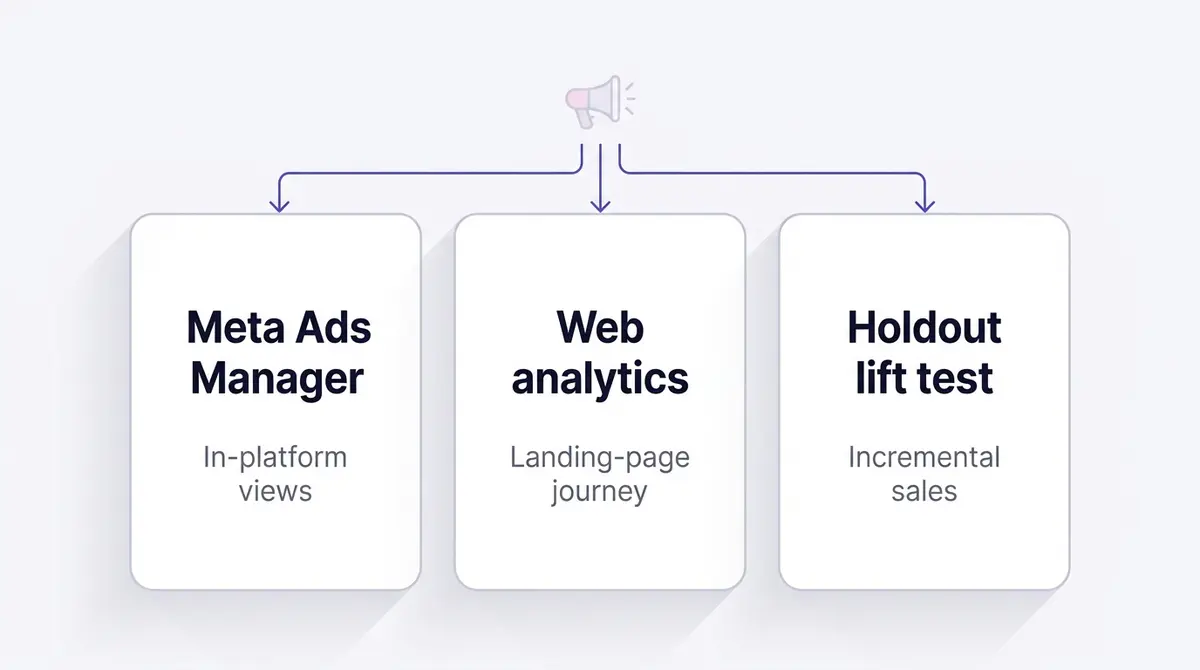
Even with the perfect window, Meta's reported conversions and your own analytics will rarely match, and that gap is normal. They are measuring different things. Meta sees in-platform clicks and views that your site analytics can never observe, including cross-device journeys where someone sees an ad on their phone and buys on a laptop. Your analytics, meanwhile, sees the full landing-page path Meta is blind to once the click leaves the platform.
Privacy changes widened that gap. Apple's App Tracking Transparency means a large share of iPhone users decline cross-app tracking, with the industry-wide opt-in rate sitting at about 35% in Q2 2025 according to Adjust's benchmark. When a user opts out, Meta cannot stitch their ad exposure to their eventual purchase the way it once could, so it leans more on modeled and aggregated estimates. The result is reported conversions that are directionally useful but no longer a perfect one-to-one count of real-world sales. This is also why view-through numbers deserve extra skepticism: they were already the softest signal, and they are the most affected by lost tracking.
There is a way to claw back some of what privacy took. A server-side Conversions API feed sends the same purchase and lead events from your store backend, deduplicated against the browser Pixel, so Meta keeps receiving conversion signal even when a browser drops it. On top of that, Meta fills remaining gaps with modeled conversions, statistical estimates of the sales it can no longer observe directly. Neither restores the long view windows Meta retired, but together they are the practical response to a shrinking view window: more of your real conversions get matched and credited. If your numbers look thinner than they should, setting up the Conversions API is usually the highest-leverage fix before you touch the attribution setting at all.
| Source | What it sees well | What it misses |
|---|---|---|
| Meta Ads Manager | In-platform clicks, views, cross-device exposure | Everything after the click leaves Meta |
| Your web analytics | Full landing-page journey, on-site behavior | In-platform views and cross-device ad exposure |
| Holdout or lift test | True incremental effect of the ads | Day-to-day creative-level granularity |
The practical move is to stop hunting for a single true number and instead triangulate. Use a consistent UTM tagging convention so your analytics can name the campaign and creative behind each session. For high-stakes budget calls, lean on a holdout or lift test that measures incremental sales rather than attributed ones. And label every Meta-reported conversion in your own mind as directional, because in a post-tracking world that is exactly what it is. The free Meta Ad Library is useful for studying what competitors are running creatively, but it tells you nothing about their attribution, so do not read a rival's ad volume as proof their numbers are clean.
Reading creative tests on trustworthy numbers
Attribution windows quietly decide which of your ads looks like the winner, which makes them a creative-testing issue, not just a reporting one. If you compare a brand-new variant against a week-old one on a 7-day click window, the new ad is at a structural disadvantage: it simply has not had seven days to accumulate its delayed conversions. Read the test that early and you will pause the slow-burn creative that was about to pull ahead.
The fix is patience plus consistency. Let every test run past your full click window before you judge it, then add a buffer for your typical conversion lag. Hold spend steady during the read so you are not confusing a budget change with a creative difference. Most importantly, compare every variant on the exact same window. Switching from 7-day click to 1-day view halfway through an analysis is the fastest way to convince yourself a losing ad won.
When the numbers are trustworthy, the loop gets clean: you research what is working, generate the next variant, launch it to Facebook and Instagram, and measure it on a stable window so the comparison means something. A platform like AdPlay.ai can keep that loop in one place, but the discipline matters more than the tool. The brand that wins is the one reading honest numbers, not the one with the biggest dashboard. The same care you would put into diagnosing ad fatigue belongs here, because a window mismatch can fake a decline that is really just an early read.
This is where a brand like Skinlycious illustrates the trap. A before-and-after skincare creative often converts on a delay: the shopper watches the transformation, leaves to think, and buys days later. Judge that ad on a 1-day click window and it looks weak. Judge it on the 7-day click window that matches the real decision, and it earns its credit. Same ad, same spend, two stories, and only one of them is honest.
A practical attribution checklist
Before your next campaign reaches scale, run through these to make sure your numbers describe reality and not an artifact of a setting.
- Confirm your attribution window in Ads Manager and write it down, because every cost and return figure you quote is only meaningful next to it.
- Pull your time-to-conversion report and pick the window that matches where most of your sales actually land, not the widest one available.
- Use 7-day click for considered or higher-priced purchases and a 1-day click window for impulse buys, then leave the setting alone so your trend lines stay comparable.
- Treat the 1-day view number as the softest signal, especially given that roughly a third of iPhone users opt into tracking, so the rest are modeled.
- Tag every destination URL with a consistent UTM convention so your analytics can corroborate or challenge what Meta reports.
- For any decision worth real money, run a holdout or lift test and trust incremental sales over attributed ones.
- Never compare two results captured on different windows; pick one ruler and measure everything with it.
- Let creative tests run past the full click window plus your conversion lag before you crown a winner, and hold spend steady while you read.
Get these right and the January 2026 changes stop feeling like a loss and start feeling like clarity. A shorter window menu means fewer ways to fool yourself, and a smaller view-through number means the conversions you do see lean harder on the strongest signal there is: someone who clicked, arrived, and bought. The marketers who thrive in 2026 are not the ones with the prettiest reports. They are the ones who know exactly what their numbers count, and who judge every creative the platform sends them on a ruler that does not move.
Example ad angles
Representative hooks and formats from the category.
“Before and After ad for clearer skin after a 28-day serum routine”
“Showcase ad for a minimalist gold pendant styled three ways”
“Testimonial ad for a member who stuck with training for six weeks”
“Feature Callout ad for one app that controls every light and lock”
By the numbers
Frequently asked questions
What is the difference between a click-through and a view-through conversion?
A click-through conversion is credited when someone clicks your ad link and then converts within the click window, which can be 1 day or 7 days. A view-through conversion is credited when someone sees your ad, does not click, and then converts within the view window, which in 2026 is capped at 1 day. Click-through is the stronger signal because the person actively engaged. View-through captures the softer influence of an ad someone scrolled past, which is why Meta shortened it to a single day.
What attribution windows can I still choose in 2026?
Inside Ads Manager you can choose 1-day click, 7-day click, 28-day click, 1-day view, or 1-day engage-through, and combine the click and view settings. The default combination is now 7-day click, 1-day engage-through, and 1-day view, and the widest click window you can still set is 28-day click. Only the 7-day view and 28-day view options were removed on January 12, 2026; the 1-day click, 7-day click, 28-day click, and 1-day view windows all remain, per PPC Land. The Ads Insights API mirrors these limits.
Why did my conversions drop in January 2026 even though nothing changed?
If your reported conversions fell around January 12, 2026 without a change in spend or creative, the attribution-window removal is the most likely cause. Conversions that used to count inside the 7-day or 28-day view window simply stopped being attributed once those windows disappeared. Awareness, video, and longer-consideration campaigns felt it most because their buyers often see an ad, leave, and convert days later without clicking. The sales did not vanish; the credit did.
Which attribution window should I use for a low-priced ecommerce product?
For impulse buys under roughly the price of a dinner out, a 1-day click or 7-day click with 1-day view setting is usually plenty, because most of these purchases happen the same session or within a day or two. A short window keeps your reported numbers tight and close to real-time, which makes daily optimization decisions cleaner. The longer your average decision takes, the more you want the full 7-day click window so you do not under-count delayed sales.
Does the attribution window change how much Meta charges me?
No. The attribution window only changes how conversions are reported and which results Meta's delivery system optimizes toward. It does not change your bid, your spend, or the price of an impression. What it can change is the apparent cost per result, because a wider window credits more conversions to the same spend and therefore shows a lower cost per acquisition. Always compare cost figures captured on the same window or you will be comparing two different rulers.
What is engage-through attribution and when did it start?
Engage-through attribution credits a conversion when someone engaged with your ad without clicking the link, then converted within one day. Meta introduced it on March 3, 2026, when it narrowed click-through so that only an actual link click to your website, app, or lead form counts. Engage-through both renamed and expanded the former engaged-view bucket: it now covers non-link social interactions like likes, shares, and saves that used to fall under click-through, alongside qualifying video views. Meta also dropped the video engaged-view threshold from 10 seconds to 5, citing that 46% of Reels purchase conversions happen within the first 2 seconds of attention. The practical effect is that pure link-click attribution became a cleaner, slightly smaller signal.
Should I trust Meta's reported conversions or my own analytics?
Treat them as two different measurements rather than one truth. Meta sees in-platform clicks and views your own analytics cannot, while a tool like GA4 sees the full landing-page journey Meta cannot. Since privacy limits cut the raw signal, a server-side Conversions API feed plus Meta's modeled conversions now fill part of the gap the shrinking view window opened, so wiring up the Conversions API recovers measurement you would otherwise lose. Reconcile the two by using a consistent UTM convention and a model like a holdout test or marketing mix study for big budget decisions. Meta-reported conversions are best read as directional, and the gap between platform and analytics numbers is normal, not a bug.
How long should I wait before judging a new creative test?
Wait at least as long as your attribution window before reading results, then a little longer. If you run a 7-day click window, a creative is barely a day old has not had its full chance to convert, so early numbers understate the late-blooming winners. A practical rule is to let a test run past the click window plus your typical conversion lag, hold spend steady, and only then compare variants on the same window. Reading results too early kills slow-burn creatives that would have won.
Sources
- 1.Meta restricts attribution windows and data retention in Ads Insights API (2026)
- 2.How Meta Ads Attribution Works in 2026, Jon Loomer Digital (2026)
- 3.Meta introduces click and engage-through attribution updates, Search Engine Land (2026)
- 4.About Attribution Models and Attribution Settings, Meta Business Help Center (2026)
- 5.ATT opt-in rates: 2025 data and benchmarks, Adjust (2025)
- 6.Meta Q4 and full-year 2025 results, Meta Investor Relations (2026)
- 7.Compare Attribution Settings in Meta Ads Manager, Meta Business Help Center (2026)
- 8.About the Learning Phase, Meta Business Help Center (2026)
Keep exploring
Turn ad research into winning ads
Research the ads that work, generate the creative on-brand, and launch to Meta, all in one tool.
7-day free trial · No credit card required