
UTM Tracking for Facebook Ads (2026)
How to build, structure, and apply UTM parameters at the ad level so click data flows into analytics and tells you which creative won.
Updated August 2026 · Likit Sae Lee, CTO

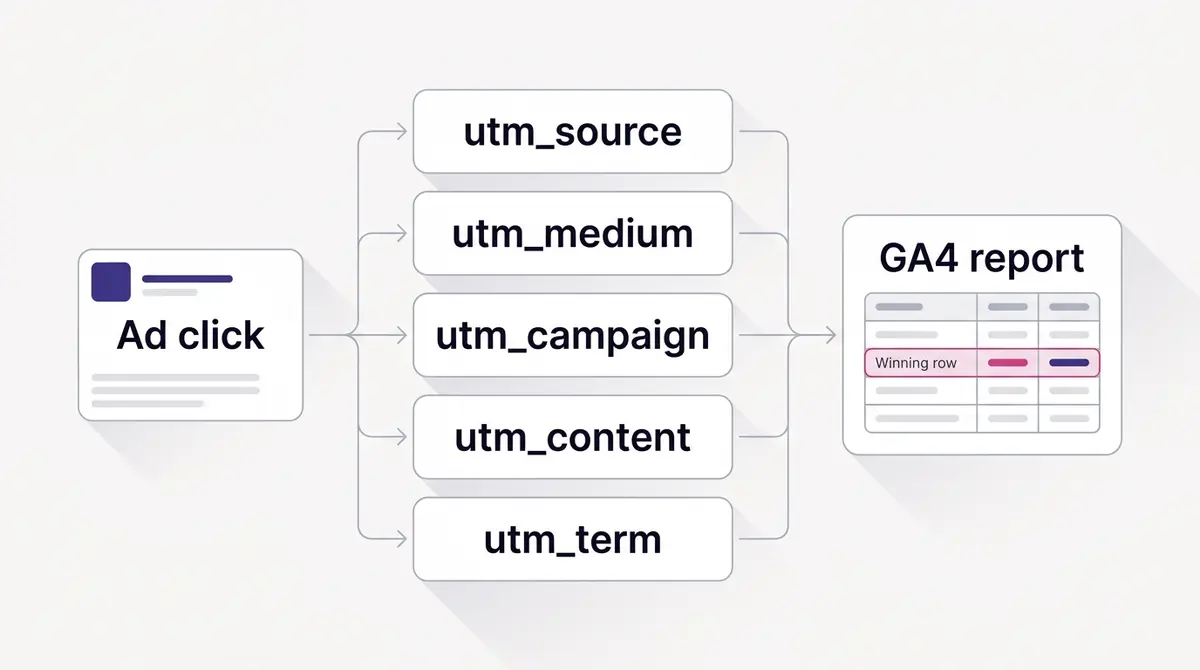
UTM parameters are tags you append to the destination URL of a Facebook ad so analytics can attribute clicks to the exact source, campaign, and creative. The cleanest setup uses the ad-level URL parameters field in Ads Manager (under Ad, Links, Advanced options) with a fixed lowercase naming convention and Meta's dynamic placeholders like {{site_source_name}} and {{ad.name}}. Get it right and GA4 tells you which angle drew the most landing-page clicks, so you research more of that angle, generate the next variant, and relaunch. Google confirms UTM values are case-sensitive, which is the technical reason a strict convention matters.
You launched four creatives, the campaign spent, and a week later you cannot say which ad actually drove the sales. Ads Manager shows clicks and CPMs, but the moment a visitor lands on your site, attribution breaks unless you tagged the URL first. UTM parameters are that tag. They are five small strings appended to your destination link, and they decide whether your analytics can name the winning angle or just shrug at a wall of direct traffic. The setup takes minutes, the payoff compounds for the life of the account, and the only hard part is being disciplined about how you name things.
What UTM parameters actually do for a Facebook ad
A UTM parameter is a short tag you append to the end of a destination URL so analytics software can identify where a visitor came from. The acronym dates back to Urchin, the company Google bought to build Analytics, and the five tags have not meaningfully changed since. What changed is the stakes. The moment a person clicks your ad and lands on your own website, Meta hands off to your analytics, and your analytics only knows what the URL tells it. No tags, and GA4 typically buckets that visitor as direct or as undifferentiated social traffic. Tag the URL, and the same visitor arrives stamped with the platform, the campaign, and the exact creative that earned the click.
That handoff is where most attribution quietly fails. The scale of the problem is not small. Meta booked $196.18 billion in full-year 2025 advertising revenue, up 22% year over year per the company's own investor reporting, and it controlled 65.8% of social-media ad spend in Q2 2025 according to Sculpt's analysis of platform earnings. eMarketer projects Meta will overtake Google in net digital ad revenue for the first time in 2026, at a projected $243.46 billion versus Google's $239.54 billion, as reported by The Next Web. More money is flowing into Meta ads than ever, which means more advertisers than ever are trying to prove those ads worked. UTMs are the cheapest, most durable way to do it, because they live in first-party analytics you control rather than in any one ad platform's reporting.
The business pressure is real and measurable. Sprout Social's 2025 Index found 65% of marketing leaders want to see direct connections between social campaigns and business goals, and 57% name revenue as a metric they use to define social ROI. Yet Accutics' 2025 survey of several hundred global leaders found 67% say inconsistent data-collection practices limit their ability to prove impact, and 73% say their current data setup is holding them back from reaching business goals, with teams juggling an average of 8.4 dashboards. UTMs do not fix every dashboard, but they fix the one upstream cause that quietly corrupts all of them: traffic that arrives without a name.
It helps to be precise about what a UTM is and is not. It is not a cookie, a pixel, or a tracking script; it is plain text in the URL, visible to anyone who looks at the address bar. That makes it private-by-design in a useful sense, because it carries no personal data, only the labels you chose. It also means UTMs survive the privacy changes that broke other measurement. When a browser blocks third-party cookies or a user opts out of ad tracking, the source, campaign, and creative labels still ride along on the link, so your first-party analytics keeps attributing the click. That durability is exactly why UTMs have outlasted nearly every other tracking technique introduced since: they depend on nothing the browser can revoke.
Where UTMs fit: the source label, the pixel, and the Conversions API
UTMs are one of three tracking layers on a Facebook ad, and confusing them is the most common reason a setup half-works. Each answers a different question, and a healthy account runs all three.
| Layer | Where it lives | What it answers | Who reads it |
|---|---|---|---|
| UTM parameters | The destination URL | Which source, campaign, and creative sent this click | Your own analytics, like GA4 |
| Meta Pixel | A browser tag on your site | What the visitor did after the click: view, add to cart, buy | Meta, for optimization and reporting |
| Conversions API | Your server | The same conversion events, sent server-side and deduplicated against the Pixel by a shared event ID | Meta, durable past browser limits |
Read it as a clean division of labour. UTMs answer where a visitor came from, inside a tool you own. The Meta Pixel and the Conversions API answer what that visitor did, and feed it back to Meta so delivery can find more buyers. UTMs never touch Meta's optimization, and the pixel never appears in your GA4 source report. You want the whole set: UTMs for first-party reporting, pixel and CAPI for the optimization loop.
That separation is also why UTMs are the durable layer. They are plain text in the URL, not a cookie or a script, so an ad blocker or a cookie restriction that suppresses the pixel still lets the tagged link arrive intact, labels and all. The privacy trend cuts the same way. Apple's Link Tracking Protection, introduced with iOS 17, removes the information some sites add to URLs to track people across other sites, including click identifiers like fbclid, from links in Messages, Mail, and Safari Private Browsing, and the links still work as expected. Those per-person click IDs are exactly what gets stripped. The standard utm_ campaign parameters, which name a campaign rather than a person, ride through untouched. The lesson is practical: do not lean on fbclid-based attribution, and treat your own UTM labels as the layer that survives. Note too that GA4's click attribution is a separate question from Meta's own attribution window, which counts conversions on different rules, so expect the two sets of numbers to differ.
The five parameters, and what each one should carry
Every UTM string is built from five named tags. Three of them are core, the two others add the granularity that makes creative testing possible. Use all five and keep each one doing one job.
| Parameter | What it names | Example value |
|---|---|---|
| utm_source | The platform sending the click | |
| utm_medium | The channel type | paid-social |
| utm_campaign | The campaign or promotion | collagen-q1-2027 |
| utm_content | The specific ad or creative | ugc-hook-a_before-after |
| utm_term | Placement (repurposed for paid social) | instagram-stories |
Source, medium, and campaign are the three GA4 maps to its core traffic dimensions, so they belong in every report. The field that earns its keep for paid social is utm_content. It is the one that carries the creative or angle, and it is the field your testing loop reads to decide which ad won. Treat utm_content as the load-bearing parameter and the rest as context around it. A campaign can run a dozen creatives; if they all share one utm_content value, GA4 collapses them into a single undifferentiated row and you have learned nothing about which angle pulled. Give each creative its own value and the same report becomes a leaderboard.
utm_term is the spare. In search advertising it held the keyword, but paid social has no keyword, so the disciplined move is to repurpose it for placement: feed, stories, reels, and so on. That lets you slice performance by where the ad ran without burning your utm_content field, which you want reserved for the creative itself.
Where to set UTMs at the ad level
There are two places you could paste a tracking string into a Facebook ad, and only one of them is right. The wrong place is the website URL field itself, where you set the destination. Tagging there clutters the visible link, breaks if you reuse the creative, and does not play well with dynamic shop destinations.
The right place is the dedicated URL parameters field. In Ads Manager you find it at the ad level, under Ad, then Links, then Advanced options; some flows label that section Tracking. Paste your parameter string there and Meta applies it to every destination the ad sends people to. One detail matters and trips up most first-timers: paste the parameters without a leading question mark. Write utm_source=facebook&utm_medium=paid-social and so on, not ?utm_source=facebook. Meta appends the separator itself, and a stray question mark produces a malformed URL with two of them.
Setting tracking at the ad level, rather than baking it into the link, is what keeps the whole system clean. Your destination URL stays readable, the same landing page can serve a dozen ads, and every ad still arrives in analytics correctly labelled. It also means you can run the same product link across an entire campaign and still tell every ad apart, because the differentiation lives in the parameters, not the URL.
Dynamic placeholders: let Meta fill the values for you
Typing utm_content by hand for fifty ads is how naming conventions die. Meta solves this with dynamic URL placeholders: double-curly-brace tokens it auto-fills at click time with the real campaign, ad set, ad, and placement values. According to Mixed Analytics' guide, updated in April 2026 and matching Meta's own help documentation, eight placeholders are confirmed available at the ad level:
| Placeholder | Auto-fills with |
|---|---|
| The platform: fb, ig, msg, or an | |
| The placement, such as feed or stories | |
| The campaign's name | |
| The campaign's numeric ID | |
| The ad set's name | |
| The ad set's numeric ID | |
| The ad's name | |
| The ad's numeric ID |
A fully dynamic string looks like this: utm_source=&utm_medium=paid-social&utm_campaign=&utm_content=&utm_term=. Set it once at the account or campaign level and every ad inherits correctly named tracking without you touching a single ad again. The catch, and it is worth stating plainly rather than discovering in a report: and can return empty under some Advantage+ configurations, where Meta's automation abstracts placements away. Always check live reporting after launch to confirm your placeholders are resolving, and keep a human-readable fallback in mind for campaigns where they come back blank.
There is a tradeoff between dynamic and static values. Dynamic placeholders scale effortlessly and never drift, but they inherit whatever you named your ads, so they are only as clean as your ad names. Static values, like utm_content=ugc-hook-a_before-after, give you total control over the label but require discipline to type consistently. The strong default is dynamic for source, campaign, ad, and placement, with a deliberate static utm_medium of paid-social so your channel grouping never wobbles.
Because dynamic placeholders inherit your ad names, the convention you enforce inside Ads Manager becomes your tracking convention by proxy. If you name an ad "Final FINAL v3 (use this one)", that string lands in your analytics verbatim, spaces and all. So the cheapest way to keep tracking clean is to name ads the way you want them to appear in GA4: lowercase, hyphenated, descriptive of the angle. A small habit at the ad-naming stage saves a large mess at the reporting stage. One more practical note on : it returns a short code rather than a tidy word, fb for Facebook, ig for Instagram, msg for Messenger, and an for Audience Network. Decide up front whether your reports should show those codes or whether you would rather set utm_source statically to facebook and instagram for readability. Either is defensible; what matters is that you pick one and apply it everywhere.
A naming convention that survives a year of campaigns
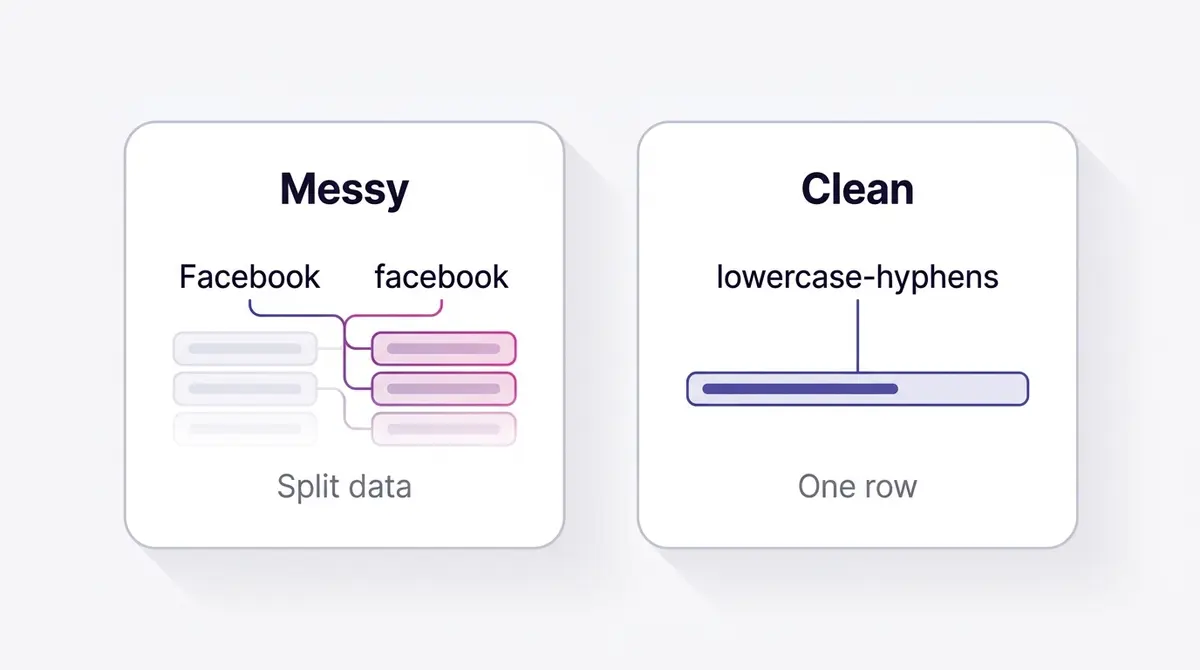
The single technical fact that justifies a strict convention comes from Google itself: GA4 treats UTM values as case-sensitive. Google's own URL builder documentation confirms that utm_source=google and utm_source=Google are recorded as two different sources. The same is true of every parameter. So Facebook, facebook, and FaceBook become three separate rows, your campaign splinters across duplicates, and a report that should read clean reads like noise. This is not a style preference. It is the difference between provable ROI and the 67% of leaders Accutics found cannot prove impact because their data collection is inconsistent.
If you would rather assemble the string than type it, the Meta ads UTM builder takes the five parameters and hands back the tagged URL with these rules already applied. A convention worth keeping has four rules. Lowercase everything, always. Use hyphens between words and never spaces, because spaces become %20 in the URL and break readability. Version your campaigns with a year and quarter, such as q1-2027, so the same promotion run twice never collides. And keep each value to three or four meaningful components, enough to be specific without becoming unreadable. Applied to utm_content, that yields values like ugc-hook-a_before-after or static_pore-clean_3step, where you can read the format, the angle, and the variant at a glance.
Consider how this plays out across real creative tests. A brand like Medicube can run a comparison ad that split-tests two pore-care angles in one campaign, tagging one creative utm_content=medicube_poreclean_before-after and the other utm_content=medicube_poreclean_3step. GA4 then reports landing-page clicks and conversions for each angle separately, so the winner is obvious rather than inferred. A brand like Beyond Collagen+ testing three creator hooks in a founder or UGC video can let utm_content= carry each creator's name automatically, attributing checkout clicks to the exact hook that won. The convention is what makes both of those reports trustworthy.
The mistakes that quietly break UTM data
Most broken UTM reports trace to a short list of avoidable errors, and the biggest one is not in the parameter string at all: tagging your own internal links. When a visitor arrives from a paid Facebook ad stamped utm_source=facebook&utm_medium=paid-social and then clicks an on-site button, pop-up, or menu item that also carries UTM parameters, GA4 overwrites the session's campaign information with whatever that internal link says. The original paid-Facebook source is gone, and the ad you paid for shows no credit. Search Engine Land documents the same failure: tracking parameters on internal links fragment attribution and shift credit away from the real entry point. The rule is simple. UTMs are only ever for external links pointing into your site (your ads, your emails, your partner placements). Never put one on a link that keeps someone on the same domain.
The damage scales with spend. Picture a $2,000 day across four creatives and a sitewide pop-up whose "Shop now" button is tagged utm_source=popup. Every visitor who clicks it restarts attribution, so a day that should report four labelled creatives instead reports a pile of popup sessions and almost nothing credited to Facebook. The same habit also spawns crawlable URL variants of your own pages, the kind of near-duplicate that muddies organic reporting, which is a second reason to keep internal links clean.
The rest of the common traps fit in one table. Scan it before every launch.
| Mistake | What it breaks | Fix |
|---|---|---|
| Leading ? on the parameter string | Meta adds its own separator, so you get a malformed double-? URL | Start with utm_source, no question mark |
| Mixed case (Facebook vs facebook) | Case-sensitive values split one source into duplicate rows | Lowercase everything |
| Spaces in values | Encoded as %20, unreadable in reports | Use hyphens between words |
| utm_medium=social on a paid ad | GA4 files it under Organic Social, not Paid Social | Use a paid medium like paid-social or cpc |
| UTMs on internal links | Self-referral overwrites the paid source | Tag external links only |
| Shortening the link after Meta resolves placeholders | null tokens ship as literal text and never fill | Shorten the static base URL, never the parameter string |
| One utm_content for every creative | GA4 collapses all ads into one row, no leaderboard | Give each creative a distinct utm_content |
The Organic Social row is worth dwelling on, because it fails silently. GA4 files a session under Paid Social only when the source is a recognized social site and utm_medium matches its paid pattern, the regex ^(.cp.|ppc|retargeting|paid.*)$. Set utm_medium=social and the source still matches the social list, so GA4 routes the click to Organic Social instead. Your paid traffic then hides inside your organic numbers, and every channel-level report reads wrong without throwing a single error. That one wrong value is why utm_medium=paid-social or cpc is not a style choice, it is what keeps the channel report honest.
QA the tagged URL before you spend
A mis-tagged campaign does not announce itself. It quietly collects empty or wrong data until you notice a week and a budget later. A two-minute check before launch prevents that. Build the link with Google's free Campaign URL Builder so the syntax and encoding come out right, then paste it into a browser and load it: confirm it lands on the correct page, that there is exactly one ? in the address, and that no null token is sitting there as literal text on a static value.
Dynamic placeholders cannot be verified that way, because they only resolve on a real click. So the final test moves to launch. Set a tiny budget, publish, open GA4's Realtime report, and click your own live ad. The session should arrive within seconds stamped with the right source, medium, and campaign, a populated utm_content (the ad's name, not an empty ), and, critically, filed under Paid Social rather than Organic. If utm_content comes back blank or the channel is wrong, you caught it after a few cents instead of after the campaign.
Then write it down. A UTM registry is a shared spreadsheet that lists every approved value for every parameter: the exact spelling of each source, the medium set you allow, the campaign naming pattern, and one row per campaign holding the final tagged URL. Conventions do not decay because people forget the rules. They decay because two people invent different rules at once. The registry is where one teammate's facebook stops colliding with another's fb, and it is the cheapest way to keep a year of campaigns comparable.
Two honest limits round this out. GA4 recognizes more than the classic five tags: utm_id carries a Campaign ID for joining imported cost data, and newer manual parameters (utm_source_platform, utm_creative_format, and utm_marketing_tactic) exist, though GA4 does not currently report on the last two. For most Facebook advertisers the five tags plus a fixed medium are plenty, and you only reach for utm_id when you import spend data. And UTMs label the link, not the person, so when someone copies or screenshots your tagged ad link into a group chat, the paid source travels with it, and genuine organic shares can inflate your paid numbers. It is usually a small effect, but it is why you treat UTM attribution as directional at the edges rather than gospel down to the last click.
Reading the data in GA4, then proving the revenue
Once tagged traffic flows in, GA4 maps your parameters to named dimensions. utm_source and utm_medium populate Session source and Session medium, utm_campaign becomes Session campaign, and utm_content maps to Session manual ad content, the dimension you pivot on to compare creatives. Build a single exploration with Session manual ad content as the row, then add sessions, key events, and revenue as columns, and you have a creative leaderboard updated in real time. The cheapest, highest-converting utm_content is your winner, full stop.
Turn that leaderboard into a decision with two more views. Add a comparison date range to see whether the winning utm_content held up over the following weeks or faded, and pivot by utm_term to learn which placement carried it. The pixel and Conversions API half of measurement is covered above; this is the first-party reporting half, the side you own. For the broader picture of which numbers to trust and how to read them together, our guide on Facebook ad reporting walks through the full dashboard, and Facebook ad A/B testing shows how to use utm_content as the dimension that calls each test.
One honest limit: UTMs ride on a landing-page URL, so they do not apply the same way to Meta Instant Forms, where the lead is captured on-platform with no site click to tag. For lead forms, map the form fields into your CRM instead. UTMs cover the website-destination majority of your spend, which is where most of the attribution money sits.
Closing the loop: from winning UTM to the next ad
Attribution is only useful if it changes what you make next. The point of a clean utm_content is not a tidy report; it is a decision. When GA4 names the angle that drove the most or cheapest conversions, that angle becomes your brief. You research more of what made it work, build the next variant, relaunch it with a fresh utm_content value, and read the result the same way. The loop tightens with every cycle, and the convention is what keeps each cycle comparable to the last.
This is the practical engine behind every account that compounds rather than plateaus. The market is already moving this direction with automation: more than 4 million advertisers were using at least one of Meta's generative-AI creative tools as of early 2025, roughly quadrupling from one million six months earlier per AdExchanger, a directional figure from a vendor-adjacent disclosure but a clear trend. The advertisers pulling ahead are not the ones generating the most ads; they are the ones with the cleanest read on which ads worked, feeding that signal straight back into the next round. Platforms like AdPlay.ai are built around exactly this loop, where the winning angle from your reporting becomes the input to the next on-brand creative you generate and relaunch. Whatever tooling you use, the discipline is the same: tag every ad, name it consistently, read the leaderboard, and let the winner write the next brief. For the metrics that tell you which UTM is actually winning, our guide on Facebook ad metrics covers what to track beyond raw clicks.
Example ad angles
Representative hooks and formats from the category.
“Comparison ad for two pore-care angles split-tested in one campaign”
“Founder or UGC ad for three creator hooks attributed by creative name”
By the numbers
Frequently asked questions
What are UTM parameters and why do Facebook ads need them?
UTM parameters are tags appended to a destination URL, like utm_source and utm_campaign, that analytics tools read to attribute a visit to its origin. Facebook ads need them because once a click leaves Meta and lands on your site, Ads Manager loses the thread; without UTMs, GA4 often files that traffic as direct or generic social. Tag the URL and your analytics can name the exact campaign and creative behind every session, conversion, and dollar.
Where do I put UTM parameters on a Facebook ad?
Use the ad-level URL parameters field, found under Ad, then Links, then Advanced options in Ads Manager (some flows label the section Tracking). Paste the parameter string there without a leading question mark, because Meta appends the separator automatically. Setting them in this dedicated field keeps your website URL clean and applies the tags to every destination, including dynamic shop links.
Why is my paid Facebook traffic showing up as organic or social in GA4?
Almost always a utm_medium problem. GA4 files a click under Paid Social only when the source is a recognized social site and utm_medium matches its paid pattern, the regex that catches values like cpc, ppc, and paid-social. Tag utm_medium=social and the source still matches the social list, so GA4 routes the session to Organic Social and your paid spend disappears into your organic numbers. Set a paid medium such as paid-social or cpc and the traffic lands in Paid Social where it belongs.
What are Meta dynamic URL placeholders?
Dynamic placeholders are double-curly-brace tokens Meta auto-fills at click time, so you do not hand-type values per ad. The eight confirmed ones are {{site_source_name}}, {{placement}}, {{campaign.id}}, {{campaign.name}}, {{adset.id}}, {{adset.name}}, {{ad.id}}, and {{ad.name}}. A common pattern is utm_source={{site_source_name}} and utm_content={{ad.name}}. Verify them in reporting, because {{placement}} and {{site_source_name}} can return empty under some Advantage+ configurations.
Why does my UTM naming convention need to be lowercase?
Because GA4 treats UTM values as case-sensitive: utm_source=Facebook and utm_source=facebook register as two separate sources, splitting your data into duplicate rows. Google states this directly in its URL builder documentation. Standardizing on lowercase with hyphens removes a whole class of silent reporting errors and keeps every campaign comparable over time.
Can I add UTM parameters to internal links on my own website?
No, and it is the costliest UTM mistake there is. When a visitor who arrived from a paid Facebook ad clicks an internal link that carries its own UTM tags, like a tagged pop-up or menu button, GA4 overwrites the session's source with the internal link's values, so the ad loses all credit. Keep UTMs strictly for external links pointing into your site (ads, emails, partner placements), and never on a link that keeps someone on the same domain.
Do UTMs work for Meta lead forms?
Not the same way. Instant forms capture leads on-platform, so there is no landing-page click for a URL parameter to ride along on. For those, map form fields and pass them to your CRM rather than relying on UTM-in-URL tracking. UTMs apply when the ad sends people to your website, which is the majority of traffic and conversion campaigns.
How do UTMs help me find my winning ad creative?
Tag each creative with a distinct utm_content value, then open GA4 and compare sessions, engagement, and conversions by that dimension. The ad whose utm_content drove the most or cheapest conversions is your winner. From there you research more of that angle, build the next variant, and relaunch it with a new utm_content, turning attribution into a repeatable testing loop.
Sources
- 1.Meta, Reports Fourth Quarter and Full Year 2025 Results (2026)
- 2.Google Analytics Help, URL builders: Collect campaign data with custom URLs (2026)
- 3.Mixed Analytics, Track FB Ads in GA with URL Dynamic Parameters (2026)
- 4.Sculpt, Share of Social Media Ad Spend: Q2 2025 (2025)
- 5.AdExchanger, Q4: Meta Minted Money And Improved Its Monetization (2025)
- 6.The Next Web, Meta set to overtake Google in digital ad revenue in 2026 (2026)
- 7.Sprout Social, Social Media ROI Statistics (2025)
- 8.Accutics, Marketing Data Challenges in 2025: Insights from Global Leaders (2025)
- 9.Meta Business Help Center, Add URL parameters to your Meta ads (2026)
- 10.Google Analytics Help, [GA4] Default channel group (2026)
- 11.Google Analytics Help, Traffic-source dimensions, manual tagging, and auto-tagging (2026)
- 12.Apple Newsroom, Apple announces powerful new privacy and security features (2023)
- 13.Search Engine Land, Why tracking parameters in internal links hurt your SEO and how to fix them (2026)
Keep exploring
Turn ad research into winning ads
Research the ads that work, generate the creative on-brand, and launch to Meta, all in one tool.
7-day free trial · No credit card required