
Facebook Ad Account Restricted? (2026)
What a restricted ad account, a disabled account and a flagged Page each mean, why Meta restricts them, and the request-review steps to recover and harden.
Updated August 2026 · Likit Sae Lee, CTO

A restricted ad account is a targeted limit (you cannot advertise, your spend cap drops, or some formats vanish), which is different from a fully disabled account and from a separately flagged Page. The fix lives in Account Quality inside Meta Business Suite: read the exact issue, settle any payment problem, confirm your identity if the flag is suspicious activity, and use Request Review to appeal a policy decision. Most restrictions are recoverable because Meta wants legitimate advertisers spending: advertising was around 97.6% of Meta's revenue in 2025, per Meta's own reporting. Move within the deadline shown in Account Quality, because every frozen day costs you reach, with traffic clicks averaging $0.70 in 2025.
You open Ads Manager, the campaigns are paused, and a red banner tells you the account is restricted. The instinct is to panic, spin up a backup account, or fire off five identical appeals. None of that helps. Most restrictions are a specific, named problem with a specific fix, and the platform is built to put a paying advertiser back to work, not to lose one. The first job is to read what actually happened, because a restricted ad account, a disabled account and a flagged Page are three different situations with three different recovery paths. Slow down, find the real status, and work the appeal once, properly.
Restricted, disabled, or flagged: name what actually happened
The single most expensive mistake in this moment is acting before you know which problem you have. People read a red banner, assume the worst, and start building a backup account, which is exactly the behaviour that gets the backup flagged too. There are three distinct situations, and they are not interchangeable.
A restricted ad account is a targeted limit. The account still exists and most of it still works, but Meta has clipped something specific: you may be blocked from advertising, your daily spend cap may have dropped, or certain ad formats may have disappeared. A disabled account is a full shut-off, where nothing runs until the decision is reviewed and reversed. And a Page can be restricted or limited on its own, separately from the ad account, with its own reason and its own review route. Your ad account can be frozen while the Page is healthy, or the reverse.
| Status | What it means | Where you fix it |
|---|---|---|
| Restricted ad account | A targeted limit: no advertising, lower spend cap, or lost formats. The rest of the account works. | Account Quality, plus Payment Settings if billing is the cause. |
| Disabled account | A full shut-off. Nothing runs until the decision is reviewed and reversed. | Account Quality, Request Review. |
| Restricted or flagged Page | The Page itself is limited, independent of the ad account. | Account Quality, the Page's own review option. |
Reading the wording precisely is not pedantry. The recovery path branches here, and fixing the wrong asset is the most common way people burn the few days they have to act.
There is a fourth layer worth knowing about: the Business Account itself, the top-level organisation that owns your ad accounts, your Pages and the people who work on them. A restriction can land on the whole Business Account rather than a single asset inside it, which is the worst case because it freezes everything at once. Account Quality distinguishes this for you, so when you read the dashboard, note not just which asset is affected but at what level. A single ad account paused is an inconvenience; the Business Account restricted is a full stop, and it changes how urgently you treat the deadline.
What a frozen account actually costs you
The urgency is easy to underrate, so make it concrete. The moment a restriction lands, the bill comes due in several ways at once.
- Your live campaigns stop. Active ads pause mid-flight, and the momentum and delivery learning they had built starts to decay.
- You cannot launch anything new. No fresh campaigns, no creative tests, no scaling the winner you were about to push.
- Your reporting can go dark. Past performance, the numbers you use to decide the next move, is often locked behind the same wall right when you need it.
- The auction moves without you. Competitors keep buying the impressions you are not, and the cost of getting back in climbs while you wait.
None of it looks dramatic on day one, but it compounds: a week frozen is a week of lost sales, a cooling audience, and a learning phase you will pay to rebuild. That is why the steps below are worth doing today, not after the weekend.
Why Meta restricts accounts, even clean ones
It helps to understand the machine you are appealing to, because the why reframes the panic. Advertising is the business. Meta's advertising revenue reached $196.18 billion for full-year 2025, around 97.6% of total revenue, per the company's own results. A platform that depends on advertising for nearly all of its income does not want to lose a legitimate advertiser. It does, however, police the system hard, because the same auction that carries your sale carries scams.
The scale of that policing is the reason a careful advertiser still gets caught. Meta reported removing over 159 million scam ads across its platforms in 2025, and 92% of those came down before anyone reported them, according to its newsroom. It also removed 10.9 million accounts linked to criminal scam centres in the same period. Treat those as Meta's own figures, directional rather than independently audited, but the direction is clear: enforcement is overwhelmingly automated and proactive. A net that wide will snag clean accounts.
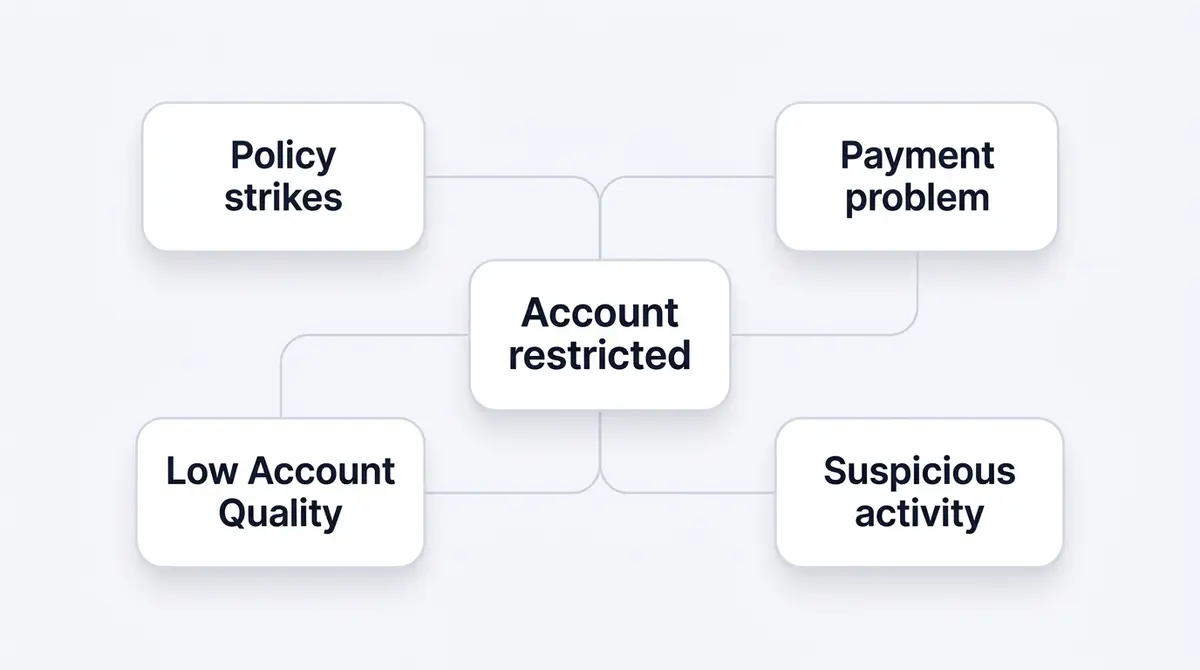
Four causes account for most restrictions. Policy strikes, where ads or behaviour violate Meta's Advertising Standards and violations accumulate. Payment problems, where a failed charge, an unpaid balance, a disputed payment or an unverified method trips a billing restriction. Suspicious activity, where login signals, a sudden country change, or a sharp spend spike from a new account look like a compromised or fake actor. And low Account Quality, the cumulative health of the asset over time. Identity checks are part of this last bucket: Social Media Today, citing Meta's own reporting, noted that an estimated 4% of Meta's 3 billion-plus monthly active users are fake accounts, which is why the platform runs aggressive suspicious-activity and identity checks that occasionally misread a real business.
Crucially, Meta admits the false-positive problem itself. Its Transparency Center reported Facebook content-enforcement precision above 90% in Q3 2025, with less than 0.1% of content removed incorrectly. That sub-0.1% sounds tiny until you remember it sits on top of billions of actions. If your account is one of them, the appeal flow exists precisely for you.
Customer feedback is its own scored trigger
One cause hides inside that Account Quality bucket and deserves naming on its own, because it has a measurable threshold and it catches sellers who never broke a content rule. If you sell through Facebook and Instagram, Meta surveys buyers after purchase and turns their answers about product quality, shipping, and service into a feedback score for your Page. Let that score slide and Meta throttles delivery first: your ads reach fewer people for the same budget, so cost per result quietly climbs. Let it slide far enough and the Page can lose the ability to advertise at all. This is not a one-off complaint. It is a standing, scored signal Meta watches continuously, which means a run of late shipments or refund disputes can restrict your advertising even when every ad you ran was compliant. Check it on a schedule, the way you check spend.
Find the real status in Account Quality
Every recovery starts in one place: Account Quality, which lives inside Meta Business Suite at business.facebook.com/accountquality. Do not work from the notification email, which is usually vaguer than the dashboard and sometimes lands days late. The dashboard is the source of truth.
Account Quality shows the status of four things at once: your ad account, your Page, your Business Account, and your personal user account. Each can carry its own issue. Open it and read, in order, which asset is affected, the specific reason Meta states, and whether a Request Review or Appeal button is present. A restriction can hit the whole Business Account or just a single asset, so note the scope before you touch anything. If the reason names a payment problem, your path is billing, not an appeal. If it names a policy violation against Advertising Standards, your path is Request Review. If it names suspicious activity, you may need to confirm your identity or secure the account first.
Write down exactly what the dashboard says, including any deadline. The deadline matters more than the panic does, and it is the number that should set your pace.
One reading habit saves a lot of wasted effort. Account Quality often lists more than one issue, and they are not always equal. A payment hold and a policy flag can sit on the same account at the same time, and clearing only one leaves the account restricted. Read the whole list, not just the first red line, and decide the order: settle payment first because it is mechanical and may auto-resolve, then appeal any policy decision that remains. If the only issue is suspicious activity, the dashboard will usually route you to secure the account, confirm identity, or re-verify before anything else, and skipping that step makes every later appeal pointless because the system still does not trust the login.
The request-review flow, step by step
Once you know the asset and the cause, work the appeal once and work it cleanly. Submitting five identical review requests does not speed anything up; it can muddy the queue and look like the kind of automated behaviour that triggered the flag in the first place.
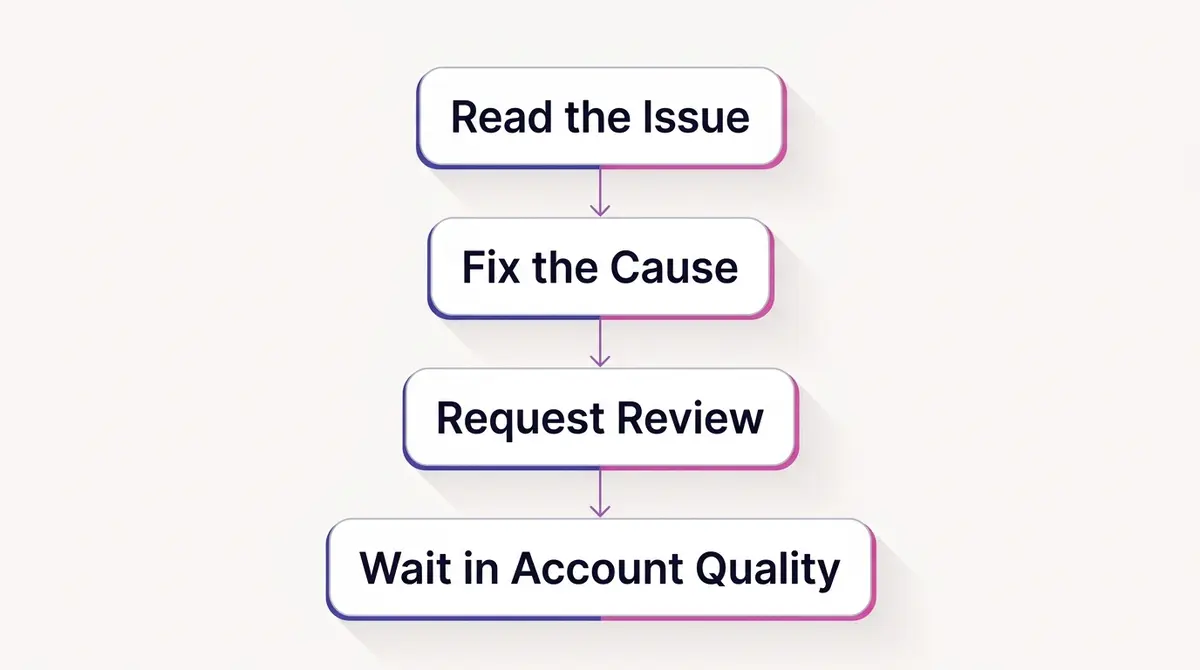
The flow has four steps.
First, read the issue in Account Quality and identify the affected asset. Second, fix the underlying cause if it is fixable before you appeal. If billing is the problem, open Payment Settings, settle any outstanding balance, and verify or replace the payment method. A payment-driven restriction frequently lifts on its own once billing is healthy, sometimes with no manual review at all, so this step can end the whole ordeal. Third, if the cause is a policy decision, select the restricted asset and use Request Review to appeal. Be accurate and specific. If you genuinely believe the enforcement was a mistake, say so plainly and reference the ad or behaviour in question; if you made a fixable error, correct it and note that you have. Fourth, wait inside Account Quality for Meta's response rather than re-submitting. The status updates in the dashboard.
A practical note on deadlines. Various timeframes circulate online for how long you have before a restriction hardens into something permanent, and many of them are unverified. Rather than trusting a number from a third party, read the deadline shown in your own Account Quality and act before it. That is the only timeline that applies to your specific case.
The cost of waiting is real, which is why the deadline deserves respect. WordStream's 2025 benchmarks put the average Facebook traffic cost-per-click at $0.70, down from $0.77 the year before, and the average cost-per-lead at $27.66 across the data window ending mid-2025. Every day an account sits frozen is a day of reach and leads you are paying for in lost momentum, while auction costs keep climbing: Meta's average price per ad rose 9% year over year across 2025, per its own results. The market does not pause while your account is stuck.
There is also a writing discipline to the review request itself. Keep it short, factual and free of pleading. State which asset is restricted, what the dashboard says the reason is, and either why you believe it is a mistake or what you have already corrected. If a specific ad was flagged, name it and explain why it complies with Advertising Standards. Avoid copy-pasting a template you found online, because a generic, emotional appeal reads like the kind of mass-submitted request the system is built to filter. One precise, human paragraph that addresses the stated reason head-on does more than five urgent ones. Then resist the urge to re-submit while the status still says under review; re-submitting resets nothing and only adds noise.
What the review can come back with
The flow ends with you waiting in Account Quality, but the wait is not a simple yes or no. A review can land in several places, and knowing them in advance keeps you from misreading the result or quitting too early.
- Reinstated. The restriction lifts and the asset works again. Paused campaigns usually do not restart themselves, so switch them back on and expect a fresh learning phase.
- Reinstated with limits. The account returns on a tighter leash: a lower spend cap, closer monitoring, or restricted formats for a while as you rebuild trust. Treat it as probation, not a clean slate.
- More information needed. Meta asks you to confirm your identity, verify the business, or add detail before deciding. This is not a rejection, it is a held door, and answering quickly is the whole job.
- Rejected. The decision stands. A rejection is not always final: you can often submit again if you have new information or have fixed the underlying cause, though repeated identical appeals get you nowhere.
- No response yet. The status simply sits under review. Do not re-submit, which resets nothing and adds noise; if a clear, valid case stalls well past the deadline the dashboard showed you, that is when escalating through Meta's support channels beats re-filing the same request.
What to do when the cause is payment
Payment restrictions deserve their own treatment because they are common, separate from policy, and usually the fastest to clear. The triggers are mundane: a card that failed at the monthly charge, an unpaid running balance, a payment a bank disputed or charged back, or a method Meta could not verify.
The fix is mechanical. Open Payment Settings, clear any outstanding balance in full, and then verify the payment method or add a fresh one that Meta can confirm. Avoid the temptation to swap to a brand-new card from a brand-new profile, because a sudden change in payment identity can itself read as suspicious activity and stack a second problem on the first. Settle, verify, and give it time. Because this path can resolve automatically, many advertisers never need to file a formal review at all; the restriction simply lifts once the billing record is clean. If it does not lift after billing is healthy, then return to Account Quality and Request Review, noting that the payment issue has been resolved.
A chargeback deserves special care, because it is the one payment problem you cannot fix purely on Meta's side. If a bank reversed a charge, Meta sees an unpaid debt, and adding a new card does not erase it. Pay the outstanding amount through Payment Settings so the ledger reads as settled, and if the chargeback was a genuine error on the bank's part, resolve it with the bank too so it does not repeat next cycle. The pattern to internalise is that billing restrictions are about trust in the payment relationship, not about a single transaction, so the goal is a clean, verified, paid-up record rather than a quick workaround.
When the flag is suspicious activity, secure first then verify
A suspicious-activity restriction is a different animal from a policy strike, and the order of operations decides whether your appeal lands or wastes a day. If Meta thinks the login looks compromised, a sudden country change, an unfamiliar device, a spend pattern that does not match your history, an appeal is pointless until the account looks safe again. Appealing first hands the system nothing it can trust.
So secure the account before you write a word of appeal. On the personal profile that administers everything, review the active login sessions and log out any device or location you do not recognise, change the password to something unique, and turn on two-factor authentication if it is not already on. If a real compromise triggered the flag, this is the step that actually ends it.
Then expect to prove who you are. For a suspicious-activity or identity flag, Meta may ask you to upload a government-issued ID to confirm your identity, and for certain restrictions it requires full Business verification: confirming your legal business name and details in your Business settings. Skipping this on the way to the appeal button is a common way to lose days. For these flags the verification is often the gate the appeal cannot pass until it clears, so treat the ID upload and the business check as the real fix, not a formality.
When it is the Page, not the ad account
If Account Quality points at the Page rather than the ad account, your work moves to a different asset with a different route. A Page can be restricted, limited, or have features removed because of content it published, repeated community-standards issues, or feedback from people who saw its posts. None of that necessarily touches the ad account, and an ad-account appeal will not fix it.
Confirm the scope in the dashboard, then use the Page's own review option to appeal the Page decision specifically. Keep the two streams separate in your head. It is entirely possible to be running ads fine while the Page is limited, or to have a healthy Page while the ad account is frozen. The asset that carries the issue is the asset you fix, and Account Quality is explicit about which one it is.
When the restriction is on your personal profile
There is a version of this that catches people off guard: the limit lands not on an ad account or a Page, but on you. Meta can restrict the personal profile's advertising access, and when it does, you cannot create or manage ads anywhere, across every ad account and Business Account that profile touches. The ad accounts themselves can read as healthy; the problem is that the person operating them has been benched.
Account Quality shows this under your personal user account, listed separately from the ad account and the Page, which is exactly why reading all four levels matters. The fix follows the suspicious-activity path above: secure the profile, confirm your identity if asked, and request a review of the restriction on the profile itself.
There is a tempting workaround that carries real risk. Because the restriction is tied to you, a coworker or an agency whose own profile is healthy can sometimes keep the ads running while you sort yours out. That buys time, but it spreads your assets across more people, and if their profile is later flagged the exposure travels with it. Use it as a short bridge, not a permanent setup.
Harden the account so it does not happen twice
Recovery is only half the job. The advertisers who get restricted once and then never again are the ones who turn a scary afternoon into a permanent checklist. The goal is a clean, boring record that gives the automated systems nothing to react to.
Start with billing hygiene: keep a verified payment method on file and never let a balance go unpaid, because the cheapest restriction to avoid is a payment one. Turn on two-factor authentication on the personal account that administers everything, so your login signals read as legitimate and a compromise cannot quietly trigger a suspicious-activity freeze. Keep your creative and behaviour inside Meta's Advertising Standards, since there is no public fixed strike count, only cumulative violations that escalate enforcement the more they pile up. Avoid the patterns that look automated or fraudulent to the system: a brand-new account that suddenly spends large sums, recycled creative that previously drew complaints, or rapid administrative changes that resemble an account takeover.
Structure matters too. Run from one well-organised Business Account rather than scattering Pages and ad accounts across improvised setups, so a single issue stays contained and never freezes everything at once. A brand like Fitness Achievers keeps its gym, its Page and its ad account inside one tidy Business Account precisely so a single strike cannot take down the whole operation. And keep your proven creative in a place you control, separate from the account, so that the day a restriction lifts you are back in market within the hour rather than rebuilding from memory. Working in one place for research, generation, editing and Meta launch, the way a platform like AdPlay.ai is set up, makes that bounce-back fast, because nothing you depend on is locked inside the asset that got frozen.
The reason scattering is dangerous is that Meta's enforcement travels. Accounts, Pages, payment methods, and the people who administer them are linked, so a problem on one can pull the others down: a disabled admin can drag the assets they touch, a sibling ad account can taint the Business Account it sits in, and running several ad accounts for one small business is itself a pattern that invites a sweep. One tidy Business Account acts as a firebreak, keeping a single issue contained instead of cascading across everything you own.
Understand the end state you are working to avoid. An account disabled and never successfully appealed does not sit in limbo forever; eventually it hardens into a permanent shut-off. The damage then outlives the account, because Meta ties enforcement to the profile and the payment method behind it, not only to the ad account that froze. Spinning up a brand-new ad account on the same profile and card is the move the intro warned against: the new account is born under the old shadow and tends to get caught by the same signals. If you genuinely need a fresh start, recover the original asset the right way rather than improvise a duplicate; the mechanics of setting one up properly are in the guide on how to create a Facebook ad account.
If you want to go deeper on the rules your ads are judged against, read the guide on Facebook ad policies; if your issue is an ad stuck before it ever ran, the guide on why ads sit in review covers that adjacent case. Most restrictions are a named, recoverable problem. Read the dashboard, fix the real cause, appeal once, and harden so you do not return.
Example ad angles
Representative hooks and formats from the category.
“Reassurance ad for a clinic that settled a payment hold and got its ad account un-restricted”
“Behind-the-scenes ad for hardening a Business Account so one strike never freezes the whole gym”
By the numbers
Frequently asked questions
What is the difference between a restricted and a disabled Facebook ad account?
A restriction is a targeted limit: you may lose the ability to advertise, see a reduced spend cap, or lose certain ad formats while the rest of the account works. A disabled account is a full shut-off, where nothing runs until the decision is reviewed and reversed. Meta uses the two words deliberately, so read the wording in Account Quality carefully. The recovery path differs, and treating a restriction as a total loss usually means people overreact and create a second, riskier account.
Why was my Facebook ad account restricted when I did nothing wrong?
Enforcement is largely automated, and automation casts a wide net. Meta reported removing over 159 million scam ads in 2025, with 92% taken down before anyone reported them, per its own newsroom. A system catching that much bad activity proactively will sometimes flag a clean advertiser by mistake. Meta also states that on Facebook and Instagram, less than 0.1% of content was removed incorrectly in Q3 2025, which is a small share but a large absolute number across billions of items. If you believe you were caught wrongly, that is exactly what Request Review exists for.
Where do I see why my account was restricted?
Open Account Quality, which lives inside Meta Business Suite at business.facebook.com/accountquality. It shows the status of your ad account, your Page, your Business Account and your personal user account, the specific issue behind each restriction, and any Request Review or Appeal button that applies. This is the single source of truth: do not rely on the email summary, which is often vaguer than the dashboard. Read which asset is actually affected before you act.
How do I request a review of a restricted ad account?
In Account Quality, select the restricted asset, read the stated reason, then use the Request Review option to appeal the decision. Submit one clear, accurate review request rather than several. If the cause is a payment problem, settle the balance and verify your payment method in Payment Settings first, because that path often lifts automatically once billing is healthy. Then wait for Meta to respond inside the dashboard rather than re-submitting repeatedly.
How long does it take to recover a restricted Facebook ad account?
There is no fixed published timeline, and it varies with the cause and the queue. A payment-related restriction can clear quickly once the balance is settled and the method is verified, sometimes automatically. A policy review takes longer because a human or a model has to reassess the decision. Watch the deadline shown in Account Quality and act before it, since a frozen account is costing you reach every day; Facebook traffic clicks averaged $0.70 in 2025 per WordStream.
Can a payment problem restrict my ad account?
Yes, and it is a common and separate cause from policy. A failed charge, an unpaid balance, a disputed or charged-back payment, or an unverified payment method can each restrict an account on their own. The fix is to open Payment Settings, settle any outstanding balance, and verify or replace the payment method. Once billing is healthy, a payment-driven restriction frequently lifts without a manual appeal at all.
If my ad account is permanently disabled, can I just create a new one?
It is the worst move you can make, and panic pushes people straight toward it. Meta ties enforcement to the profile and the payment method behind an account, not only to the ad account that was frozen, so a fresh account spun up on the same profile and the same card tends to get caught by the same signals and disabled again, often faster. A disabled account that is never successfully appealed eventually becomes permanent, which is exactly why the appeal is worth working properly the first time. If you must start clean, recover or replace the underlying asset the right way rather than improvising a duplicate.
How do I stop my account from getting restricted again?
Harden the basics. Verify your payment method and keep the balance clear, turn on two-factor authentication so login signals look clean, and keep your ads inside Meta's Advertising Standards so violations do not accumulate. Run from one well-structured Business Account rather than scattering assets, and avoid the patterns that trigger automated flags, such as sudden spend spikes from a new account or recycled creative that previously drew complaints. Repeated violations escalate enforcement, so the goal is a clean, boring record.
Sources
- 1.Meta Business Help Center, Troubleshoot a Disabled or Restricted Account (2026)
- 2.Meta Business Help Center, Request a Review for a Restricted Advertising Account (2026)
- 3.Meta Business Help Center, Verification Requirements for Advertisers (2026)
- 4.Meta Business Help Center, About Your Business Portfolio Feedback Score (2026)
- 5.Meta, Fourth Quarter and Full Year 2025 Results (2026)
- 6.Meta Newsroom, Meta Launches New Anti-Scam Tools (2026)
- 7.Meta Transparency Center, Integrity Reports Q3 2025 (2025)
- 8.WordStream, Facebook Ads Benchmarks 2025 (2025)
- 9.Social Media Today, Meta Outlines Latest Data on Content Removals and Fake Accounts (2025)
Keep exploring
Turn ad research into winning ads
Research the ads that work, generate the creative on-brand, and launch to Meta, all in one tool.
7-day free trial · No credit card required