
Advantage+ vs Manual Placements: Pick 2026
Facebook Advantage+ placements vs manual: when to trust Meta's AI, when to hand-pick surfaces, a test framework, and how to read placement results before relaunch.
Updated September 2026 · Likit Sae Lee, CTO

Advantage+ placements let Meta's delivery system spend across all eligible surfaces (Facebook, Instagram, Messenger, Audience Network), and they usually win on cost-per-result because the system has more inventory to shop. Manual placements trade that efficiency for control: brand safety, format consistency, or excluding a weak surface. The honest 2026 default is Advantage+ for most conversion campaigns, then split-test manual only when placement-level data shows a real drag.
You set up a campaign and Meta nudges you toward Advantage+ placements, but a part of you wants to switch off Audience Network and keep your ad on Feeds and Reels where it looks good. Both instincts are reasonable. The question is which one actually lowers your cost per result, and how to prove it with a clean test instead of a hunch.
What Advantage+ placements actually does
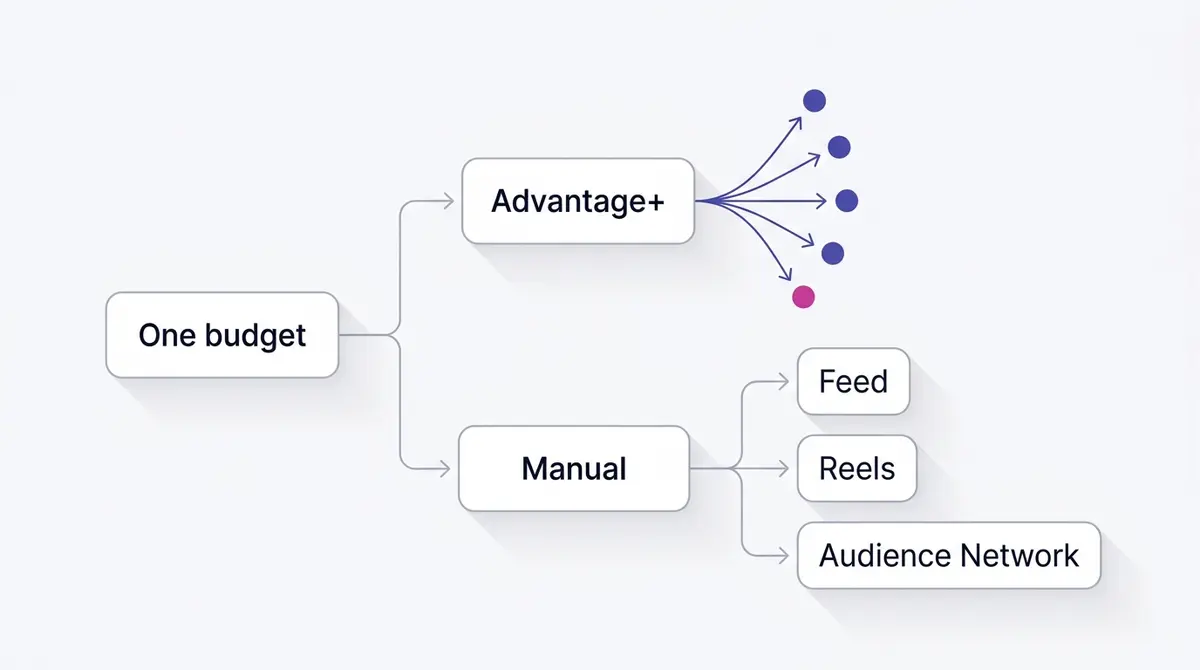
When you choose Advantage+ placements, you are handing Meta's delivery system permission to show your ad across every eligible surface it controls: Facebook Feed, Instagram Feed, Reels, Stories, Messenger, the right-hand column on desktop, Marketplace, Search, and the Audience Network of partner apps and sites. In 2026 that is around 19 to 20 distinct placements you would otherwise tick by hand, depending on the surfaces eligible for your objective. The system then spends in real time wherever it predicts the cheapest result for your objective, reshuffling budget hour by hour as auctions move.
The mechanical argument for letting it do this is simple. The more inventory the system can shop, the more chances it has to find an underpriced impression that still converts. Constrain it to three surfaces and you have shrunk its menu. Meta reported that ad impressions across its apps grew 6% year over year in Q4 2024 while the average price per ad rose 14% over the same period, a sign that demand and competition keep climbing. In a tightening auction, flexibility on where you appear is worth more, not less.
It helps to picture how the system reads a single auction. For each impression that comes up, your ad competes alongside everyone else's, and the winner is decided on a blend of bid, estimated action rate, and ad quality. Advantage+ placements let that calculation run across the full surface pool at once, so a cheap, high-intent Reels slot and a pricey Feed slot are weighed against each other in the same moment. Manual placements remove options from that comparison before it even starts, which can quietly raise your effective cost because the system is bidding into a smaller, sometimes more crowded slice of inventory.
Manual placements flip the relationship in another way too. You select a specific list of surfaces and the system is forbidden from spending anywhere else, even if a cheaper, better-converting impression exists somewhere you excluded. That is sometimes exactly what you want. But it is a cost you are choosing to pay, and the rest of this guide is about deciding when the control is worth the price. The trap is treating manual as the safe, responsible choice by default. It is not safer; it is simply more constrained, and constraint only pays off when you have a specific reason for it.
Advantage+ placements is not an Advantage+ Sales campaign
It is easy to tangle two things that share a name. Advantage+ placements is a single setting at the ad set level: it decides where your ad shows. It sits next to two other ad set automations. Advantage+ audience widens who sees the ad beyond the people you named, and Advantage campaign budget pools one budget across your ad sets instead of fixing an amount on each. None of those three is the same as an Advantage+ Sales campaign, which is the campaign-level product that switches the entire setup to automation in one move.
The practical upshot is that the controls are independent. You can leave placements on Advantage+ inside an otherwise hand-built manual campaign, and you can switch placements to manual inside an Advantage+ Sales campaign. Hand-picking a short list of surfaces is the one move that flips the placements setting out of Advantage+ and into manual, because excluding individual placements is exactly what the automated setting will not let you do. If the budget side of this is fuzzy, campaign budget versus ad-set budget untangles that dial, while the Advantage+ audience guide and the Advantage+ Sales campaign guide cover the other two.
A placement directory: what each surface is
Around 19 to 20 individual placements are selectable by hand, and they group into a handful of families. Knowing what each family is, and what format it rewards, is what turns "run everywhere" from a shrug into a deliberate choice.
| Surface family | What it is and who it reaches | Best-fit format |
|---|---|---|
| Facebook and Instagram Feeds | The main scrolling feeds, plus Marketplace, video feeds, and Explore. The broadest, highest-intent inventory. | 1:1 or 4:5 image, video, or carousel |
| Stories | Full-screen vertical cards between friends' Stories on both apps. Fast, tap-through attention. | 9:16 image or video |
| Reels | Short-form vertical video feeds on Facebook and Instagram, the fastest-growing surface. | 9:16 sound-on video |
| In-stream video | Ads before or during longer Facebook videos. Lean-back, sound-on viewing. | Short video |
| Search results | Ads inside Facebook and Instagram search. Intent-led, lower volume. | Feed-style image or video |
| Messenger | The Messenger inbox and Messenger Stories. | Image or video |
| Right column | Small ads beside the Facebook desktop feed. Cheap, low attention, desktop only. | Simple static image |
| Audience Network | Third-party apps and sites off Meta's own surfaces, in native, banner, interstitial, and rewarded-video slots. Cheap reach, variable quality. | 1.91:1 to 1:1 native or short video |
The point of the directory is not to memorise it. It is to notice that these surfaces carry wildly different intent. A Reels viewer is mid-scroll on sound-on video, a right-column slot is a glance on desktop, and an Audience Network impression is inside someone else's app entirely. That spread is why one creative rarely fits all of them, and why the next two sections matter.
The case for trusting the algorithm
Most marketers should default to Advantage+ placements for conversion and sales objectives, and the reason is signal. Delivery models optimise best when they have enough conversions flowing through to learn from. Fragment a modest budget across hand-picked surfaces and you starve each placement of the events it needs, which keeps the whole ad set stuck in the learning phase longer and noisier. Pooling spend across all eligible inventory does the opposite: it concentrates signal.
There is also the matter of where attention is actually moving. Short-form video keeps absorbing inventory. Meta has reported Instagram Reels watch time growing more than 30% year over year in the US, and by late 2025 it described Reels as carrying an annual ad revenue run rate above $50 billion. Both figures are Meta-reported and therefore directional, but the direction is unambiguous: a manual placement list that quietly excludes Reels because you find it awkward to design for is excluding one of the fastest-growing surfaces on the platform.
For small and medium budgets the case gets stronger still. If your daily spend is in the range where you collect only a handful of conversions per day, you cannot afford to split that thin signal across surfaces. Let the system pool it. A useful rule of thumb: the smaller your budget, the more you should let Meta decide where to spend it, because every conversion you collect is a precious training example and you do not want to scatter them. The time to get selective is after you have volume and a clear, data-backed reason, which is what the test framework below is for.
There is a second, less obvious benefit to staying automatic early on. Manual placement lists tend to ossify. A marketer picks Feed and Reels in month one, the campaign works, and that list never gets revisited even as the surfaces underneath it shift in cost and reach. Advantage+ re-evaluates continuously, so it cannot fall behind in the same way. If you are going to constrain delivery, treat the constraint as a hypothesis with an expiry date, not a permanent setting you forget about.
When manual placements genuinely win
There are real situations where hand-picking beats the algorithm, and pretending otherwise helps no one. The clearest is creative fit. If your asset only exists in one aspect ratio, or its hook lives in a spot that gets cropped on vertical surfaces, running it everywhere produces a stretched, broken-looking ad in half its placements. Either fix the creative coverage or restrict delivery to the surfaces the asset was built for. The right ratios and crop-safe zones are covered in Facebook and Instagram ad sizes, and getting them right is what lets you stay automatic without your ad looking broken on the surfaces you did not design for.
A real example shows how creative fit drives the placement call. A skincare brand like Skinlycious running a before and after of dull skin brightening over a four-week routine lives or dies on the reveal. Shot vertically with the transformation timed to the first few seconds, it belongs on Reels and Stories, where the format rewards a strong opening frame. The same footage forced into a tiny right-hand-column slot on desktop is wasted. That is not an argument against Advantage+; it is an argument for supplying a vertical cut so the system can place the asset where it shines instead of where it shrinks.
Brand safety is the second, and here it pays to know how much governance you can satisfy while staying automatic. Audience Network places ads inside third-party apps and sites, and in-stream video runs your ad against longer content you do not own, so advertisers in regulated or premium categories often worry about what sits next to the brand. Meta gives you several levers before you reach for a fully manual list. The inventory filter sets a sensitivity tier for the content your ads run beside: Expanded (the widest reach, the default on Feeds), Moderate (the default on in-stream, Reels, and Audience Network), and Limited (the most restrictive). On top of that, publisher and content block lists let you exclude specific apps, Pages, or unsuitable organic content, and topic exclusions keep ads out of in-stream videos about subjects like news, politics, gaming, or religion. For many advertisers those controls are enough to meet a brand-safety rule without surrendering the algorithm's full inventory pool. A fully manual placement list is the right call only when your governance is strict enough that you need a hard guarantee rather than a filter you have to trust.
The third is diagnosis. When you already suspect a specific surface is dragging your cost per result, the cleanest way to prove it is to build a manual variant that isolates the suspect, then compare. This is less a permanent strategy than a temporary instrument. You go manual to learn something, confirm it, and then often fold the learning back into a refined Advantage+ setup. A concrete example helps make this clear: a brand like Dasher Smart Home running a demo of a smart lighting scene may find the walkthrough lands beautifully on Reels and Stories but converts poorly on Audience Network, where the format gets a quick swipe rather than a watch. That is a manual-test hypothesis worth confirming, not a reason to abandon automation everywhere.
| Decision factor | Lean Advantage+ | Lean manual |
|---|---|---|
| Budget size | Small to medium, thin signal | Large, plenty of conversions per surface |
| Objective | Conversions, sales, app installs | Reach or traffic where you must guard quality |
| Creative coverage | You have 1:1, 4:5 and 9:16 ready | Single ratio, hook unsafe on vertical |
| Brand safety needs | Standard filters are enough | Strict, must guarantee surfaces |
| Current goal | Maximise efficiency and learning | Isolate or exclude a known weak surface |
The third path: customize the asset per placement
Most of the time, the reason a marketer reaches for manual placements is the first one above: the creative breaks on some surface. There is a middle option that fixes that without giving up the algorithm, and it is the path this whole debate tends to skip over. Inside one ad, placement asset customization lets you tailor the media for each surface group. Two tools do the work. A crop control reframes a single asset so the important part survives on a different shape. A replace control swaps in an entirely different file for a placement group, so you can hand Reels and Stories a true 9:16 cut while feeds keep a 1:1 or 4:5 version, all within the same ad.
The ad stays on Advantage+ placements the whole time, so the delivery system keeps shopping its full inventory pool. What changes is that each surface now receives an asset built for it instead of a square stretched into a vertical slot. That dissolves the most common argument for going manual, because you no longer have to choose between "looks right" and "let the system optimise." You get both. Have the ratios ready before you launch, and keep the hook, the price, the logo, and the call to action inside the safe zones, away from the top and bottom edges that captions and interface cover on vertical surfaces.
| Surface | Recommended aspect ratio |
|---|---|
| Facebook and Instagram Feeds | 1:1 or 4:5 |
| Stories and Reels | 9:16 |
| Audience Network native | 1.91:1 to 1:1 |
Even done well, asset customization is a coverage tool, not a strategy. It makes the creative render cleanly everywhere; it does not tell you which surfaces deserve the spend. That call still belongs to the test framework below.
A clean test framework
The mistake that wrecks most placement decisions is reading results too early or comparing two things that differ in more than placement. A trustworthy test changes one variable and gives it time. Here is a framework that holds up.
First, hold everything else constant. Same objective, same audience, same creative, same budget. The only difference between your two ad sets should be placements: one on Advantage+, one manual. If you also swap the creative or the audience, you can no longer attribute the result to placements, and you have wasted the spend. The discipline here is identical to any honest A/B test on Facebook ads.
Second, decide your metric before you launch, not after. For a conversion objective that is cost per result or cost per acquisition, not CPC. It helps to understand why surfaces price so differently in the first place. Each one runs its own auction, with its own density of advertisers, its own format competition, and its own audience intent, so CPMs swing widely from surface to surface. Cheap, low-attention inventory like the right column and parts of the Audience Network often shows a low CPM and a flattering CPC precisely because few people engage with it, while Reels and Feed cost more because demand and attention concentrate there. A cheap click on a surface nobody acts on is not a win, which is how cheap traffic masquerades as performance when you judge a placement on clicks alone. Anchor your read on the metrics that map to revenue.
Third, respect the learning phase. Let each variant accumulate enough conversions to exit learning, then give it additional days so daily noise smooths out. One to two weeks is a common practical window, longer on small budgets. Deciding after two days reflects which surface Meta happened to sample first, not which one is genuinely better.
Fourth, read the placement breakdown, not just the headline. Even inside a single Advantage+ ad set, Meta reports results split by placement. That breakdown is often more useful than the manual-versus-auto comparison, because it tells you exactly which surface is carrying the campaign and which is leaking budget.
| Test step | What to fix | What to watch |
|---|---|---|
| Isolate the variable | Only placements differ | Identical audience, creative, budget |
| Pick the metric first | Cost per result or CPA | Not CPC alone |
| Wait out learning | One to two weeks typical | Stable daily delivery before reading |
| Use the breakdown | Placement-level split | Which surface carries vs leaks |
For reference on what a healthy result even looks like in your category, the all-industry medians give you a floor: WordStream's 2024 benchmark set, drawn from 2,946 campaigns running between February 2023 and April 2024, put the average CPC at $0.77 for traffic campaigns and $1.88 for leads campaigns. Those are median figures in USD, so treat them as a sanity check, not a target. Your real comparison is variant against variant inside your own account.
Reading placement results and reallocating
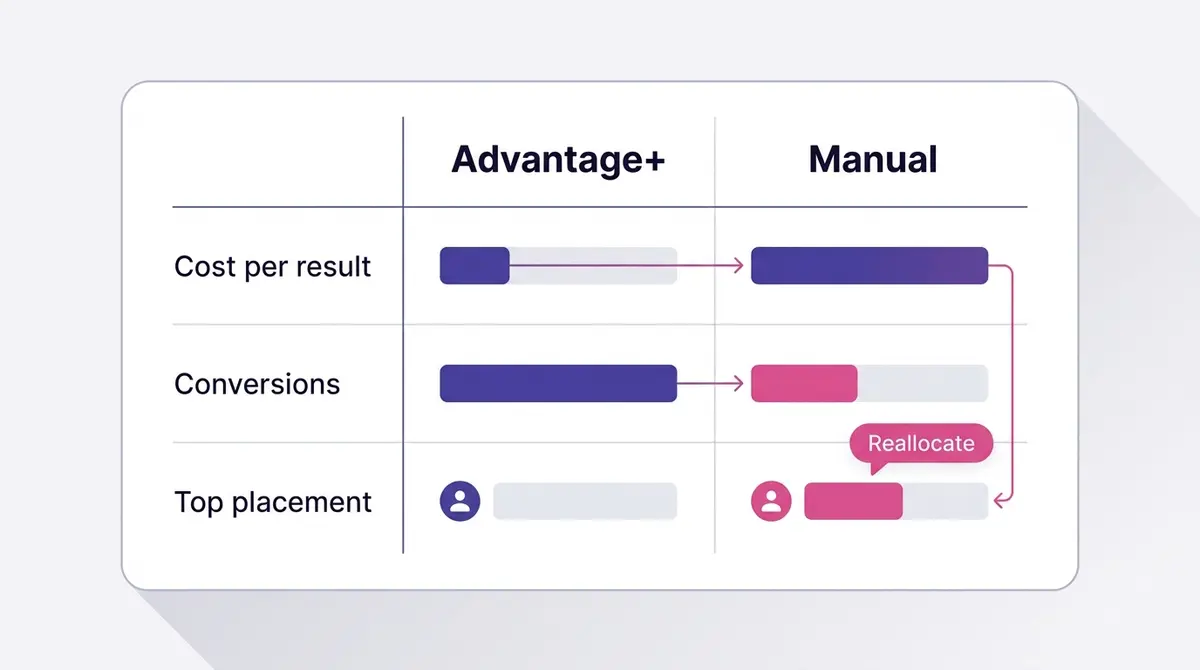
A test only pays off if you act on it cleanly. Once a variant has matured, pull the placement breakdown and look for three patterns. A surface with a low cost per result and meaningful volume is a keeper. A surface with high spend and few conversions is a candidate to exclude or down-weight. And a surface with too little data to judge should be left alone rather than killed on a tiny sample.
When the breakdown clearly indicts a placement, you have two levers. You can build a manual variant that excludes the offender and let it compete head to head with the original Advantage+ setup, or you can improve the creative for the surface that is failing rather than removing it. A demo that dies on Reels might just need a vertical cut with the hook in the first second. Removing a placement is the blunt instrument; fixing the creative is often the better one, especially given how much inventory short-form video now commands.
Whatever you change, relaunch as a fresh test rather than editing live and hoping. A placement change counts as a significant edit, and a significant edit sends the ad set back into the learning phase, where delivery turns unstable and cost per result swings while the system re-explores who to show the ad to. You were going to pay that learning-phase tax either way, so pay it once on a cleanly structured test instead of bleeding it on a live ad set you keep nudging. This is the point where pulling everything into one view helps: AdPlay.ai surfaces placement-level results next to the creative that produced them, so the reallocation decision and the relaunch sit in the same place instead of bouncing between a spreadsheet and Ads Manager.
Watch the second-order effects too. Squeezing budget onto fewer placements can lift ad frequency faster, because the same people see the ad more often when the surface pool shrinks. If frequency climbs and results soften a week later, that is creative fatigue catching up, and the answer is a new asset rather than another placement tweak. Keep an eye on ad fatigue signals so you do not mistake a worn-out creative for a placement problem. This is one of the quietest ways manual setups backfire: a marketer excludes a surface to protect efficiency, frequency creeps up on the remaining placements, and the resulting fatigue gets misread as proof that the excluded surface was carrying the campaign all along.
Format also shapes how you read the breakdown. A testimonial from a brand like Fitness Achievers, where a member talks through training around a packed work schedule, behaves differently on a sound-on Reels surface than on a muted, fast-scrolling feed. A carousel showcase, such as Celovis presenting a layered everyday jewellery set, gives the system several frames to test and naturally suits feed placements where people swipe through. When a placement underperforms, ask first whether the format simply does not match how people consume that surface, before you conclude the surface itself is weak.
A quick decision checklist
Use this before you flip any switch, so the choice is deliberate rather than a default you stumbled into.
- Default to Advantage+ placements for conversion and sales campaigns, especially on small to medium budgets where signal is scarce.
- Confirm your creative exists in the ratios each surface needs (1:1 or 4:5 for feeds, 9:16 for Reels and Stories) with hooks inside the safe zones, before you let delivery run everywhere.
- Go manual only for a concrete reason: a hard brand-safety rule, a single-ratio asset, or a data-backed suspicion about one weak surface.
- Run any placement comparison as a true one-variable test: identical audience, creative and budget, with cost per result chosen as the metric in advance.
- Wait out the learning phase plus a few smoothing days, typically one to two weeks, before reading anything.
- Trust the placement breakdown over your gut; even an Advantage+ ad set tells you which surface earned its keep.
- When a surface underperforms, try fixing its creative before excluding it, then relaunch as a fresh test rather than editing live.
Treated this way, the Advantage+ versus manual question stops being a religious debate and becomes what it should be: a default you trust, a test you run when the data earns it, and a reallocation you make with evidence in hand.
Example ad angles
Representative hooks and formats from the category.
“Before and After ad for dull skin brightening over a four-week routine”
“Testimonial ad for a member who trained around a busy work schedule”
“How-to or Demo ad for setting up a smart lighting scene in minutes”
“Showcase ad for a layered everyday jewellery set”
By the numbers
Frequently asked questions
Is Advantage+ placements better than manual placements?
For most conversion and sales campaigns, Advantage+ placements tend to win on cost per result because Meta's delivery system can shop a far larger pool of inventory and shift budget toward the surfaces that convert that day. Manual placements are better when you have a specific reason to constrain delivery: a format that only works on Reels, a brand-safety rule, or proof that one surface is dragging your numbers. Start on Advantage+, then only carve out manual control once placement-level data justifies it.
Does Advantage+ waste budget on the Audience Network?
Audience Network often carries low engagement and cheap impressions, so it can show a low cost per click while contributing few real conversions. With Advantage+, the system is supposed to allocate spend by performance, not spread it evenly, so a weak placement should naturally receive less. The honest move is to check the placement breakdown in your reporting after a campaign exits the learning phase. If Audience Network is eating spend without producing results, that is your evidence to test a manual variant that excludes it.
What is the difference between Advantage+ placements and an Advantage+ Sales campaign?
They operate at different levels. Advantage+ placements is one ad-set setting that decides where your ad shows, and it sits alongside Advantage+ audience and Advantage campaign budget as separate automations you can switch on or off independently. An Advantage+ Sales campaign is the campaign-level product that hands the whole setup, audience, budget, placements and more, to automation at once. You can keep placements on Advantage+ inside an otherwise manual campaign, and you can set placements to manual inside an Advantage+ Sales campaign, so the two are not locked together. Hand-picking a short list of surfaces is the move that flips placements out of Advantage+ and into manual.
Will my ad look broken if Meta runs it everywhere?
It can, if you only upload one aspect ratio. A single square image stretched into a 9:16 Reels or Stories slot looks cramped, with the hook or price text drifting toward an edge that gets cropped. The fix is to provide the right ratios per surface (typically 1:1 or 4:5 for feeds, 9:16 for Reels and Stories) and keep key elements inside the safe zones. Good creative coverage is often the difference between Advantage+ looking efficient and looking sloppy.
How long should I run a placement test before deciding?
Let each variant exit the learning phase first, which usually means accumulating enough conversions for stable delivery, and then give it enough additional days that daily noise smooths out. A common practical window is one to two weeks, longer if your daily budget is small. Deciding after two days of data is the most common way marketers fool themselves, because early delivery skews toward whichever placement Meta sampled first.
Does editing the placements on a live ad set reset the learning phase?
Yes. Changing placements on a running ad set counts as a significant edit, and a significant edit sends the ad set back into the learning phase, where delivery is unstable and cost per result swings while the system re-explores. That is the mechanical reason to relaunch a clean test rather than tweak a live ad set: since you pay the learning cost either way, it is better to pay it once on a properly structured comparison. If you must make changes, batch them into a single session instead of nudging the same ad set day after day.
Should small budgets use Advantage+ or manual?
Small daily budgets generally favour Advantage+ placements, because fragmenting a tiny budget across hand-picked surfaces starves each one of the conversions it needs to optimise. Letting the system pool spend across all eligible inventory gives the delivery model more signal to work with. Once the account has volume and you can clearly see a placement underperforming, selective manual tests become worthwhile.
How do I keep my ad off the Audience Network or unsafe content without going fully manual?
Use the brand-safety controls that work alongside Advantage+ placements. The inventory filter sets how sensitive the surrounding content can be, across Expanded, Moderate, and Limited tiers, and Feeds default to Expanded while in-stream, Reels, and Audience Network default to Moderate. You can also apply publisher and content block lists to exclude specific apps or Pages, and topic exclusions to avoid in-stream videos about subjects like news or politics. For many advertisers those levers satisfy a governance rule without hand-picking surfaces. Switch to manual only when you must guarantee that certain placements never serve at all.
Sources
- 1.WordStream by LocaliQ, Facebook Ads Benchmarks 2024 (2024)
- 2.Adweek, Meta revenue up 21% year over year in Q4 2024 (2025)
- 3.Meta, Q4 2024 Earnings Call Transcript (CFO remarks, Instagram Reels US watch time) (2025)
- 4.Tubefilter, Meta Reels annual run rate over $50 billion (2025)
- 5.Meta Business Help Center, Choose ad placements in Meta Ads Manager (2026)
- 6.Meta Business Help Center, About Advantage+ placements (2026)
- 7.Meta Business Help Center, About placement asset customization (2026)
- 8.Meta Business Help Center, About the learning phase (2026)
- 9.Meta for Developers, Ad Formats for Audience Network (2026)
- 10.WordStream, Facebook Brand Safety and Suitability Controls (2024)
- 11.Sprout Social, Social Media Image Sizes Guide (2026)
Keep exploring
Turn ad research into winning ads
Research the ads that work, generate the creative on-brand, and launch to Meta, all in one tool.
7-day free trial · No credit card required