
Facebook Ads Spending Too Fast? Fix (2026)
Why your Facebook ad set burns through its daily budget by noon, and the fixes that make spend last the whole day, from dayparting to hard spending limits.
Updated August 2026 · Likit Sae Lee, CTO

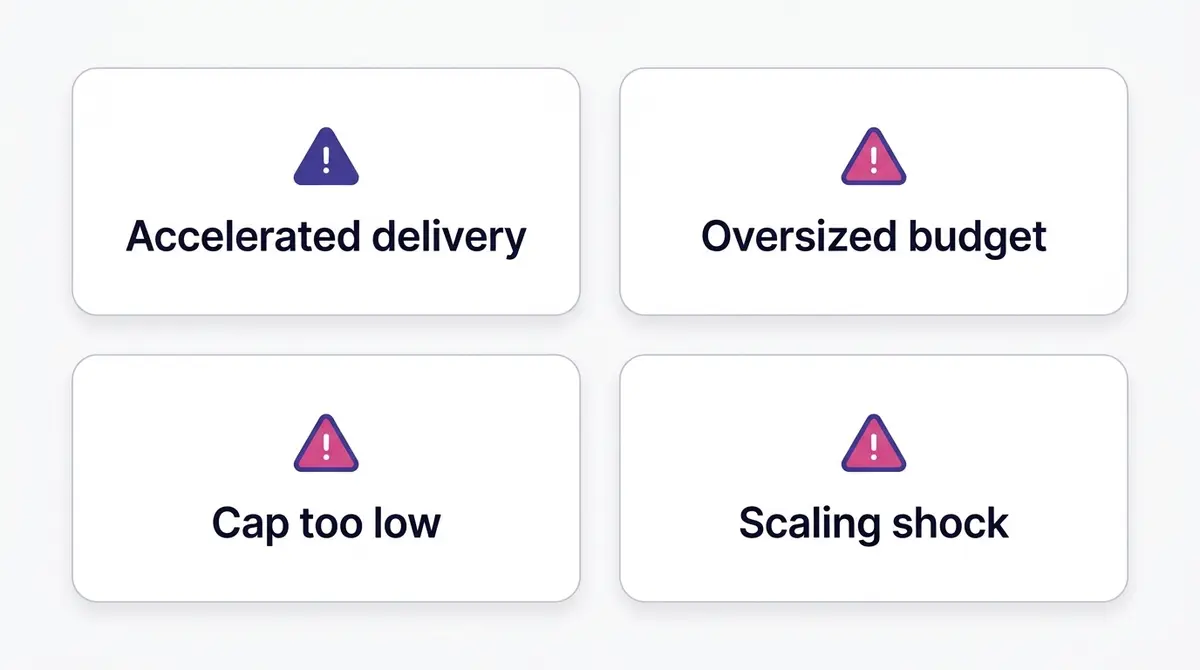
A Facebook daily budget is an average, not a hard cap: Meta can spend up to 75% over it on a strong day but never more than 7x the daily budget in a calendar week, so one fast day self-corrects. If spend genuinely clears too early, the usual causes are accelerated delivery, an oversized budget on a small audience, a bid or cost cap set too low for current CPMs (Meta CPM averaged $8.19 in 2025, per Gupta Media), or scaling shock from a big budget jump. To make spend last, restrict delivery with ad scheduling (which needs a lifetime budget), and to cap it for good, set an account or campaign spending limit.
You set a $100 daily budget, check Ads Manager at lunch, and most of it is already gone. The instinct is to panic-edit: pause the ad set, slash the budget, swap the audience. Hold off. Some of that fast spend is normal pacing behavior that corrects itself, and some of it is one of four fixable causes. This page walks through how Meta paces a daily budget, how to tell a self-correcting day from a real problem, how to make spend last with the right budget type and a schedule, and how to set a hard ceiling when you simply cannot afford an over-run.
A daily budget is an average, not a daily cap
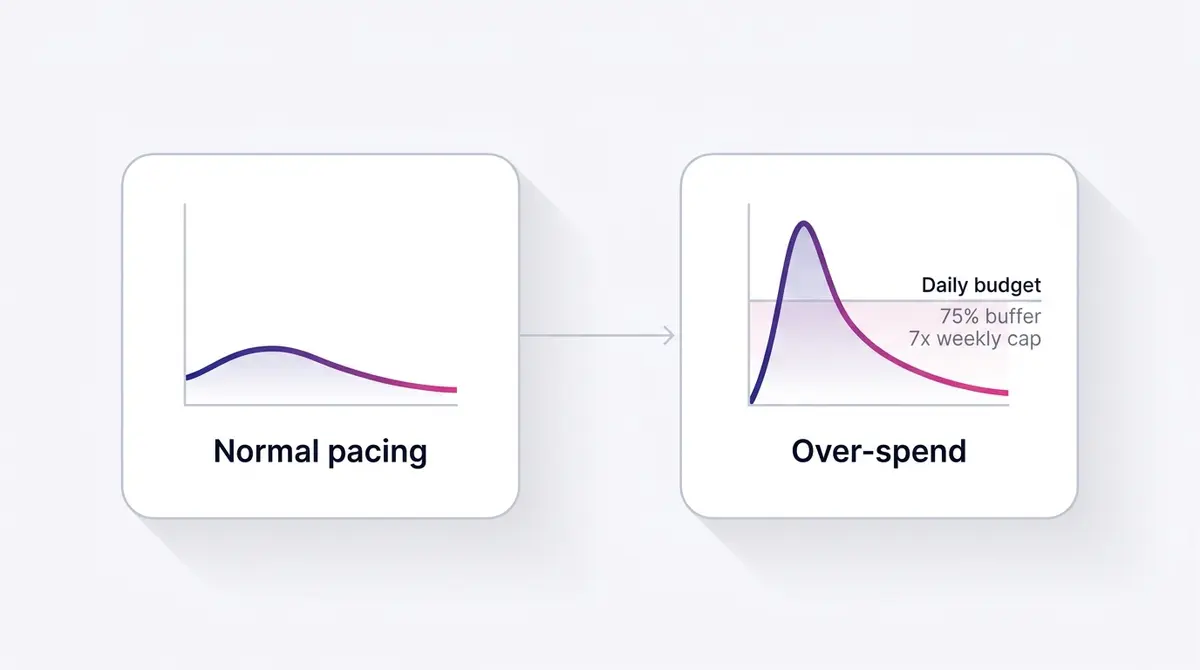
The single fact that defuses most over-spend panic: your daily budget is a target Meta averages over time, not a hard ceiling it hits every day. When the auction serves up strong, cheap opportunities early, Meta front-loads spend to grab them. Meta's own documentation on daily budgets says it may spend over your daily budget on days when better opportunities are available, and it has expanded that flexibility over time: the older guidance allowed up to 25% over, and Meta later raised it to up to 75%. So a $100 ad set might clear $175 on a high-opportunity Tuesday.
That sounds alarming until you see the matching ceiling. Meta will not spend more than seven times your daily budget across a calendar week. On a $100 daily budget, the hard weekly limit is $700, which is exactly seven average days. That week runs Sunday to Saturday and resets at midnight on Saturday in your ad account's time zone, which is not always the time zone on your own clock. If your account was created in another region, check spend against the account's day rather than your local one, or a normal evening of pacing can read as a midnight over-run that never happened. A day that runs hot is balanced by quieter days, and the week as a whole lands near your intended total.
Here is the part most over-spend posts get wrong: the 25% and the 75% are not two competing estimates from two sources, they are one number that changed. Meta used to cap the daily over-run at 25%, then expanded daily budget flexibility to up to 75%, so any guide still quoting 25% is describing the same mechanism before the change, not a different platform. Either way, the same campaign has real room to front-load on a good day, which is why the daily swings can look dramatic before the week evens out.
The practical takeaway: if your spend cleared fast but your cost per result is healthy and your weekly total is on track, nothing is broken. The worst thing you can do is panic-edit. Every meaningful change to budget, audience, or bid can reset the learning phase and make pacing genuinely erratic, turning a non-problem into a real one.
There is also a calendar logic worth keeping in mind. Because Meta paces against a rolling seven-day window, the platform is constantly deciding whether today is a "spend ahead" day or a "hold back" day based on how cheap the opportunities look right now versus the rest of the week. A Monday that runs hot does not mean Tuesday will too. If you check spend at noon and extrapolate the morning's pace across the rest of the day, you will almost always overestimate where it lands, because the pacing engine deliberately slows down once it has banked the early efficient impressions. Read the full day, then the full week, before you draw any conclusion.
How to tell a self-correcting day from a real problem
Before you touch anything, separate normal front-loading from a true over-spend. Look at the spend alongside the results it bought, not the spend alone.
| Signal | Normal front-loading | A real pacing problem |
|---|---|---|
| Cost per result | Flat or improving as spend rises | Climbing as the budget clears |
| Weekly total | Tracking near 7x the daily budget | Exhausted well before the week's end |
| Frequency | Slow, steady climb | Jumps fast on a small audience |
| Time of clearance | Spends through the evening | Empty by mid-morning, every day |
| Delivery setting | Standard delivery | Accelerated delivery or a tight bid cap |
If the left column describes your ad set, leave it alone. If the right column does, you have one of four causes to fix, and they each have a clean remedy. Use the median benchmarks to sanity-check the cost side: Gupta Media's CPM tracker put the average Meta CPM (Facebook and Instagram) at $8.19 in 2025, and WordStream put average traffic CPC at $0.70, down 6.67% from the prior year. If your fast-spending ad set is also buying clicks far above those numbers, the spend is not just fast, it is expensive, which points to a delivery or bidding issue rather than a lucky auction.
Make the spend last: daily budget, lifetime budget, and ad scheduling
If the spend keeps emptying before your best hours, the fix is rarely a smaller number. It is a different budget type and a delivery schedule. Most advertisers only ever use a daily budget, which is the simplest option and the one that gives Meta the most freedom to front-load. A daily budget hands Meta a per-day average and lets it pace by opportunity, running over on strong days and easing off on slow ones.
A lifetime budget works differently. You set one total plus a start and end date, and Meta tries to spread that total across the whole flight rather than per day. Meta's own documentation describes a lifetime budget as an amount it spreads as evenly as it can over the period you choose. That makes it the better fit for a sale with a hard start and finish, and it unlocks the lever the daily budget hides.
That lever is ad scheduling, also called dayparting. It lets you restrict delivery to the exact days and hours you choose, so spend cannot drain into dead time. If your store converts on weekday evenings, you can pin delivery to roughly 6pm to 11pm and Meta concentrates the budget there instead of burning it by 10am on shoppers who never check out. The catch, and the reason most people never find it, is that the scheduling grid only appears when the ad set runs on a lifetime budget. A daily budget does not expose it at all. So "schedule my ads" and "switch to a lifetime budget" are the same decision.
One honest caveat keeps you from trading one surprise for another. Switching to a lifetime budget by itself does not stop front-loading. A lifetime budget still paces toward opportunity and can deliver heavier early in the flight, the same fast-takeoff behavior that surprises daily-budget users. It is the lifetime budget plus a schedule, not the lifetime budget alone, that pins delivery to the windows you picked.
| Daily budget | Lifetime budget | |
|---|---|---|
| What you set | An average to spend each day | One total across a fixed start-to-end window |
| Pacing | Runs up to 75% over on a strong day, evens out across the calendar week | Spread across the flight, but still paces toward opportunity, so it can deliver heavier early |
| Ad scheduling (dayparting) | Not available | Required to unlock the day and hour grid |
| Hard total cap | No, it averages over the week | Yes, the lifetime amount is the ceiling for that window |
| Best for | Always-on prospecting and conversion campaigns | Fixed-window sales and any campaign that should run only at certain hours |
Cause one: accelerated delivery instead of standard pacing
Standard delivery, sometimes called discount pacing, is Meta's default and the right setting for almost everyone. It lowers your effective bid when needed so spend spreads evenly across the day at an efficient cost per result. Accelerated delivery does the opposite: it enters every auction it can as fast as possible, favoring speed over cost. That is the textbook reason a budget vanishes by noon.
Accelerated delivery is now largely limited to bid-cap ad sets in current Ads Manager, so most advertisers will not stumble into it by accident. But if you inherited an old ad set, duplicated one that carried the setting forward, or you deliberately set a bid cap, check the delivery type. The fix is simply to move back to standard delivery and a standard bid strategy. A brand like Skinlycious running a testimonial offer that was clearing its full daily budget before midday would typically find the culprit here: an old accelerated or bid-cap setup, re-paced the moment it switches back to standard delivery.
The reason standard pacing wins for nearly every advertiser is that the few legitimate uses for speed-first delivery are narrow. Accelerated made sense when you were racing a hard deadline, such as a flash sale ending in hours, and you would rather pay more per result than leave budget unspent. For an always-on prospecting or conversion campaign, that trade is backwards: you want the cheapest qualified impressions Meta can find, spread across the hours your audience is actually online. Spending everything by 10am means your evening shoppers never see the ad, which on most consumer offers is exactly the wrong audience to skip. If you are unsure which setting an ad set is using, the delivery column in Ads Manager will say so, and the safe default is always standard.
Cause two: an oversized budget on a small audience
This is the most common real over-spend, and it hides in plain sight. When you point a large daily budget at a narrow audience, Meta has only a small pool of people to spend the money on. To clear the budget, it shows your ad to the same people again and again. Frequency climbs fast, the cost to reach an incremental person rises, and the budget empties early because there simply are not enough fresh impressions to buy at an efficient price.
Lead campaigns make this vivid because Meta lead volume is cheap and scales quickly on budget. WordStream put the average Facebook lead-ads CPC at $1.92 in 2025, up slightly from the year before, while the average cost per lead rose 20.94% to $27.66. A generous daily budget on a cheap-CPC lead campaign can exhaust quickly when the audience is small. Picture an aesthetic clinic like UR Klinik running an instant-form lead ad to a tight local radius: the cheap clicks burn the budget fast, and the fix is to widen the audience or lower the daily budget so pacing stays even across the day.
The math to remember: budget and audience size have to be in proportion. A useful rule of thumb is to ask whether your daily budget could realistically be spent on roughly 50 conversion events a week, the volume an ad set needs to exit the learning phase per Meta's published guidance. If the audience is too small to produce that volume at a sane frequency, your budget is too big for it.
Advantage+ Audience makes this easy to get wrong in a new way. Because its audience inputs are treated as suggestions rather than hard limits, Meta can expand beyond the people you listed, which usually helps pacing. But when you combine a deliberately narrow custom audience with a high budget and tight placements, you re-create the small-pool problem even inside a broad-by-default system. The signature is the same every time: frequency climbing faster than spend, cost per result drifting up day over day, and the budget clearing earlier each day as the audience tires. The two levers are unchanged. Give Meta more people, or give it less money to spend on the people it has.
Cause three: a bid or cost cap set too low for today's auction
Cost cap and bid cap are not "spend fast" levers, but a cap set wrong distorts delivery in ways that look like a pacing problem. A cost cap tells Meta to keep your average cost per result at or below a target. A bid cap puts a hard ceiling on each auction bid. Set either too low for current auction prices, and Meta cannot deliver smoothly: it may starve the ad set, then lurch as it tries to clear spend within the constraint.
The trap is using last year's numbers. Auction prices climb most years, and a cap calibrated to a cheaper era will not clear in today's auction, where the average Meta CPM ran about $8.19 in 2025 per Gupta Media's tracker. The lead-ads CPL rising almost 21% in a single year is the clearest warning: a cost cap pinned to last year's CPL will starve delivery this year. The fix is to raise the cap to reflect current prices, or remove it entirely and let standard pacing do its job. Caps are an optimization tool for mature campaigns with stable cost data, not a starting setting.
One more wrinkle: a cap that is slightly too low does not always look like under-delivery. Sometimes the ad set delivers in bursts, spending nothing for hours while it waits for auctions cheap enough to clear the cap, then clearing a block of impressions all at once when prices dip. That stop-start rhythm reads as "spending too fast" on the hours it does spend, even though the underlying cause is a constraint that is too tight, not a budget that is too loose. The tell is uneven hour-to-hour delivery rather than a smooth curve. When you see it, loosen or remove the cap before you touch the budget, because lowering the budget on a cap-starved ad set just makes both problems worse.
There is a flip side to a starved cap worth naming, because it produces the same bursty delivery from the opposite direction. Meta enforces minimum daily budgets that scale with your optimization event: roughly a dollar a day is enough for impression-optimized delivery, while click, engagement, and conversion optimization require more. Set a conversion budget down near that floor and the ad set cannot gather enough events to pace smoothly, so it spends in stops and starts that read as "spending weirdly fast" on the hours it does spend. The cure matches the one for a starved cap: give the ad set enough budget to clear its optimization event at a sane frequency, or step down to a cheaper event that the small budget can actually feed.
Cause four: scaling shock from a sudden budget jump
You found a winner, so you doubled the budget overnight. The next day, spend is erratic and results dip. That is scaling shock. A large, sudden budget increase can push an ad set back into the learning phase, where Meta re-gathers signal and spends unevenly until it stabilizes. With ad-set budgets, Meta's automation can also shift a portion of spend between ad sets, so a jump on one ad set can ripple in ways that look like over-spend, with some guides citing shifts of up to 20% of an ad set's budget under current Advantage+ behavior. Treat that figure as directional, but the lesson holds: big edits disturb pacing.
Scale in smaller steps and give each step time to settle. A common practitioner approach, guidance rather than a Meta-published number, is to raise the budget by roughly 20% every few days so delivery re-stabilizes between bumps. A carousel campaign for a brand like Dasher Smart Home that re-triggered learning after a budget jump and started spending erratically would be fixed not by another edit, but by restoring stable pacing first, then scaling the proven winner gradually. The same goes for the February 2026 unified campaign flow, where AI optimizations for audience, placement and budget are on by default. They are individually toggleable, but each one you change is a fresh variable, so change one thing at a time. For a deeper playbook on raising spend without breaking delivery, see our guides on the Facebook learning phase and how to scale Facebook ads.
Set a hard ceiling: spending limits and automated rules
Pacing fixes are soft controls: they smooth delivery, but they do not promise a number you cannot exceed. If you genuinely cannot afford an over-run, set a hard cap on top of them.
The strongest one is the account spending limit. It sits in your Billing and payment settings and caps the total your whole ad account can spend across every campaign, no matter how any individual budget paces. When the account reaches the limit, Meta pauses delivery account-wide until you raise it, remove it, or reset the amount spent, and it warns you as you approach the threshold. This is the true stop for an advertiser who has a fixed amount to spend this month and wants a guarantee, not a tendency.
A campaign spending limit is the same idea one level down. It is a hard ceiling on a single campaign's total spend, used alongside the daily budgets on the ad sets inside it. When the campaign hits the limit, all of its ad sets and ads stop. It does not change how delivery paces day to day, it just draws the line the campaign cannot cross. Reach for it when one campaign needs a firm total but you do not want to cap the whole account.
Automated rules are the safety net that does not need you watching Ads Manager. In the Rules tool you set a condition and an action: turn off an ad set when cost per result climbs above a number, when spend in a window passes a threshold, or when ROAS drops below your break-even. Pair the trigger with a minimum-results condition so the rule does not fire on a thin sample, and a short check window so it reacts in hours, not days. A common setup for a $10 target cost per result is a rule that pauses the ad set when cost per result exceeds $15 over the last six hours with at least five results recorded, then emails you. Meta turns the ad set off and tells you, so a runaway stops itself overnight instead of greeting you at breakfast.
Treat all three as bounds, not strategy. They cap your downside, they do not make a campaign efficient. The work that actually lowers cost still lives in pacing, audience size, and creative. The limits just make sure a bad day cannot become a bad month.
What to check when the spend is fast but delivery looks wrong
Sometimes the spend is not just fast, it is fast and unproductive: high cost per result, climbing frequency, or thin delivery despite a full budget. Run this short checklist before assuming the budget itself is the issue.
| Check | What it tells you |
|---|---|
| Cost per result vs benchmark | Above the $0.70 CPC or $8.19 CPM range suggests a bidding or relevance issue, not just pacing |
| Ad-set frequency | Above 3 in prospecting or 5 in retargeting means saturation, not budget |
| Number of ad sets sharing budget | Campaign-level budget can pour spend into one ad set and starve others |
| Recent edits | A budget, audience or creative change in the last few days likely reset learning |
| Dataset and event quality | Weak Conversions API event matching degrades optimization and pacing |
If frequency is the flag, the problem is not pacing at all, it is creative. That is the bridge to the bigger lever. If delivery has dropped to nothing rather than running fast, that is a different failure mode covered in why your Facebook ad is not delivering. And if you are weighing where to hold the budget lever in the first place, our CBO vs ABO guide explains how budget placement changes pacing behavior across ad sets.
Once pacing is stable, fresh creative is the real bottleneck
Re-pace the budget and the campaign stops burning out. But even a perfectly paced ad set decays. Search Engine Land's analysis of creative fatigue found that engagement drops roughly 20% to 30% week over week as a tired creative nears the end of its run, and that frequency above 3 in prospecting or above 5 in retargeting signals the audience has seen the ad too many times. A stable budget aimed at a stale ad just spends evenly on something people have learned to ignore.
This is where the leverage actually lives. Analysis summarized by Marketing Charts attributes roughly 47% to 56% of advertising sales lift to creative quality, more than reach, targeting and budget combined. Meta's own citation of a Nielsen study puts creative at 56% of digital sales ROI, which you should read as directional given the source, but it points the same direction as the neutral figure. Pacing keeps you from wasting money; fresh creative is what makes the money work.
The reframe matters because most advertisers spend their problem-solving time in the wrong place. They tweak budgets, audiences and bid strategies repeatedly, each edit nudging the learning phase and unsettling the very pacing they were trying to protect, while the ad creative itself sits untouched for weeks. The order of operations is the opposite of the instinct. First, get pacing stable and leave it alone. Then put your effort into the lever that the evidence says drives roughly half the result: a steady supply of fresh, on-brand creative built around the hooks and angles that are already proving themselves.
The compounding move is to refresh before the decline, not after, and to keep a deep pool of proven winners rather than betting on one ad. A short-form video for a brand like Fitness Achievers that beat the engagement drop did it by routing its winning hook into new variations the moment frequency crept past the threshold. The practical loop is to research what is already winning in your category, generate fresh variations of those angles fast, launch them straight to Meta, and read the results to feed the next round. Platforms such as AdPlay.ai are built to run that research-to-launch loop in one place, but the discipline matters more than the tool: stable pacing plus a steady stream of fresh creative is what keeps spend efficient long after the over-spend scare is gone. For the refresh triggers in detail, see our guide on Facebook ad fatigue.
Example ad angles
Representative hooks and formats from the category.
“Testimonial ad for a skincare offer re-paced off a too-low bid cap”
“Lead ad for an aesthetic clinic re-paced by widening a narrow local audience”
“How-to or Demo ad for a winning hook refreshed before engagement decayed”
By the numbers
Frequently asked questions
Why did Facebook spend my whole daily budget by lunchtime?
A daily budget is an average, not a same-amount-every-day cap. When Meta sees strong, cheap opportunities early, it front-loads spend and can go up to 75% over the daily budget on that day, per Meta's documentation on daily budgets. That flexibility used to be capped at 25% before Meta raised it. Meta compensates by spending less on slower days, and it will never exceed 7x the daily budget across a calendar week. If results are still solid, one fast day is usually not a problem.
How do I make my Facebook ad budget last the whole day instead of burning out by noon?
Use ad scheduling. It restricts delivery to the days and hours you choose, so spend cannot drain into dead time before your real shoppers are online. If your audience converts on weekday evenings, schedule delivery into that window and Meta concentrates the budget there. The one requirement is that scheduling only works on a lifetime budget, not a daily one, so switching budget type and scheduling are the same move. A smaller daily budget also slows the burn, but it does not aim the spend at your best hours the way scheduling does.
Can I schedule my ads to run only during certain hours, and does that need a lifetime budget?
Yes, the feature is called ad scheduling or dayparting, and it does need a lifetime budget. With a daily budget the hour-and-day grid never appears in Ads Manager. Set a lifetime budget with a start and end date, then turn on running ads on a schedule and pick the windows. Note that a lifetime budget alone still paces toward opportunity and can deliver heavier early, so it is the lifetime budget plus the schedule, not the budget type alone, that pins delivery to your chosen hours.
How do I set a hard cap on my total Facebook ad spend so it can never run over?
Set an account spending limit in your Billing and payment settings. It caps the total your entire ad account can spend across every campaign, regardless of how individual budgets pace, and Meta pauses all delivery once the account hits it. A campaign spending limit does the same for a single campaign, stopping its ad sets when they reach the cap. For a softer guard, an automated rule can pause an ad set when cost per result or spend crosses a threshold you set. Budgets influence pacing; spending limits and rules are the real stops.
What is the difference between standard and accelerated delivery?
Standard delivery (also called discount pacing) is Meta's default. It spreads spend evenly across the day at an efficient cost. Accelerated delivery spends as fast as possible by entering every auction it can, favoring speed over cost. Accelerated is the classic 'burns out by noon' setting and is now largely limited to bid-cap ad sets. For almost everyone, standard delivery is the correct choice.
Can a too-low bid or cost cap make ads spend strangely?
Yes. A bid cap or cost cap set to last year's CPMs can distort delivery in current auctions, where the average Meta CPM was about $8.19 in 2025 per Gupta Media's tracker. Too low, and Meta either starves delivery or behaves erratically as it tries to clear the budget within the constraint. Raise the cap to reflect current auction prices, or switch to a standard bid strategy and let Meta pace.
Why does a small audience burn budget faster?
A large daily budget aimed at a narrow audience forces Meta to show your ad to the same people repeatedly to spend the money. That drives frequency up fast, raises cost per result, and clears the budget early. Either widen the audience or lower the daily budget so the math balances.
Once pacing is stable, what actually moves results?
Fresh creative and a larger pool of proven winners. Creative quality explains roughly half of advertising sales lift, more than reach, targeting and budget combined, per analysis summarized by Marketing Charts. Once spend is even, watch for frequency above 3 in prospecting or 5 in retargeting and the 20% to 30% week-over-week engagement drop that signals a tired ad, then refresh.
Sources
- 1.Meta Business Help Center, About Daily Budgets (2026)
- 2.Meta Business Help Center, About Lifetime Budgets (2026)
- 3.Meta Business Help Center, About Scheduling Ads (2026)
- 4.Meta Business Help Center, About Ad Account Spending Limits (2026)
- 5.Meta Business Help Center, About Campaign Spending Limits (2026)
- 6.Meta Business Help Center, About Actions for Automated Rules (2026)
- 7.Meta Business Help Center, Best Practices for Minimum Budgets (2026)
- 8.Meta Business Help Center, About the Learning Phase (2025)
- 9.WordStream, Facebook Ads Benchmarks 2025 (2025)
- 10.Gupta Media, Social Media Ads Cost and CPM Tracker (2025)
- 11.Search Engine Land, Your ads are dying: spot and stop creative fatigue (2025)
- 12.Marketing Charts, Creative's Still the Biggest Driver of Sales (2024)
Keep exploring
Turn ad research into winning ads
Research the ads that work, generate the creative on-brand, and launch to Meta, all in one tool.
7-day free trial · No credit card required