
Facebook Ad Not Delivering? 8 Fixes (2026)
Eight reasons a Facebook ad stops spending, in order of likelihood: review, rejection, narrow audience, tight bids, learning resets, schedules, caps, fatigue.
Updated August 2026 · Likit Sae Lee, CTO
A Facebook ad that is not delivering is stuck at one known point: ad review (Meta typically completes it within 24 hours), a policy rejection, a setup error, an audience too narrow to serve, your own ad sets overlapping and competing in the auction, weak ad-relevance rankings, a budget or bid too tight, a learning phase that keeps resetting, fatigued creative, a schedule mismatch, or an account-level block like a spending limit, a failed payment, or a restriction. Read the Delivery column in Ads Manager first, because it names the exact state the ad is in, then work the causes in order of likelihood. Most blocked ads are spending again within a day.
The campaign is live, the card is on file, and the spend column still reads zero. A Facebook ad that will not deliver feels opaque, but it is stuck at one of a small set of known choke points, and Ads Manager will tell you which one if you read the right column. This guide decodes the Delivery column first, then works through the causes in order of likelihood, from a review queue you only need to outwait to the account-level blocks everyone checks last, with the way to confirm each one and the specific fix that follows.
Start with the Delivery column, not guesswork
An ad that refuses to spend is rarely a mystery. Ads Manager has already decided what is wrong and written it down. Open the campaign and read the Delivery column at all three levels: campaign, ad set, and ad. Each level carries its own status, and the most restrictive one wins, so a green campaign can still sit on top of an ad set that is not delivering and an ad that is in review. Read all three before you touch anything.
The column names a state, usually with a coloured dot, and each state points at a different fix. Decode it before you start changing settings:
| Delivery status | What it means | Where to look next |
|---|---|---|
| Active (green dot) | Eligible to serve; spend should ramp over the first day | If still zero after 24-48h, check audience, bids, and billing |
| In review | Still being checked against policy | Wait; do not edit, which resends it to the queue |
| Rejected | Failed policy review | Read the named policy, fix the flagged element, resubmit |
| Scheduled | A future start date has not arrived | Check the start date and time zone |
| Not delivering | Eligible but nothing is serving | Audience, schedule, spending limit, or setup |
| Learning / Learning limited | Ad set still gathering optimization events | Consolidate, broaden, or raise budget |
| Error / Setup error | The unit is malformed and cannot serve | Open the ad to see the field that failed |
| Completed | An end date or lifetime budget is spent | Extend the schedule or add budget |
Hover any status for the exact reason and the action Meta suggests. Check Account overview too, because billing failures and spending limits show there as banners rather than as per-ad statuses. Two minutes of reading beats an hour of guessing. The causes that follow run in order of likelihood, each with the quickest way to confirm it and the fix that follows. Start at the top and stop when the status matches yours.
Quick triage: match your symptom to the first screen to open
The Delivery column names the state. The shape of the problem, how it started, tells you which cause to suspect first. Before you work the full list in order, find your symptom below and open the screen in the right-hand column. It turns a nine-cause checklist into a sixty-second decision.
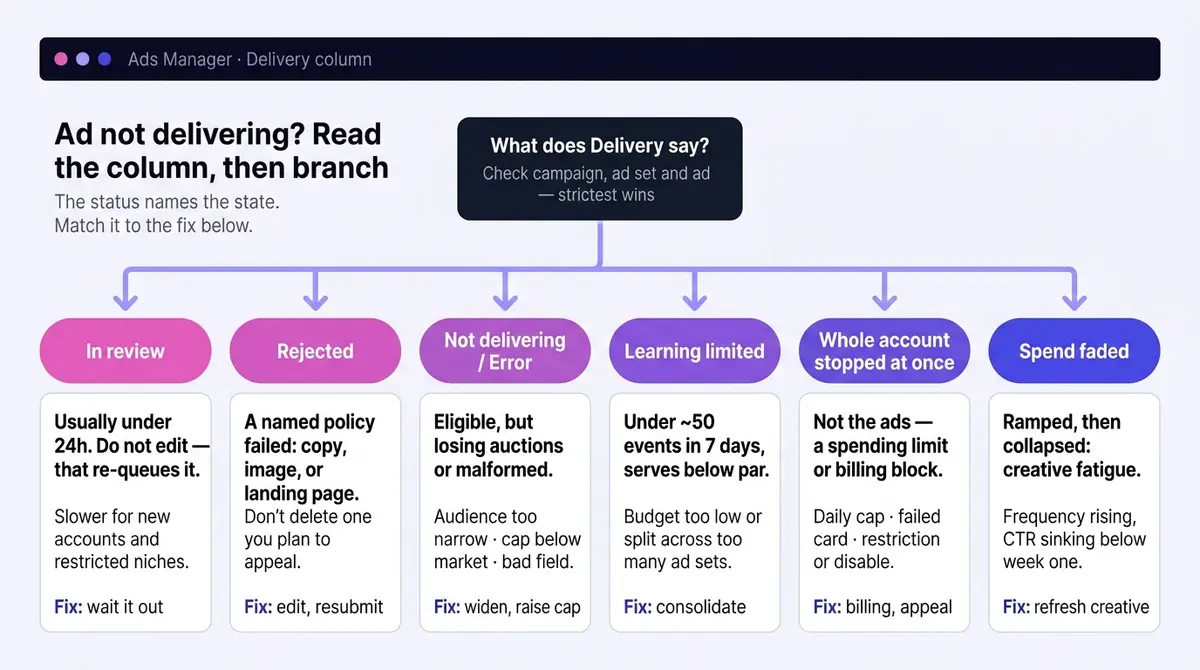
| What you are seeing | Most likely cause | First screen to open |
|---|---|---|
| Spend is flat zero on a brand-new ad, hours in | Still in review, or a setup error | Delivery column on the ad (In review vs Error) |
| Active green dot, but spend stays at zero after a day | Audience too narrow, or a cost/bid cap below market | Ad set audience size estimate, then the cap field |
| "Learning limited" that never clears | Too few events: budget below the floor, or audience split across too many ad sets | Ad set budget vs your cost per result |
| Spend ramped, then collapsed after one good week or two | Creative fatigue: frequency up, CTR down | Frequency and CTR columns on the ad |
| Delivery resets to learning every few days | Significant edits restarting the count | Edit history and your own change cadence |
| Every campaign in the account stopped at once | Account spending limit, failed payment, or a restriction | Billing and Account Quality, not the ads |
| Relevance columns are blank or show a dash | Under 500 impressions, or columns not added | Add the three ranking columns; wait for volume |
| It says Scheduled or Completed | A date or dayparting window, not a delivery fault | Start date, end date, and time zone |
Reach the right screen first and most of these resolve in one move. The sections below take the same causes in order of likelihood, each with the quickest way to confirm it and the fix that follows.
Still in review, or rejected on policy
Every new ad goes through review before it can serve, and so does every significantly edited one. Meta's stated turnaround is that review typically completes within 24 hours, but Meta is equally clear that it may take longer in some cases, so treat the 24-hour figure as a median, not a ceiling. Two situations reliably push toward the long end: a brand-new account, where Meta runs a deeper check on the first several ads before it trusts the account, and a sensitive or restricted category like supplements or financial services, where a human reviewer often looks at the ad even with no violation. So if you are a first-time advertiser running a supplement, plan for delivery to start later than the 24-hour headline suggests. If the column reads "In review", the fix is mostly patience, but not entirely. Submit during business hours rather than overnight, and do not relaunch the same ad repeatedly, because each resubmission drops it to the back of the queue. Past the 24-hour mark with no movement, request a manual review or contact support with the ad ID instead of waiting indefinitely, and build extra lead time around peak retail weeks, when queues run slower.
A rejection is more concrete. The notice names the policy, and the review covers more than the creative: Meta checks images, video, text, targeting, and the landing page the ad clicks through to. Common triggers are wording that asserts personal attributes ("struggling with your weight?"), claims that overpromise results, restricted categories that need prior authorization, and a destination that fails to load or does not match the ad. Fix the flagged element and resubmit, or request another review from Account Quality when you believe the call is wrong. If a compliant ad keeps getting rejected, try a materially different variant, or run the message as an organic post while you appeal.
One non-obvious trap: do not delete a rejected ad you intend to dispute. Meta needs the original record to re-evaluate it, so deleting can forfeit your ability to request another review. Keep it, appeal it, delete only once the case is closed. And ads stay subject to re-review at any time, so a live ad that stopped suddenly may simply have been rejected on a second pass.
Setup errors and broken posts
Some ads never serve because the system cannot run them, with no policy rejection involved. A "Setup error" or "Error" status means the unit is malformed: a missing or broken destination URL, a creative that fails the format check, or an optimization event that has never fired. Open the ad and Meta usually flags the offending field. Image ads should be JPG or PNG, no larger than 30MB, and built at a workable resolution (a 1:1 or 4:5 frame around 1440 pixels on the long side, never below the 600-pixel minimum), so an oversized or oddly formatted file is a quiet, easily missed cause.
Boosted posts have their own version. A boost rides on an underlying organic post, so the ad can break with nothing rejected. Delete the original post, lose permission to a shared post from another page, or boost a time-limited post that has since expired, and the ad has nothing left to serve. Confirm the source post still exists and that you still hold rights to it; if it is gone, rebuild the creative as a fresh ad in Ads Manager rather than reviving the broken boost. And if the optimization event never fires (a purchase the Pixel was meant to send), the ad set has no signal to work with, so switch to an event that registers and fix the tracking before relaunching.
The auction is beating you: audience, budget, bid, relevance
An approved, active ad with no spend is losing auctions. The first suspect is an audience too narrow to serve. Stacked interest conditions, a tight age band, a small geography, and exclusion lists multiply against each other, and the audience size estimate in the ad set shows the result. Custom audiences shrink quietly too: a website audience fed by a broken Pixel withers to nothing without telling you, and a source list that matches only a few hundred people often will not serve at all, since Meta generally wants around a thousand matched users before a custom audience delivers reliably. Broaden one constraint at a time, starting with the AND conditions, and let the estimate recover before you touch the next.
The second suspect is the money. A cost cap or bid cap tells Meta the most you will pay for a result, and when that number sits below what the auction clears at, Meta stops entering you. Markets move underneath fixed caps: Search Engine Land reported Facebook's average cost per lead climbed 21% in 2025 to $27.66, so a cap copied from last year's campaign can fall below market without anyone touching it. Raise the cap, or remove it and run highest volume while you relearn what a result actually costs. A daily budget far below your cost per result causes the same starvation in slow motion: an ad set that cannot afford one conversion a day never builds momentum.
The third suspect is relevance, which has its own diagnostic. Meta populates three ad-relevance rankings you can add as columns: quality, engagement rate, and conversion rate. Each is graded against other ads that chased the same audience and bucketed as above average, average, or below average. Two facts about these columns save a lot of confusion. First, Meta does not calculate them until the ad has served at least 500 impressions, so a fresh ad shows a blank or a dash, and that is normal, not a fault. Second, the rankings are diagnostic only: Meta is explicit that they are not a direct input to the auction, so a "below average" score does not itself throttle you. What it does is explain why a starved ad is starving. A low-quality or low-engagement ad earns fewer clicks per impression, which makes it more expensive to deliver and weaker in the auction, and the ranking is the readout of that. Read which column is weak. Low quality or engagement points at the creative and the hook; low conversion rate points at the offer or the landing page. For the shape of an engagement-first fix, a typical angle from a crowded skincare auction is Medicube's curiosity hook, the K-beauty secret no one shared with me: an ad built to earn the click before it explains the product.
The fourth suspect: you are bidding against yourself
A subtler auction loss hits accounts that have plenty of audience but split it badly. When two or more of your ad sets target heavily overlapping people, the same person can be eligible in both during one auction, and Meta will not show them two of your ads at once. Your ad sets bid against each other, you pay more for the same impression, and the weaker set quietly suppresses. This is the inverse of a narrow audience: not too few people, but the same people fought over twice.
Confirm it with the audience overlap tool. In Ads Manager open the Audiences section, check the box next to each audience you want to compare, and choose Show Audience Overlap. The report shows how many people sit in more than one audience and the percentage that represents; a high overlap between ad sets running at the same time is the smoking gun. Fix it by merging the overlapping ad sets, or by adding exclusions so each person is eligible in only one place, which also stops the leak of paying twice to reach the same person.
Stuck in learning, or reset out of it
A new ad set enters the learning phase while Meta's delivery system works out who responds. Meta states an ad set needs about 50 optimization events within 7 days to exit, and that floor still governs delivery today. An ad set that cannot get there shows "Learning limited" and serves below its potential indefinitely. The fix is structural, not patience: consolidate overlapping ad sets so events pool in one place, optimize for a higher-volume event (add to cart rather than purchase) while sales are sparse, or raise the budget until 50 weekly events are arithmetically possible.
That last lever is the one worth doing the math on, because "raise the budget" is useless without a number. Work backward from your own cost per result: multiply it by 50, then divide by 7 for the daily budget that makes 50 weekly events realistic. The arithmetic falls out quickly; the rows below are worked in USD, but the ratio holds in any currency.
| Your cost per result | 50 events cost | Daily budget needed |
|---|---|---|
| $4 (add to cart) | $200 / week | About $29 / day |
| $10 (lead) | $500 / week | About $71 / day |
| $20 (purchase) | $1,000 / week | About $143 / day |
| $40 (purchase) | $2,000 / week | About $286 / day |
If the daily figure for your real conversion is unaffordable, that is your answer: optimize for a cheaper event higher in the funnel, which lowers the number, or pool several thin ad sets into one. The optimized event drives the math more than the spend does. WordStream's 2025 benchmarks put the average Facebook leads-campaign conversion rate at 7.72% off a $1.92 cost per click, which works out to that $27.66 average cost per lead. Optimize for a purchase instead and the event gets rarer and dearer, so the same $500 a week that buys 50 leads buys far fewer purchases, and a thin ad set never reaches the floor. That is why moving up the funnel to a cheaper, more frequent event is often the only honest fix when budget is fixed.
When you have split one budget across too many ad sets
Audience fragmentation is the structural twin of bidding against yourself, and it is the more common one for a beginner. Overlap is too many ad sets fighting over the same people. Fragmentation is the opposite: you have spread one modest budget across so many ad sets that none of them clears 50 events in a week, so every one stalls in "Learning limited" at once. Five ad sets at a few dollars a day each, splitting a budget that would comfortably feed one, is the classic shape. Each gets a sliver of spend, each collects a handful of events, and none ever proves itself.
The fix is consolidation. Pool the budget into fewer ad sets so each commands a larger share and a real shot at 50 weekly events. One ad set at $40 a day will exit learning while four at $10 will each crawl. Meta's automation now expects breadth inside an ad set, not breadth across many of them, so resist the urge to carve one audience into a dozen narrow slices. Fewer, better-fed ad sets pool events, exit learning, and give the system the signal density it needs. The audience overlap tool above helps here too: if several of your ad sets target near-identical people, merging them solves overlap and fragmentation in a single move.
The quieter version of this problem is self-inflicted. Meta counts a range of edits as significant, and any one of them resets learning to zero: changing the targeting, the optimization event, the creative, or the bid strategy, or moving the budget or bid by more than about 20%, all restart the count, and under a shared campaign budget a change to one ad set can ripple to its siblings. So an account tweaked every morning never leaves the phase at all. Pausing matters too: a paused ad set does not learn, and leaving one off for several days can start learning over on reactivation. Batch your changes into one pass, then leave the ad set alone for a week and judge it on what it does with the room.
Schedules, caps, and billing: the account-level blocks
When every ad set looks healthy and still nothing serves, stop staring at the ads. Check the calendar first: a start date sitting in the future, a campaign that already passed its end date, or dayparting on a lifetime budget that is outside its serving window right now. Each shows in the Delivery column as scheduled, completed, or not delivering.
Then follow the money paths. There are five distinct ones, and they stop delivery in different ways, so check them in order:
- An account spending limit you set. Easy to forget. Once cumulative spend reaches it, every campaign in the account stops until you raise or remove the limit in payment settings.
- A campaign spending limit. The same idea one level down: a cap on total spend for one campaign that, once hit, parks that campaign while the rest of the account runs.
- The Meta-assigned daily spending limit. This is the one you did not set, and it surprises new advertisers most. Meta gives a new account a low daily ceiling, which ecomparkour's 2026 teardown of account tiers puts commonly in the $25 to $50 a day range, to limit fraud before it trusts you. It is not a bug and it is not your budget setting. The cap lifts automatically in steps as you spend and pay reliably, often climbing within the first week or two, so an account that "barely spends anything" on day three is usually throttled by this, not broken. A rejection or a restriction in the last thirty days can pause that climb until your compliance history recovers.
- A declined or expired card. A failed payment is harsher than any cap: Meta pauses all delivery until the outstanding balance is settled, and no campaign-level fix matters until the card clears. Update the payment method and clear the balance in billing.
- A hit billing threshold. Meta bills you each time spend crosses a rolling threshold; if that charge fails, delivery pauses the same way a declined card does. Settle it and delivery resumes.
Last, the scariest stop. Open Account Quality. A restriction is a soft limit on what the account can do; a disable is a hard stop on all advertising, and a beginner can hit either after a policy strike. The recovery path is the same for both: in Account Quality or Business Support Home, select the affected account, choose Request review, acknowledge any violation, describe the fix you made, and submit. Decisions on these appeals commonly return within about 48 hours. While you wait, do not open a fresh ad account to keep running, which can read as evasion and make reinstatement harder. Nothing inside Ads Manager moves until that decision comes back.
Creative fatigue, and the fix that lasts
If delivery faded rather than stopped, and especially if it keeps fading on a cycle, the cause is usually the creative itself. The same people have seen the ad too many times. Confirm it with two numbers read together: frequency climbing week over week while CTR sinks well below the ad's own early results. For scale, WordStream's 2025 benchmarks put the average traffic-campaign CTR at 1.71%, but your ad's first week is the truer baseline, and a drop toward half of it while frequency rises is a clear fatigue signal. The auction charges more to deliver an ad people scroll past, so cost per result rises while reach quietly shrinks, and the relevance rankings above usually slide at the same time.
There is a pattern to anchor this. For a cold, prospecting audience, the marginal value of each extra impression falls as weekly frequency climbs, and cost per result tends to rise as the same people scroll past the ad rather than act on it. So watch the frequency column rising week over week against your ad's own CTR falling, rather than waiting for delivery to crater. Your early-week frequency is the truer baseline than any fixed number.
You can also turn frequency from a symptom you read into a control you set. On a Reach or awareness objective, Meta exposes a frequency cap directly: in the ad set, under Optimization and Delivery, choose a custom frequency cap such as one impression every seven days. For brand-building reach, frequency-capping guidance puts the optimal range around 2 to 3 impressions per user per week, enough to register without burning the audience out. On Sales or Leads objectives there is no hard cap field, so you manage frequency indirectly: widen the audience so impressions spread across more people, lower the budget on a small warm audience, or rotate creative before frequency builds. A cap is a guardrail, not a fix for tired creative. It slows the burn; it does not refresh the ad.
The cadence matters as much as the diagnosis. A strong creative typically holds for a couple of weeks before performance erodes against the same audience, so watch frequency and CTR from the start and keep the next variation queued rather than waiting for a crash. The smaller and warmer the audience, the faster it tires, because fewer new people are left to absorb the impressions, which is exactly why a small retargeting pool can run frequency up and CTR down within days.
Match the fix to the depth of the problem. A creative refresh is the routine move: a new hook, a new opening frame, a different format on the same offer, giving the auction something fresh without restarting your strategy. Real skincare advertisers model that rotation well. Shakura takes the before-and-after door (stubborn dark spots faded without laser, RM68 for two sessions), while Berlanco takes the social-proof door (a ten-year brand stocked in 300 pharmacies, pitched straight at scam-wary scrollers). Same buying decision, different angles, and an account holding a few of these in reserve outlasts one that keeps re-cropping a single winner. A full reposition is the bigger move for when refresh after refresh stops working, a sign the angle or audience itself, not just the execution, has worn out. No audience swap rescues a tired creative on its own; showing the same stale ad to new people only delays the decay.
So the full rescue order: read the Delivery status, confirm review and any rejection, rule out a setup error or broken boosted post, widen a starved audience, check for overlap and for the opposite problem of too many fragmented ad sets, read the relevance rankings once the ad clears 500 impressions, loosen the cap or raise the budget to the 50-event figure, stop editing mid-learning, check the schedule, the five money paths (your spending limits, the Meta-assigned daily limit, the card, and the billing threshold), and any account restriction, then read frequency and refresh the creative. Most blocked ads are spending again within a day.
Fatigue is the one cause that comes back on a cycle. Review delays and failed cards are one-off mechanical problems; fatigue is structural, and the advertisers who stay ahead of it keep the next variation ready before the current one decays. A platform like AdPlay.ai keeps that refresh loop in one place (research what is winning, generate on-brand variations, edit the video, launch to Meta), but the principle holds with any workflow: by the time an ad starts to fade, its replacement should already exist. And if the campaign needs rebuilding rather than rescuing, the full setup sequence is in how to run a Facebook ad.
By the numbers
Frequently asked questions
What do the different Delivery column statuses actually mean?
Active (a green dot) means the unit is eligible to serve. In review means it is still being checked against policy. Rejected means it failed review and will not run until you fix and resubmit it. Scheduled means a future start date has not arrived. Completed means an end date or lifetime budget is spent. Not delivering and Error are the catch-alls for an audience, schedule, billing, or setup problem, and Learning or Learning limited describe an ad set still gathering optimization events. Hover any status to see the exact reason and the action it suggests, and read the column at all three levels, because the most restrictive one wins.
Why is my campaign active but the ad set or ad still says Not delivering?
Status is set independently at the campaign, ad set, and ad level, and the most restrictive one wins. A green campaign means the campaign itself is not blocked, but an ad set inside it can still be Not delivering because its audience is empty, its schedule has not started, or it hit a spending limit, and a single ad can be In review or Rejected while its siblings run. Always read all three levels and act on the lowest one showing a problem, not the reassuring green at the top.
How big does my audience need to be for Facebook to deliver?
There is no universal floor for interest-based audiences, but very small ones starve delivery because the system cannot find enough eligible people to run a stable auction. Custom audiences are the strict case: a source list that matches only a few hundred people often will not serve at all, and Meta generally wants around a thousand matched users before a custom audience delivers reliably. If your audience size estimate reads in the low thousands or shows as unavailable, broaden it before blaming bids or budget.
How do I check whether my own ad sets are competing against each other?
Use the audience overlap tool. In Ads Manager open the Audiences section, check the box next to each audience you want to compare, then choose Show Audience Overlap. The report shows how many people sit in more than one audience and what percentage that represents. When two ad sets target heavily overlapping people without exclusions, the same person can trigger both in the same auction, so you bid against yourself and push your own costs up. Fix it by merging the ad sets or adding exclusions so each person is eligible in only one. Watch for the opposite problem too: splitting one budget across many small ad sets so none reaches the 50-event learning floor. Both overlap and that fragmentation are solved the same way, by consolidating into fewer, better-fed ad sets.
Exactly how much daily budget do I need to exit the learning phase?
Work backward from your own cost per result. An ad set needs roughly 50 optimization events in 7 days, so multiply your cost per result by 50, then divide by 7 for a daily figure. At a $10 cost per lead that is $500 across the week, about $71 a day. At a $4 cost per add-to-cart it is $200 a week, about $29 a day. If that number is unaffordable, optimize for a cheaper, higher-volume event or consolidate ad sets so events pool in one place instead of splitting across several. One caveat for new advertisers: even if your budget clears the math, a brand-new account carries a Meta-assigned daily spending limit, often around $25 to $50 a day, that caps delivery until it lifts as you spend and pay reliably.
Can I make Facebook review my ad faster instead of just waiting?
Mostly you wait, since Meta says ads typically clear within 24 hours, but you have a few levers. Submit during business hours rather than late at night, and avoid relaunching the same ad repeatedly, which sends it to the back of the queue each time. Two cases run longer by design, because Meta notes review can take longer in some cases: a brand-new account, where Meta checks the first several ads harder, and a sensitive or restricted category like supplements or financial services, where a human often reviews even a clean ad. If it has sat well past a day with no movement, request a manual review or contact support with your ad ID for a status check. Plan extra lead time around peak retail weeks, when review queues run longer than usual.
Why did my boosted post stop delivering even though nothing was rejected?
Boosted posts depend on an underlying organic post, so the ad can break without any policy rejection. If you deleted the original post, lost permission to a shared post from another page, or boosted a time-limited post that has expired, the ad has nothing left to serve and quietly stops. Check that the source post still exists and that you still have rights to it. If it is gone, rebuild the creative as a fresh ad in Ads Manager rather than trying to revive the broken boost.
My whole ad account got restricted or disabled. How do I get it back?
A restriction is a soft limit on what the account can do; a disable is a hard stop on all advertising. Both are handled the same way. Open Account Quality or Business Support Home, select the affected account, and choose Request review. Acknowledge any violation, briefly explain the fix you have made, and submit. Decisions on these appeals commonly come back within about 48 hours. Do not spin up a new account in the meantime, which can be read as evasion and make reinstatement harder.
Sources
- 1.Meta Transparency Center, Introduction to the Advertising Standards (2026)
- 2.Search Engine Land, Facebook Ad Costs in 2025 (2025)
- 3.WordStream, Facebook Ads Benchmarks 2025 (2025)
- 4.WordStream, How to Use the Facebook Ads Audience Overlap Tool (2025)
- 5.Meta Business Help Center, About the Learning Phase (2026)
- 6.Meta Business Help Center, Significant Edits and the Learning Phase (2026)
- 7.Meta Business Help Center, About Ad Relevance Diagnostics (2026)
- 8.Improvado, Frequency Capping: Definition, Best Practices and Ad Strategy (2026)
- 9.Hootsuite, 2026 Facebook Ad Sizes and Specs Cheat Sheet (2026)
- 10.KlientBoost, Tips to Get a Better Facebook Ad Quality Ranking (2026)
- 11.ecomparkour, Facebook Ad Account Daily Spending Limits (2026)
Keep exploring
Turn ad research into winning ads
Research the ads that work, generate the creative on-brand, and launch to Meta, all in one tool.
7-day free trial · No credit card required