
How to Write a UGC Creative Brief (2026)
The fields a UGC creative brief needs, from hooks and shot list to deliverables, usage rights, and disclosure, plus a fill-in template a creator or AI can use.
Updated December 2026 · Likit Sae Lee, CTO
A UGC creative brief tells the maker, human or AI, exactly what ad to produce. It has two tiers. The message fields cover the objective, the audience, one core insight, three to five hook options, the must-say messages, the do-not-say list, the format and specs, and reference clips. The production and rights tier covers the shot list, the deliverables you expect back, usage rights, and the disclosure labels the ad must carry. The brief earns its place because creative quality drives 49% of the incremental sales lift from advertising, the single biggest factor per NCSolutions and Nielsen, yet marketers underestimate creative's impact by roughly 2.5x. A brief that names the angle, lists the shots, fixes the usage window, and front-loads the message into the first three seconds is the cheapest performance lever most teams skip.
You hand a creator a product and a paragraph that says 'make it feel authentic and showcase the benefits,' and three days later you get back a video you cannot run. The lighting is fine. The energy is fine. But it sells nothing, because nobody told it what to sell, to whom, or in which three seconds. A vague UGC brief is not a small problem. It is the difference between a creative asset that compounds and a re-shoot that burns a week. The same brief now has a second job: it has to be legible to an AI generator as well as a person, because increasingly both are making the cut.
Why the brief matters more than the budget
The reason to obsess over the brief is that the brief controls the part of advertising that moves the most money. In the NCSolutions and Nielsen analysis summarized by Westwood One, creative quality accounted for 49% of the incremental sales lift from advertising, ahead of brand at 21%, reach at 14%, targeting at 11%, and recency at 5%. Creative is the single largest factor, and it is the one a brief directly controls.
Now the twist. The same body of research found that marketers perceive creative as driving only about 19 to 20% of the sales effect, roughly 2.5 times less than its real contribution, per Advertiser Perceptions data reported alongside the NCSolutions findings. Teams pour hours into audience tweaks worth eleven points and skim the brief that is worth forty-nine. The brief is the cheapest, highest-leverage document in your funnel, and it is the one most often written in two vague lines.
A UGC brief specifically has a third advantage: it is briefing for trust. In a Stackla survey of more than 2,000 consumers reported by Social Media Today, around 80% said user-generated content highly impacts their purchasing decisions, while only 19% found brand-created content authentic. Treat those as directional, vendor-sourced numbers, but the direction is clear and matches what every performance team sees: a real person saying a real thing outsells a polished brand film. The brief's job is to make a creator, or an AI, sound like that real person without losing the message.
The eight fields every UGC brief needs
A usable brief has eight fields and fits on one page. Anything longer is description pretending to be decision-making.
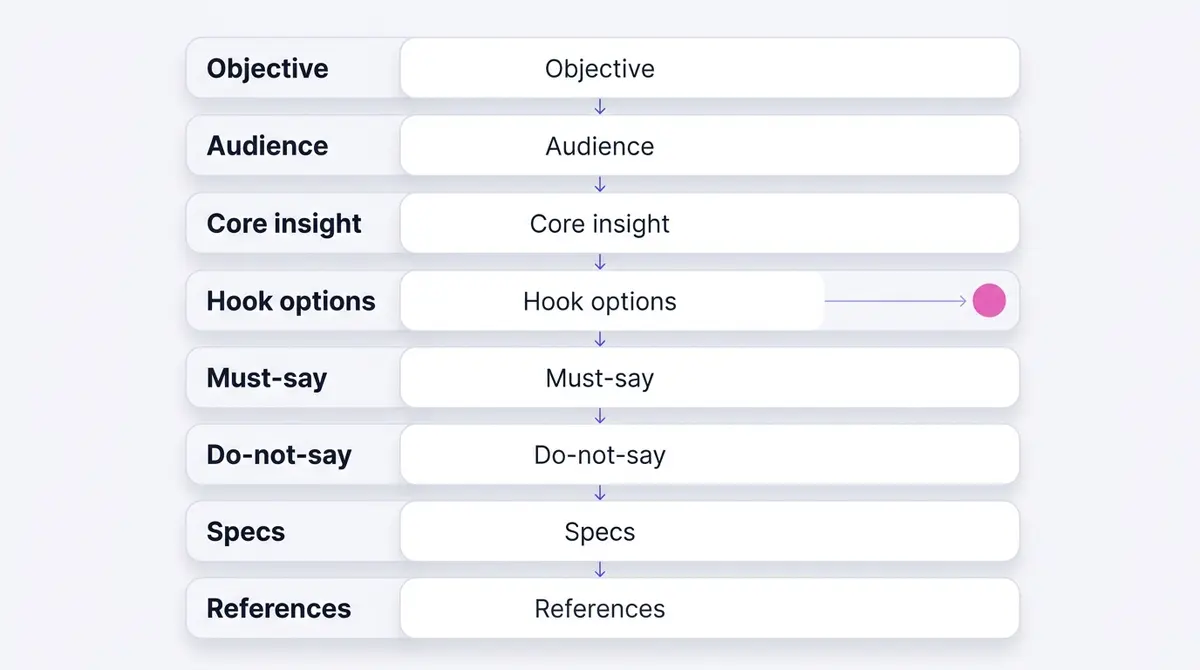
- Objective. The single outcome and the exact conversion event the ad optimizes for: a purchase, an instant form lead, a site visit, a DM. Name the event, not the vibe.
- Audience. Who the ad talks to in one sentence, written as a person, not a demographic grid. "Working mums in their 30s who want a supplement routine that survives a chaotic morning" beats "F25-44, urban."
- Core insight. The one true thing about the customer's problem the ad is built on. This is the spine; everything else hangs off it.
- Hook options. Three to five distinct first-three-seconds openings, each a different angle. You will test these, so make them genuinely different.
- Must-say messages. The two or three points the ad cannot omit: the key benefit, the offer, the proof. Keep it to three or the ad becomes a list.
- Do-not-say. The claims, guarantees, and words that get ads rejected or misrepresent the product. Short and absolute.
- Format and specs. Aspect ratio, length, placement, and the non-negotiables: captions on, sound-off-readable hook, vertical 9:16 for Reels and Stories.
- References. One or two clips that show the style, pacing, or energy you want. A linked clip does the work of a paragraph.
The order matters. Objective and audience set the frame, the core insight is the engine, and the rest are constraints that keep the maker on the road. Those eight decide what the ad says. A second tier, the shot list, the deliverables, the production logistics, and the usage rights, decides how it gets made and what you are allowed to run, and we come to it once the message is locked.
The core insight is the engine, not the feature list
Most weak briefs fail at field three. They list features, "30g collagen, halal-certified, no added sugar," and hand the maker a spec sheet. A spec sheet produces a feature reel, and feature reels do not get finished. Even a trust cue like halal certification has to be dramatized as a reason to buy, not just stated on the list.
A core insight is different. It is the friction or desire that makes the product matter, stated from the customer's point of view. "Mums skip collagen because mixing a drink is one more thing to do in a morning they have no time for" is an insight. It immediately suggests the hook (someone tearing a sachet one-handed while packing a school bag), the demo (no mixing, no cup), and the must-say (it fits the morning you already have). A brand like Beyond Collagen+ running a demo ad for the daily sachet that fits a busy mum's morning is briefing the insight, not the ingredient list.
The test is simple: if the insight does not write the hook for you, it is not sharp enough yet. Keep cutting until one sentence about the customer makes the rest of the brief obvious.
Where do insights come from? Three reliable sources, none of them a brainstorm in a meeting room. The first is your own reviews and support tickets: the phrases customers actually use to describe the problem are usually sharper than anything a copywriter invents, because they are the language of someone who lived it. The second is the comments under your existing ads and your competitors' ads, where people volunteer objections and surprises for free. The third is the sales or DM transcripts, where you can watch the exact moment a prospect goes from skeptical to sold. Mine those, and the core insight stops being a guess. Write it in the customer's words, present tense, and it will survive contact with both a creator and a generator.
Hooks: why you brief three to five, not one
The hook is the first three seconds, and the first three seconds carry a startling share of the result. An older but instructive Nielsen study commissioned by Facebook found that video views of three seconds or fewer still produced measurable brand lift: 47% ad-recall lift, 32% brand-awareness lift, and a 44% lift in purchase intent. Treat those figures as dated and directional, they are from 2015 and Facebook-commissioned, but the craft lesson has not changed. The opening seconds are the part most people actually watch, so the brief must front-load the core insight and the must-say message into them.
That is exactly why you brief several hooks rather than locking one. You do not know which opening will earn attention until it runs, and you do not want the maker guessing. Give three to five distinct angles:
| Hook angle | What it opens on | Best when |
|---|---|---|
| Question | A pointed question the viewer answers in their head | The problem is one people quietly worry about |
| Problem callout | The friction, named in the first second | The pain is obvious and shared |
| Result reveal | The after, shown before the explanation | The outcome is visual and dramatic |
| Bold claim | A specific, provable statement | You have proof to back it immediately |
| Pattern interrupt | An unexpected visual or line | The category is crowded and ignored |
Briefing several hooks also future-proofs the ad for Meta's automated delivery. Meta reports that advertisers using its Advantage+ shopping campaigns see a 22% higher return on ad spend than those who do not; that is Meta's own figure, so read it as directional, but the mechanism is real. These systems improve by testing variety. A brief that hands them five openings rather than one locked script is feeding the machine the variants it is built to optimize.
Specs and the muted feed: caption it or lose the message
The format field is where good briefs quietly separate from bad ones, because of one fact about how the feed actually plays: muted by default. When mobile video plays with sound off, captions become the only source of verbal information. A 2024 peer-reviewed eye-tracking study in PLoS One, 161 participants, measured 77.7% comprehension when watching subtitled video with sound off, versus 81.3% with sound on. The gap is small, which is the point: well-placed on-screen text preserves nearly the full message even when nobody hears a word.
So the brief mandates captions and a sound-off-readable hook. The first line of text on screen should carry the insight by itself, no audio required. That does not mean sound is optional. The same study found that adding sound lifted viewer immersion meaningfully, by about 0.7 points on a 7-point scale, a statistically significant jump. So brief the audio as an upgrade that deepens the experience, not as the carrier of the core message. Plan for the muted majority first, reward the unmuted minority second.
The rest of the specs field is mechanical but unforgiving:
- Aspect ratio: 9:16 vertical for Reels and Stories; 1:1 or 4:5 for feed.
- Length: a tight 15 to 30 seconds for most UGC ads; the hook lands in second one.
- Captions: burned-in or styled, never relying on the platform's auto-caption toggle.
- Safe zones: keep text and the hook clear of the UI overlays at top and bottom.
For the exact pixel and ratio rules per placement, a dedicated guide on Facebook and Instagram ad sizes is worth keeping open while you fill in this field.
The do-not-say field saves the most money
The field teams skip most often is the one that prevents the most expensive mistakes. A creator who does not know your category will, in good faith, say something that gets the ad rejected: an unsupported health claim, an income promise, a before-and-after framing your category cannot make. Those rejections surface in Meta's Account Quality dashboard, slow your launch, and at volume can put account standing at risk.
A do-not-say list, three to six absolute lines, removes that risk before the shoot. "Do not promise weight loss." "Do not say cures or treats." "Do not invent a guarantee." "Do not claim a result we cannot show." It also protects accuracy: you do not want a creator improvising a feature you do not have. A brand like Dasher Smart Home briefing a problem and solution ad for the doorbell that caught a parcel thief wants the story vivid, and wants it bounded, no claim the device prevents crime, just that it caught this one on camera.
Pair the do-not-say list with the must-say list and you have defined the message's edges from both sides: here is what the ad has to land, and here is the line it cannot cross. That pairing is what makes a brief usable by someone who has never sold your product, human or model.
There is a subtler version of the same field that pays off over time. Beyond the hard policy lines, add a short "house style" do-not-say: the words and framings that are technically allowed but read as inauthentic for your brand. Banning the phrases that make UGC sound like an infomercial, the breathless "you guys, I am OBSESSED," the fake-spontaneous "so I just had to share this," protects the very thing UGC is for. The Stackla data is directional, but the 19% authenticity figure is a warning: the moment a creator slips into ad-voice, the trust that made you choose UGC evaporates. The do-not-say list is where you defend it.
What to film: the shot list and the deliverables
The eight message fields decide what the ad says. They do not say a word about what the creator actually films, or what lands in your inbox three days later. That is the gap where most UGC handoffs break: the brief was all message and no production, so you get one talking-head clip when the test needed a demo, two close-ups, and a result reveal. Two fields close it.
The first is a shot list: the concrete sequence of shots the creator captures on the day. A message field tells the maker what to say. The shot list tells them what to point the camera at, and in what order, so nothing gets missed on a set you are not standing on. A workable UGC shot list reads like this:
- Hook take: the first line, filmed two or three ways so you can test the openings you briefed.
- Talking head: the creator delivering the must-say messages to camera, conversational, not scripted-stiff.
- Product demo: the product in use. This is the single most persuasive shot in most UGC, the product doing the thing the insight promised.
- Close-up or detail: texture, label, the moment that proves the claim (the sachet tearing one-handed, the parcel caught on the doorbell).
- B-roll: hands, context, the setting, the cutaways an editor needs to cover a jump or pace the middle.
- Result reveal: the after, where the category and the do-not-say list allow it.
- Unboxing (optional): the first-look moment, when the package or the reveal is part of the story.
You do not need every shot in every ad, but listing them forces the decision before the shoot instead of after. If you want the line-by-line version that pairs words with each shot, the UGC ad script guide turns this list into what gets said over each frame.
The second field is deliverables: what you expect back, stated in numbers. Vague briefs ask for "a video" and get exactly one, which is the most common reason a UGC order produces a single cut when the test plan needed five. Name three things. The count of finished variations, where three to five distinct cuts, each built on a different hook, gives Meta's auction something to choose between. The aspect-ratio versions, a 9:16 master for Reels and Stories plus a 1:1 or 4:5 cut for feed. And whether you want the raw selects and B-roll as well as the edited master. Raw footage is the deliverable teams forget and later regret: with it, your editor recuts a tired ad into three fresh ones without booking the creator again; without it, every refresh is a re-shoot.
Production logistics: what a creator needs before they press record
A message brief assumes the shoot just happens. It rarely does. The logistics block lists the practical inputs a creator needs in hand before filming, and the items missing here are exactly where real-world re-shoots start.
- Product: who supplies it and ships it, and by when. If the creator films before the parcel arrives, you get a video built around an empty hand.
- Setting and wardrobe: the kind of room and look that fits the audience. "Real kitchen, morning light, no branded backdrop" keeps a busy-mum insight believable; a styled studio quietly breaks it.
- Lighting and sound: a window and a quiet room beat a ring light in most UGC, but say so, because a creator optimizing for polish will over-produce the very thing you hired them to keep raw.
- Who appears on camera: the creator themselves, a specific demographic, or hands only. The audience field decides this; the logistics block states it plainly.
- Turnaround: the date you need the deliverables, with enough lead time to run a revision round and clear Meta's review before any sale date.
Then set the revision policy, because an open-ended one invites scope creep on both sides. State how many rounds of changes are included (one or two is normal for a single cut), how feedback is given (timestamped notes beat "can you make it pop"), and who signs off before the ad goes live. A brief that defines two revision rounds and a single approver turns "endless re-cuts" into a bounded, budgeted step. Bundle that into the brief and the creator prices the job correctly the first time, instead of charging you for surprises later.
Usage rights: what you can actually run, and for how long
Here is the field that decides whether a great video is one you are legally allowed to run. By default, the creator owns the footage they shoot and grants you a licence to use it. The brief, and the agreement attached to it, is what defines that licence. Skip it and you can end up with a winning cut you cannot legally put behind paid spend, or a licence that lapses mid-campaign and pulls a performing ad just as it scales.
Four things belong in the field:
- The window: how long you may run the content. Define it plainly, whether that is a fixed number of months or the life of one campaign, and state the renewal terms.
- Paid or organic: whether the licence covers paid ads or only organic posts. Paid usage almost always costs more, because it puts the creator's face behind spend.
- Placements: which surfaces the content runs on (feed, Reels, Stories), so the licence matches where you will actually deliver it.
- Exclusivity and recut rights: whether the creator can work with a competitor during the window, and whether you may edit, recut, and version the footage (the right that makes raw selects worth asking for).
Price scales with all four. A short organic-only licence is cheap; a long, exclusive, paid licence with full recut rights sits at the premium end. Decide what you actually need before you negotiate, because paying for perpetual exclusive rights on a test ad you will refresh in six weeks is money set on fire.
One option deserves its own line, because it changes who publishes. You can run a creator's content as an ad from the creator's own handle, with a Paid partnership label, using Meta's Partnership Ads. The creator grants you permission in Meta's Partnership Ads tools, either for a specific post or at the account level, and they can revoke it. The ad then carries the creator's name and the social proof of their following, not just your brand Page. That is a different licence from a standard usage grant, so name it in the brief if you want it, and budget for it separately.
| Licence type | Who publishes | What you can run | Best for |
|---|---|---|---|
| Organic only | The brand or the creator | Unpaid posts on your own channels | Seeding, social proof, low budget |
| Paid usage (brand handle) | The brand | Paid ads from your own ad account and Page | Most performance UGC tests |
| Partnership ad (creator handle) | The creator's handle, you boost it | Paid ads carrying a Paid partnership label and the creator's social proof | Trust-led ads where the creator's audience matters |
Whichever you choose, write the window and the placements next to it. A licence type with no duration is a dispute waiting to happen.
Disclosure: the labels the brief has to account for
A do-not-say list keeps banned claims out of the ad. Disclosure is the other side of the same coin: the labels the ad is required to show, and getting them wrong is the advertiser's problem, not the creator's. Brief two of them.
The first is the paid-partnership disclosure. If a creator is compensated and the ad runs as a partnership ad from their handle, Meta requires the Paid partnership label, and disclosure regulators expect the commercial relationship to be obvious to anyone who sees the ad. In the United States, for example, the Federal Trade Commission's Endorsement Guides, revised effective 26 July 2023, require a material connection between a brand and an endorser to be disclosed clearly and conspicuously, which the FTC defines as a disclosure that is difficult to miss and easily understood by ordinary consumers. The principle travels even where the wording differs: lead the brief with the rule that the paid relationship must be plain, then confirm the exact label for the market you are running in.
The second is the AI-content label. If the UGC is generated or heavily edited with AI, Meta may attach its AI info label (renamed from "Made with AI" on 1 July 2024), applied when it detects industry-standard AI image indicators or when the content is self-disclosed as AI-generated. Since this brief is written to serve an AI generator as readily as a person, the label is part of the spec: decide whether the ad discloses AI use, and brief it. The Made with AI label on Meta ads guide covers when the label triggers and how it affects delivery.
Neither label sinks an ad on its own. A surprise label after launch, or a missing one that triggers a policy strike, is the avoidable cost the brief exists to prevent.
How a UGC brief differs from a classic creative brief
If you have written a traditional creative brief, you will notice the UGC version is shorter and pointier. That is deliberate. A classic brief is built for an agency producing a polished, brand-controlled asset, so it front-loads context: a project name, a brand-background summary, a competitor set, a KPI list, and a distribution-channel matrix across every platform the campaign touches. A UGC brief assumes one ad, for one feed, made fast, and it spends its words where UGC actually wins or loses.
| A classic creative brief leads with | A UGC brief shrinks or drops | A UGC brief adds |
|---|---|---|
| Project name and brand-background essay | The brand essay, down to one audience sentence | A core insight in the customer's words |
| Competitor and market analysis | The competitor list | Three to five hook options to test |
| Multi-platform distribution matrix | Down to one or two Meta placements | A shot list and deliverables in numbers |
| Brand-controlled tone and polish | The polish, in favour of a believable voice | Creator-voice guardrails and a do-not-say list |
| KPIs across the funnel | Down to a single named conversion event | A usage-rights window and disclosure labels |
The contrast is the point. A UGC brief does a different job from an agency brief, so it is built differently: short, opinionated, and spent on the insight, the shots, and the rights. If you want the long-form structure for a polished, agency-style asset, the Facebook ad creative brief guide walks the classic template. For UGC, keep it tight and put the page where the money is.
Carry the brief through generate, edit, launch, measure
A brief is not a document you file after the shoot. The best ones are written to travel through the whole loop, and the fields map cleanly onto each stage.
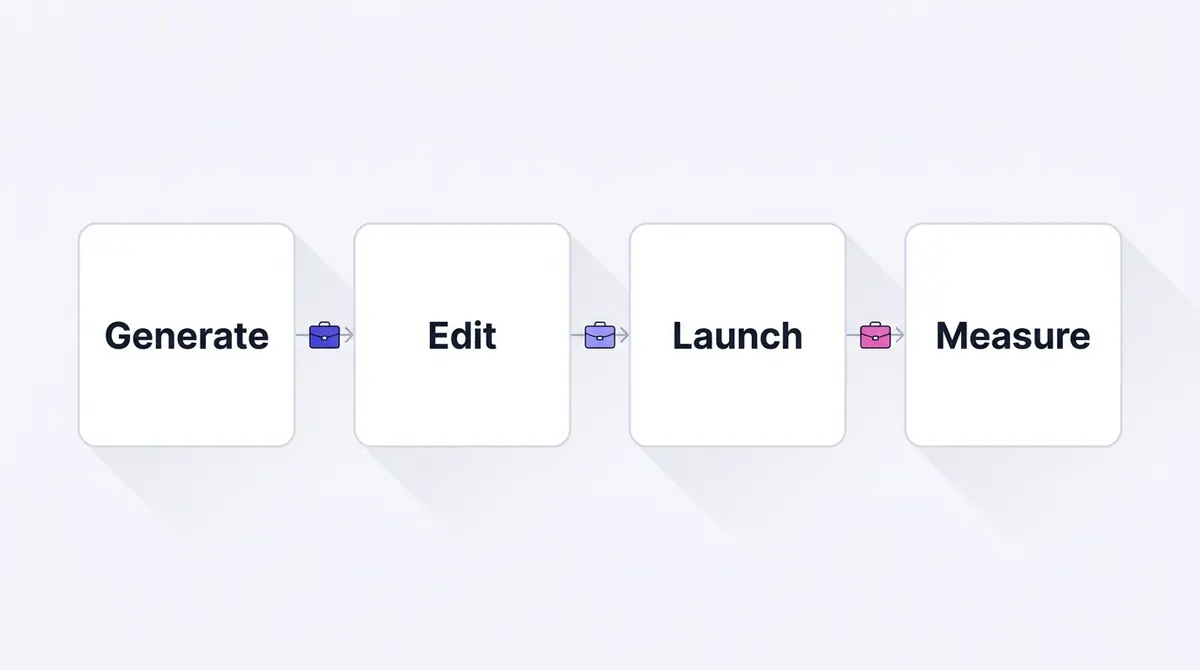
At generate, the shot list and the hook variants become the actual openings, whether a creator films them or an AI produces them; the reference clip anchors the style for either maker. At edit, the specs field is the checklist (captions burned in, hook readable muted, 9:16, length tight, text inside the safe zones), and the deliverables you asked for are what the editor has to work with, which is why the count of cuts and the raw selects you requested decide how many versions ship from a single shoot. At launch, the objective field becomes the campaign's conversion event, so the ad is optimized for the outcome you decided on day one, and the usage rights you fixed are what legally let the ad run as paid in the first place. At measure, that same named event lets you grade each hook variant on cost per result and feed the winner back into the next brief's references.
This is also where the maker question stops mattering. When the brief is structured this tightly, a human creator and an AI generator become interchangeable inputs to the same pipeline, and you can run both against the same brief to see which produces the better cut. A platform like AdPlay.ai keeps research, generation, editing, and Meta launch in one place, which is useful precisely because the brief is the thread running through all four. If you want the maker-facing half of this, the how to make UGC ads walkthrough turns these fields into a shot-by-shot production plan.
A fill-in template you can use today
Copy this, fill the blanks, and keep the message fields to one screen. The production and rights block sits underneath.
Message fields:
- Objective: drive purchase / instant form lead / site visit / DM, optimized for the exact conversion event.
- Audience: one sentence describing a real person and their situation.
- Core insight: the one true thing about their problem this ad is built on.
- Hook options (pick the angle, write the first line):
- Question: first line
- Problem callout: first line
- Result reveal: first line
- Bold claim: first line
- Pattern interrupt: first line
- Must-say messages: benefit, offer, proof. Maximum three.
- Do-not-say: claim, guarantee, word. Absolute, three to six lines.
- Format and specs: 9:16 / 1:1 / 4:5, length, captions on, hook readable with sound off, text inside safe zones.
- References: link to clip 1, link to clip 2. Note what to copy: pacing, energy, framing.
Production and rights:
- Shot list: hook take, talking head, product demo, close-up, B-roll, result reveal tick the ones this ad needs.
- Deliverables: number finished cuts, ratios 9:16 plus 1:1 or 4:5, raw selects yes / no, due date.
- Logistics: product shipped by date, setting room and look, on camera who, lighting and sound note.
- Revisions: 1 / 2 rounds included, feedback via timestamped notes, sign-off by name.
- Usage rights: organic only / paid / partnership ad, window duration, placements feed / Reels / Stories, exclusivity yes / no.
- Disclosure: Paid partnership label yes / no, AI info label yes / no / not applicable.
Two habits make this template earn its keep. First, fill the core insight before anything else and refuse to move on until it writes the hook for you. Second, link a reference clip for every brief; a real example of Medicube running a testimonial ad for skin that looks clearer after a seven-day routine tells a maker more about pacing and tone than three paragraphs ever could. The Meta Ad Library is a free place to find those references; the Meta Ad Library guide shows how to search it for proven UGC angles in your category.
A vague brief costs you a week and a re-shoot. A sharp one-pager costs you twenty minutes and produces a creative asset you can test, scale, and brief again. Given that creative is the 49% lever, that twenty minutes is the best-spent time in your entire campaign.
Example ad angles
Representative hooks and formats from the category.
“Testimonial ad for skin looks clearer after the 7-day routine”
“Problem and Solution ad for the doorbell that caught a parcel thief”
By the numbers
Frequently asked questions
What is a UGC creative brief?
It is a short document that tells whoever makes a user-generated-content ad exactly what to produce: the objective, the audience, the single core insight, a few hook options, the messages that must be said, the claims that must not, the format and platform specs, and one or two reference clips. It also carries a production and rights tier: the shot list, the deliverables you expect back, the usage rights, and any disclosure labels. It is shorter and more opinionated than a traditional ad brief because UGC lives or dies on a believable voice, so the brief constrains the message while leaving room for the creator's natural delivery.
What is the single most important field in a UGC brief?
The core insight: the one true thing about your customer's problem that the ad is built around. Everything else, the hook, the must-say message, the demo, flows from it. A brief that lists ten features but no insight produces a feature reel that nobody finishes. A brief with one sharp insight, like 'mums skip collagen because mixing a drink is one more morning step they do not have time for,' writes its own hook and its own demo.
What is the difference between a UGC brief and a regular creative brief?
A classic creative brief is built for an agency or a designer making a polished asset, so it front-loads context: a project name, a brand-background summary, a competitor set, a KPI list, and a distribution matrix across every channel. A UGC brief drops most of that. It assumes one ad for one feed, made fast, and trades the brand essay for a believable creator voice. What it adds is the part a classic brief leaves vague: a shot list, the deliverables you expect back in numbers, a usage-rights window, and the do-not-say guardrails that keep an unscripted creator on the right side of policy. Shorter, more opinionated, and built to be shot rather than admired.
What deliverables should I ask a creator for, and how many cuts?
State it in numbers, not adjectives. Ask for the finished cuts you will actually run (three to five full variations, each on a different hook, gives the auction something to choose between), the aspect-ratio versions you need (a 9:16 master for Reels and Stories, plus a 1:1 or 4:5 cut for feed), and whether you want the raw selects and B-roll as well as the edited master. A brief that says only make a video gets you one cut when the test needed five. Raw footage is the field teams forget: with it your editor recuts a tired ad without booking another shoot. Put a turnaround date on each deliverable.
Why does a UGC brief need a do-not-say list?
Two reasons. First, policy: unsupported health, income, or before-and-after claims get ads rejected and can hurt account standing, and a creator who does not know your category will say them by accident. Second, brand and accuracy: you do not want a creator inventing a feature you do not have or a guarantee you cannot honor. A short do-not-say list, three to six lines, prevents the most expensive re-shoots and rejections.
What usage rights should a UGC creative brief specify, and who owns the footage?
Spell out four things: how long you may run the content (the usage window), whether the licence covers paid ads or organic posts only, which placements it covers, and any exclusivity. By default the creator owns what they shoot and licenses it to you for the window you agreed, so the brief, not a handshake, is what lets you run the footage as a paid ad. If you want to run the ad from the creator's own handle with a Paid partnership label, that is a separate permission, granted through Meta's Partnership Ads tools, and it usually carries its own fee. Define the window, the placements, and renewal up front, because the price scales with how broadly and how long you can use the content.
Do UGC ads need a paid-partnership or an AI-content disclosure label?
Often, yes, and the brief should say which. If the ad runs from a creator's handle as a partnership ad, Meta requires the Paid partnership label, and disclosure regulators such as the US FTC expect any material connection between a brand and an endorser to be disclosed clearly and conspicuously wherever the ad runs. If the UGC is AI-generated, Meta may apply its AI info label when it detects AI image indicators or when the content is self-disclosed. Treat both as the advertiser's responsibility, brief them in, and confirm the rules for your market, since disclosure law is not the same everywhere.
Can the same brief work for an AI generator and a human creator?
Yes, and writing it so both can use it is the point in 2026. A human reads the insight and improvises a believable delivery; an AI generator needs the same fields stated explicitly, the objective, audience, hook variants, must-say lines, do-not-say constraints, and specs, plus a reference clip to anchor the style. The clearer and more structured the brief, the more interchangeable the maker. A vague brief fails a person and fails a model for the same reason: it never decided what the ad is.
Sources
- 1.Westwood One, Marketers Vastly Understate the Sales Effect of Creative (NCSolutions / Nielsen) (2024)
- 2.Marketing Charts, Creative Quality Has the Biggest Impact on Ad Effectiveness (2023)
- 3.PLoS One, Watching Subtitled Video With Sound Off Versus On (eye-tracking study) (2024)
- 4.MarTech, Even Brief Video Views Drive Brand Lift, Facebook-Nielsen Study Finds (2015)
- 5.Social Media Today, Survey Reveals UGC Can Drive Improved Trust and Loyalty for Ecommerce (Stackla) (2021)
- 6.Nielsen, Nielsen Expands Campaign Effectiveness Suite to Include Creative Evaluation (2024)
- 7.Meta Business Help Center, About Partnership Ad Permissions (2026)
- 8.Meta for Business, Advantage+ Shopping Campaigns: Automated Shopping Ads (2026)
- 9.About Meta, Our Approach to Labeling AI-Generated Content and Manipulated Media (2024)
- 10.Meta Transparency Center, Labeling AI Content (2024)
- 11.Federal Trade Commission, FTC's Endorsement Guides: What People Are Asking (2023)
Keep exploring
Turn ad research into winning ads
Research the ads that work, generate the creative on-brand, and launch to Meta, all in one tool.
7-day free trial · No credit card required