
Meta Pixel to Dataset: What Changed (2026)
Meta restructured the Pixel into a dataset in Events Manager: what the new terms mean, what migrated automatically, and the checklist to keep tracking intact.
Updated October 2026 · Likit Sae Lee, CTO

Meta did not delete the Pixel; it folded it into a broader container called a dataset in Events Manager that now holds your website Pixel, server-side Conversions API, app, offline, and messaging events under one ID. That dataset ID is the same number your old Pixel ID always was, and most existing pixels were converted automatically, so installed code, ad sets, and audiences keep running untouched. The accurate way to read an old tutorial that says select your pixel is to select your dataset, then verify a few things rather than rebuild anything.
You opened Events Manager to check your Pixel and found a dataset where the Pixel used to be. Nothing in your account stopped working, but the vocabulary moved under your feet, and every tutorial you half-remember now uses words that no longer match the screen. This guide explains exactly what Meta changed when it restructured the Pixel into a dataset, what migrated on its own, and the short list of things worth checking so your tracking stays intact.
The short version: what actually changed
If you learned Meta tracking even a year ago, the headline change is small to describe and easy to misread. Meta took the Pixel, the snippet that has reported browser activity since the Facebook Pixel days, and folded it inside a broader object called a dataset. The Pixel did not disappear and did not change how it fires. It simply stopped being a standalone thing you manage and became one source inside a container that manages several.
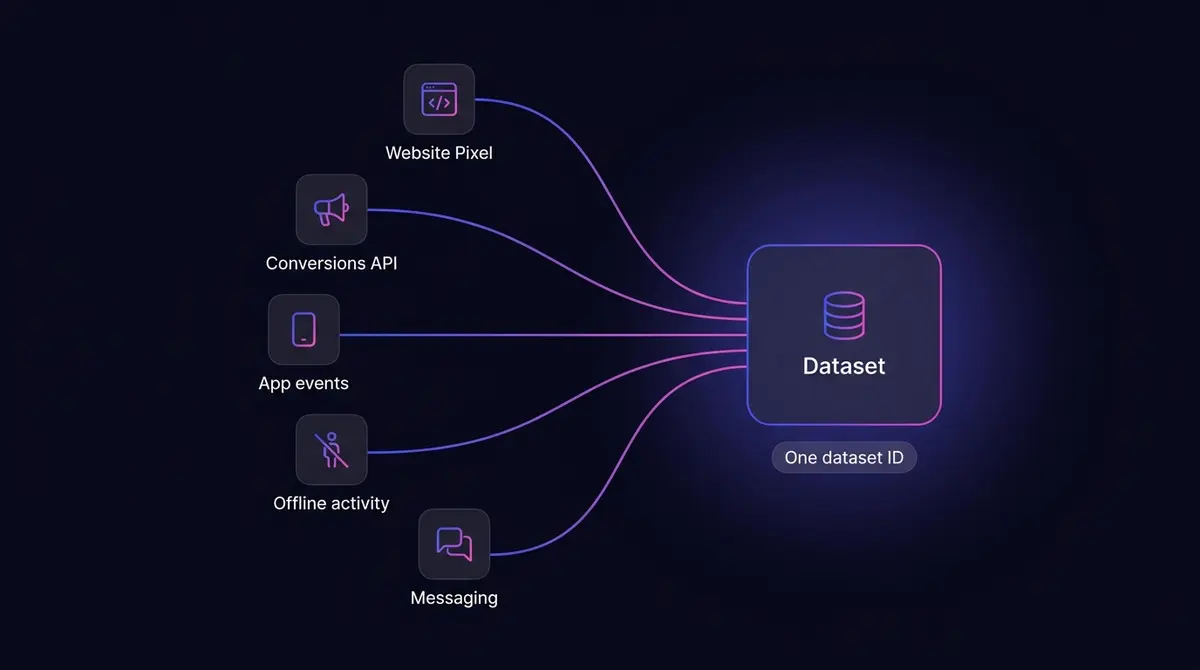
That container is the dataset, and it is the unit Events Manager now organizes around. A dataset, in Meta's own Help Center wording, lets you connect and manage event data from different sources, your website, mobile app, physical store location, or business chats, in one place. The Pixel is the website source. Your server-side Conversions API is another. Your app events, your offline activity, and your messaging conversations are the rest. All of them feed one dataset, identified by one number.
Here is the detail that should lower your blood pressure: that one number is the same Pixel ID you already had. Meta converted most existing pixels into datasets automatically as it rolled the change out, and your new dataset ID equals your old pixel ID. So your installed base code keeps firing, your ad sets keep delivering, and your Custom Audiences keep populating, all without you re-pasting a single line. The rename is a container change, not a migration you have to perform. Your real job after the change is to verify, not to rebuild, and the rest of this guide is the verification.
It helps to remember the scale of the machine this all feeds. Statista put Meta's worldwide advertising revenue at over US$196 billion in 2025, and every dollar of it is priced and delivered off the event signal your dataset sends. Getting the vocabulary and the wiring right is not housekeeping. It is how your store joins that auction with real intent signals instead of guesses.
Pixel, dataset, data source: the terminology map
The single biggest source of confusion is that four words now describe parts of one system, and old tutorials use them as if they were interchangeable. They are not. Once you can place each term, every stale guide becomes readable again, because you can translate its language to the current screen on the fly.
| Term | What it is | Where it lives |
|---|---|---|
| Dataset | The container that groups your events under one ID. The unit Events Manager organizes around now. | Events Manager, under Data Sources |
| Meta Pixel | The browser tag that reports website activity. One source inside the dataset, not a separate object anymore. | Inside the dataset, as the website source |
| Conversions API | A server-side source that sends the same events from your server. A second source feeding the same dataset. | Inside the dataset, as the server source |
| Data source | The generic Events Manager label for any connection that sends events. A dataset is one kind of data source. | The tab in Events Manager where datasets, catalogs, and other sources are listed |
| Dataset ID | The single identifier for the dataset. Equals your old Pixel ID. | Dataset, then Settings |
Read that table once and the practical translation falls out of it. When an older walkthrough tells you to "select your pixel," it now means select your dataset, because the object that used to be labelled simply as your Pixel is the dataset today. When a partner integration asks for your "Pixel ID," the number it wants is your dataset ID, the same digits either way. And when Events Manager shows you a Data Sources tab, that is the top-level list where your dataset lives alongside any catalogs or other connections you have.
The reason this matters beyond pedantry is that the wrong mental model leads to the wrong action. People who think the Pixel was deleted go looking to reinstall it, and reinstalling a Pixel that is already firing creates duplicate events. People who think they need a fresh dataset ID go generating new ones, then wonder why their audiences emptied. Hold the map instead: one container, several sources, one ID, and almost nothing for you to recreate.

The five sources a dataset unifies, and why Meta consolidated them
The deeper reason for the change is not a rename for its own sake. It is consolidation. A dataset pulls five different event sources into one identified container.
The first is the website Pixel, the browser tag that reports page views, product views, add-to-carts, and purchases as people move through your site. The second is the server-side Conversions API, which sends those same web events from your server instead of the browser, the server-side source that shares the same dataset and survives the conditions that drop browser events. The third is app events, the actions people take inside a mobile app. The fourth is offline activity: in-store purchases, phone orders, and conversions recorded in your CRM. The fifth is messaging, the conversations and conversions that happen in Messenger, WhatsApp, and Instagram direct messages. Five channels, one dataset, one ID.
Why did Meta build it this way? Because a real buyer does not stay in one channel. Someone sees your ad on the Instagram app on their phone at lunch, opens your site on a desktop browser that evening, abandons the cart, and finishes the purchase in-store on the weekend. Track each of those moments with its own separate tool, the Pixel for web, App Events for mobile, the old Offline Conversions API for in-store, and you get three disconnected records of one person and no way to know they are the same buyer. Worse, you risk counting that single sale as several, which teaches Meta's delivery system to chase phantoms.
Juggling those separate integrations also multiplied the chances of error and made setups harder to scale, which is precisely the friction the dataset removes. With one container, Meta can resolve a single person across all five sources and dedupe them into one buyer. That stitched view is what lets the system optimize toward the people genuinely likely to convert rather than toward whichever channel happened to capture them. The consolidation is the point, and the rename is just the surface of it.
This is also why the change leans so heavily on the Conversions API rather than the browser alone. The browser Pixel leaks: ad blockers strip it, browsers cap the cookies it relies on, and Apple's App Tracking Transparency lets people opt out of the cross-app tracking Meta uses to connect an ad to a sale. A dataset that included only the website Pixel would still miss a meaningful share of every channel. By making the dataset a multi-source container with the Conversions API as a first-class citizen, Meta built the structure to backfill what the browser drops. If you have not paired your Pixel with the server-side source yet, the companion guide on Facebook Conversions API setup walks the build, and the upstream guide on installing the Meta Pixel covers the web source itself.
What migrated automatically, and what did not
The reassuring part is broad. Most existing pixels were converted into datasets automatically as Meta rolled the change out, so a great many advertisers already have a working dataset and never lifted a finger. Because the dataset ID equals the old pixel ID, everything that referenced that number kept pointing at the right place. Specifically, three things carried over with no action required.
Your installed base code kept firing. The fbq snippet in your site's head, the fbq('init', ...) call and the standard events around it, all reference your ID, and since the ID did not change, the code did not need to. There is nothing to re-paste and nothing to re-deploy.
Your ad sets kept delivering. Campaigns that optimize toward your dataset's events, a Purchase or a Lead, are pointed at the same number, so they continued without interruption through the rename.
Your audiences kept populating. Custom Audiences built from Pixel activity, website visitors, add-to-cart abandoners, and the Lookalikes seeded off them, all draw from the same source ID, so they kept refreshing.
What did not migrate as cleanly, and therefore deserves attention, is the standalone offline path. Meta discontinued the separate Offline Conversions API in May 2025. In-store, CRM, and phone conversions no longer flow through standalone offline event sets or CSV uploads. They now flow through the standard Conversions API, sent to your dataset with the action source set appropriately, for example physical_store for an in-store sale. If you previously uploaded offline conversions the old way, that path stopped working, and the events need to be re-routed through the Conversions API into your dataset. This is the one consolidation step that can quietly break tracking you used to rely on, so it is the first thing to check if any of your sales happen off the website.
What this means for gtag, GTM, and partner integrations
Most stores do not paste raw Pixel code into a theme anymore. They wire Meta in through a tag manager, a gtag.js setup, or a hosted-platform connector, and the first question after the rename is whether any of that plumbing needs touching. The short answer is no, and the reason is the same one that protects your base code: every one of those integrations references your ID, and the ID did not change.
A Google Tag Manager install is the clearest case. Whether your container fires a Custom HTML tag holding the fbq base code or the dedicated template, the value it needs from you is the ID you copy out of Events Manager under Data Sources. That number is your dataset ID, the same digits your Pixel ID always was, so an existing GTM container keeps firing events to the right place with nothing to re-enter. Meta actually made this path easier rather than harder during the same period: Search Engine Land reported on April 8, 2026 that Meta shipped an official Pixel template inside Google Tag Manager that reuses your existing GA4 data layer and maps enhanced ecommerce actions (purchases, add-to-cart, content views, checkout starts) for you, where setups used to lean on a third-party community template. A gtag.js or hard-coded fbq snippet behaves identically: it carries your ID, the ID is unchanged, so it keeps reporting.
Partner connectors on hosted platforms follow the same logic. The connection is bound to your dataset ID, so it survives the rename untouched. The one thing worth a glance is that the connector still points at the right dataset and not a second one that a reconnect or platform update created during the transition, which is exactly what the verification checklist below confirms. Nothing here needs rebuilding. It needs confirming.
Where to find your dataset ID in Events Manager today
This is the practical sub-task people search for most, because the screen does not match the old screenshots. The path is short once you know it.
- Open Events Manager. The quickest route is All tools in the main Meta navigation, then Events Manager.
- Click the Data Sources tab in the left menu. This is the top-level list of everything that sends events, and your dataset lives here.
- Select your dataset. It is often named after your store or business, and if you have only one, it is the obvious entry.
- Open its Settings tab inside the dataset's panel.
- Read the ID. It is labelled Dataset ID, though some accounts still show the older Pixel ID label. Either way, it is the same number, and that number is what every integration means when it asks for a "Pixel ID."
Two notes save confusion here. First, the label genuinely varies by account during the transition, so do not panic if you still see Pixel ID where a newer guide says Dataset ID. They are the same identifier, and tools that accept one accept the other. Second, the Data Sources tab is the navigation anchor that survived the rename, so when an old tutorial sends you hunting for a Pixels tab that no longer exists, Data Sources is where it went.
Your post-change checklist: what to verify so tracking stays intact
Because the change was mostly automatic, the work is verification rather than reconstruction. Run this short list once and you can trust that the rename did not quietly cost you anything.
Confirm your dataset ID matches your installed Pixel ID. Pull the ID from Events Manager as above, then check the ID hard-coded in your site's base code or your tag manager. They should be identical. A mismatch usually means a second Pixel got created somewhere along the way, which splits your signal across two sources.
Re-check your partner integrations. If your store runs on a hosted platform or you connect through a tag manager, open that connection's Meta settings and confirm it points at the right dataset, the one with your real ID. Platform updates and reconnections during the transition occasionally repoint an integration at a freshly created dataset, which silently strands your events.
Verify the Conversions API access token is still attached to the dataset. The token was issued against your ID, and since the ID did not change, it should still be valid. But tokens expire, and an expired token stops your server-side events without any error you will notice until your numbers dip. Confirm the token is present and current in the dataset's Settings.
Confirm any offline events migrated. If you record in-store, phone, or CRM conversions, the standalone Offline Conversions API path discontinued in May 2025 no longer works. Verify those events now arrive through the Conversions API into your dataset with the correct action source, and that no old offline event set is sitting empty and assumed-working.
Walk your own funnel. The end-to-end check that catches everything is to trigger your real events and watch them land. Match quality is scored per event inside the dataset, and a clean match starts with the event actually arriving and not duplicating. The mechanics of raising that score live in the guide on improving Event Match Quality, but the dataset-level check is simpler: confirm each key event fires once, carries its value and currency on a purchase, and shows up from both the browser and the server if you run both.
Old habits the restructure made obsolete
A "what changed" post owes you the flip side too: the steps that older guides still tell you to do that you should now skip. The dataset consolidation arrived alongside a wider simplification of Events Manager across 2025 and 2026, and several rituals are gone.
| Old way | Now |
|---|---|
| Rank your 8 priority events per domain by hand | Meta auto-aggregates eligible events; the 8-event limit was removed on 15 May 2023 |
| Configure events in the Aggregated Event Measurement tab | That standalone tab was retired on 15 May 2023; there is no manual configuration step |
| Verify your domain just to configure events | Domain verification is no longer required to configure events (still worth doing for editing permissions and brand safety) |
| Create standalone offline event sets or upload conversion CSVs | Offline events flow through the Conversions API into your dataset; the standalone Offline Conversions API was discontinued in May 2025 |
| Treat server-side tracking as a developer-only project | A one-click Meta-enabled Conversions API, announced April 15, 2026, sets up server-side tracking with no developer, no server, and no fee |
That last row is part of the same arc, and it is the upside of everything living in one dataset now. On April 15, 2026, Meta shipped a one-click Meta-enabled Conversions API that, in Meta's words, requires no technical expertise, no costs, and no ongoing maintenance, because Meta hosts the infrastructure. Alongside it came AI automatic data enrichment, which can attach product names, availability, and business details to your events without anyone writing code. Enrichment comes with a runway: existing accounts get a 30-day notification window in Events Manager before it activates by default, so read the notice when it appears rather than letting the clock run out, since it controls what extra data leaves your site.
The reason to bother with any of it traces back to signal. Meta reports, as a directional figure about its own product, that advertisers running a Conversions API setup for web events saw on average 17.8% lower cost per result than those without it. Read that as a direction of travel rather than a guarantee, because it is Meta's number with no published methodology. The mechanism is sound regardless: now that the Pixel, the server source, and your offline and app events all live in one dataset, the system has a fuller picture of each buyer, and a fuller picture means less wasted spend.
What to do next
The dataset change is, in the end, more reassuring than alarming. Meta consolidated five fragmented tracking paths into one container, kept your ID, and migrated most of the wiring for you. Your part is a verification pass, not a rebuild: confirm the ID matches, the integrations point at the right dataset, the token is live, and any offline events re-routed through the Conversions API.
Once that pass is clean, the rest follows naturally. If you are setting the web source up fresh, start with how to install the Meta Pixel, then pair it with the server-side Conversions API that shares the same dataset, and tune how well each event matches in the Event Match Quality guide. The proof that this plumbing is worth getting right is everywhere Meta runs: DataReportal's Digital 2026 report counted 23.0 million people reachable by Facebook ads in Malaysia alone in late 2025, one snapshot of an audience that only converts into clean reporting when your dataset is wired correctly. Get the container right, and every optimization downstream finally has something true to learn from.
By the numbers
Frequently asked questions
Did Meta rename the Pixel to a dataset, and is the Pixel gone?
The Pixel is not gone. Meta folded it into a broader container called a dataset in Events Manager. The Pixel is still the piece of code that tracks browser activity exactly as before, it just lives inside the dataset now instead of standing on its own. You will still see the word pixel in parts of the interface and in your base code, so the accurate phrasing is the Meta Pixel, now part of your dataset. Nothing about how the Pixel reports browser events changed.
Is my dataset ID the same as my old Pixel ID?
Yes. Meta's Help Center states that if your pixel was automatically converted to a dataset, or if you create a dataset from an existing pixel ID, your dataset ID is the same number your Pixel ID used. There is no separate Pixel ID system to migrate to. That is why your installed base code, your ad sets, and your audiences keep working with nothing to re-paste: the number they reference did not change.
Did my Pixel migrate to a dataset automatically, or do I have to do something?
In most cases it happened automatically. Meta converted existing pixels into datasets as it rolled the change out, so many advertisers already have a dataset without having done anything. If you had a working Pixel before the change, you very likely already have a dataset now. The practical task is to verify the conversion landed cleanly, not to perform a migration yourself.
Where do I find my dataset ID in Events Manager now?
Go to Events Manager, open the Data Sources tab in the left menu, select your dataset (often named after your store), then open its Settings tab. The ID is listed there, now labelled Dataset ID rather than Pixel ID, though some accounts still show the older Pixel ID label. An alternative route is All tools, then Events Manager, then Data Sources. The number you find is the same one your Pixel used.
What is the difference between a dataset, a Pixel, and a data source?
A dataset is the container in Events Manager that holds your events. The Pixel is the browser tag, one source inside that dataset. The Conversions API is a second source, your server, feeding the same dataset. Data source is the generic Events Manager label for any of these connections, and a dataset is the kind of data source that groups your website, app, offline, and messaging events together under one ID.
Does the dataset change break my existing ad sets, audiences, or installed Pixel code?
No. Because the dataset ID equals your old Pixel ID, every asset that referenced that number keeps pointing at the right place. Your fbq base code does not need re-pasting, your Custom Audiences built from Pixel activity keep populating, and your campaigns keep optimizing. This is a container rename, not a teardown. The only reason to touch anything is to verify it, which the checklist in this guide walks through.
What sources does a Meta dataset combine, and why did Meta unify them?
A dataset combines five sources under one ID: your website Pixel, your server-side Conversions API, app events, offline activity such as in-store purchases or phone orders, and messaging from Messenger, WhatsApp, and Instagram. Meta unified them because people switch between app, web, and offline before buying, and tracking each channel with its own ID and API multiplied errors and missed the stitch. One dataset lets Meta resolve a single buyer across every touchpoint and avoid counting them more than once.
Do I need to update my fbq Pixel code or my Conversions API token after the dataset change?
No. The fbq base code and event calls are unchanged, and the Conversions API endpoint and access token are unchanged because the dataset ID equals the old pixel ID the token was issued against. Developers do not need to touch code. The one thing worth confirming is that the access token is still attached to the dataset and has not expired, since a silent token failure stops server-side events without any obvious error.
Sources
- 1.Meta Business Help Center, About datasets in Meta Events Manager (2026)
- 2.Meta Business Help Center, How to create a dataset in Meta Events Manager (2026)
- 3.Meta for Developers, Sending Offline Events Using the Conversions API (2026)
- 4.Adviso, Meta announces the evolution of its Aggregated Event Measurement protocol (dates the change to 15 May 2023) (2023)
- 5.DEPT, Meta's removal of Aggregated Event Measurement and its implications for advertisers (independent confirmation of the 15 May 2023 announcement) (2023)
- 6.Social Media Today, Meta simplifies ad performance elements (2026)
- 7.Search Engine Land, Meta simplifies Pixel setup with official Google Tag Manager template (2026)
- 8.PPC Land, Meta upgrades Pixel and Conversions API to close the gap for small advertisers (2026)
- 9.Statista, Global Meta advertising revenue 2025 (2025)
- 10.DataReportal, Digital 2026: Malaysia (2026)
Keep exploring
Turn ad research into winning ads
Research the ads that work, generate the creative on-brand, and launch to Meta, all in one tool.
7-day free trial · No credit card required